Category: Miscellaneous

  • How to Create an Electronic Calendar for Family or Small Business

    With the start of a new school year, it’s the time to get organized. And, with 2 adults and 4 kids with different schedules – our days tend to get a little crazy.

    Today, I’m going to share how I (cheaply!) created an electronic calendar. The more organized my family life is, the more successful my small business is. Of course, you could use the calendar for your business, too.
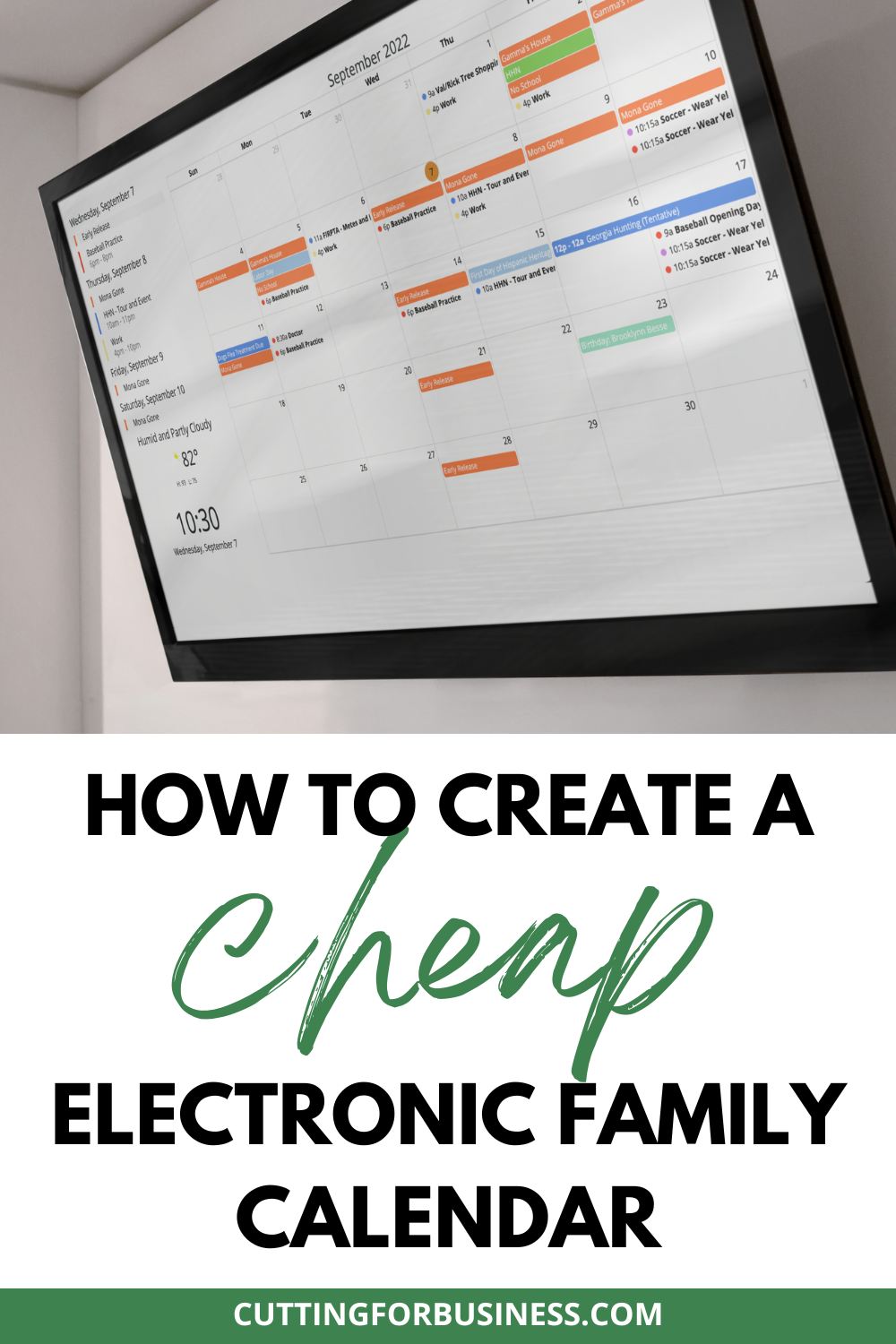
    How to Create an Electronic Family Calendar - cuttingforbusiness.com.

    My previous solution was a framed dry erase calendar similar to the one below. (Amazon link: https://amzn.to/3ex8kaE.)
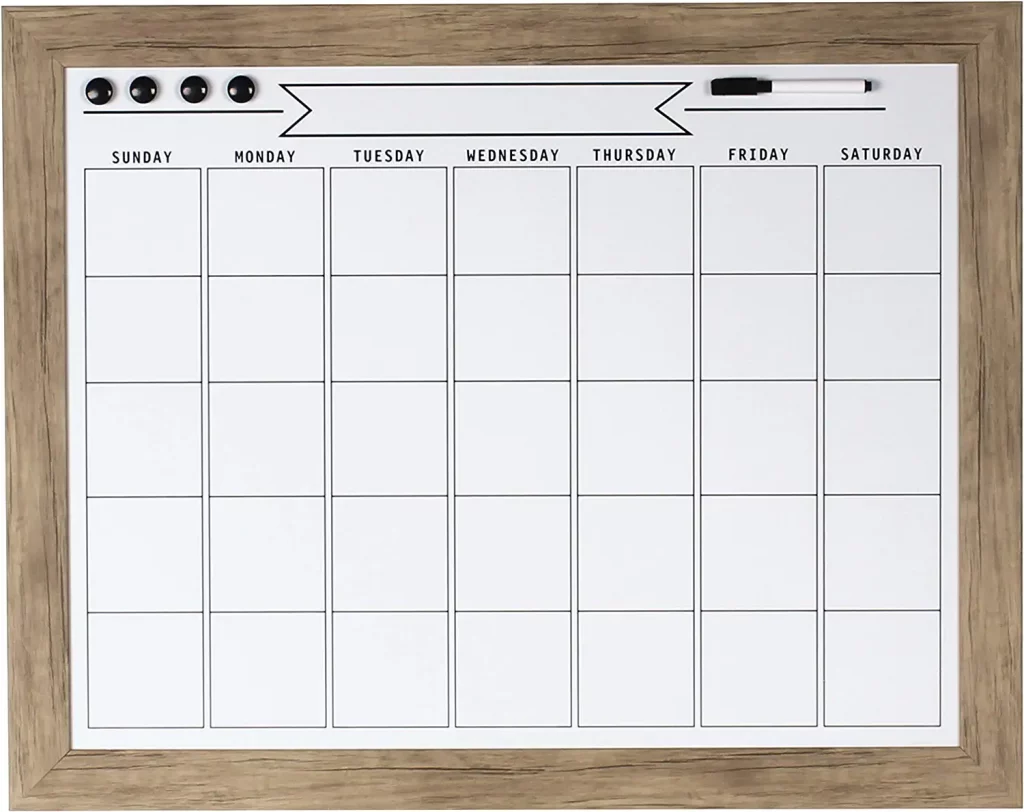
    This calendar worked well – when I could get the family members to use it. And, when there were no last minute changes and the calendar didn’t get updated. The biggest problem though? I was constantly chasing down family members to write their events on the calendar. Quite often, the events never made it to our dry erase calendar.

    So, I was in the market for a better solution. I kept seeing Facebook ads for the Skylight Calendar. If you aren’t familiar with it, Skylight is an electronic calendar that you can access through their screen and a phone app. I loved the calendar, but it doesn’t hang on the wall – and it is expensive at $300 and an optional monthly plan.

    Like many families right now, we’ve tightened down our household budgets with the rising prices of life. But, I still needed a calendar.

    What I did have was an old tv sitting around not being used. After some research, I found some software called Mango Display. It allows you to build a custom calendar and integrate it with your Apple Calendar, Google Calendar, or Microsoft Calendar.

    Step-by-Step Tutorial to Create an Electronic Calendar

    1. Find a screen to use. You could use an iPad, an Android tablet, or a tv, depending on how large of a screen you want to use. I used an old flat panel tv that didn’t have a browser. This means that I needed to buy an Amazon Fire Stick – or something else to connect to the internet.
    2. Head to the Mango Display. Before you commit to a plan, know that all plans have a 30 day free trial.

    Screenshot - Mango Display - Home Command Center - cuttingforbusiness.com.

    3. Click the ‘Get Started’ button in the top right corner. After setting up your account, click ‘Add New Display’.

    4. Choose the screen type you will be using. For my calendar, I used ‘Mango Display Amazon Fire App’.

    Screenshot - Mango Display - Home Command Center - cuttingforbusiness.com.

    4. Name your calendar, choose a theme, and click the ‘Next’ button.

    Screenshot - Mango Display - Home Command Center - cuttingforbusiness.com.

    5. Download the Mango Display App on your device, open it, and get your code. Enter the code and click the ‘Next’ button.

    Screenshot - Mango Display - Home Command Center - cuttingforbusiness.com.

    6. Choose your layout. To set up my calendar, I chose a blank layout.

    Screenshot - Mango Display - Home Command Center - cuttingforbusiness.com.

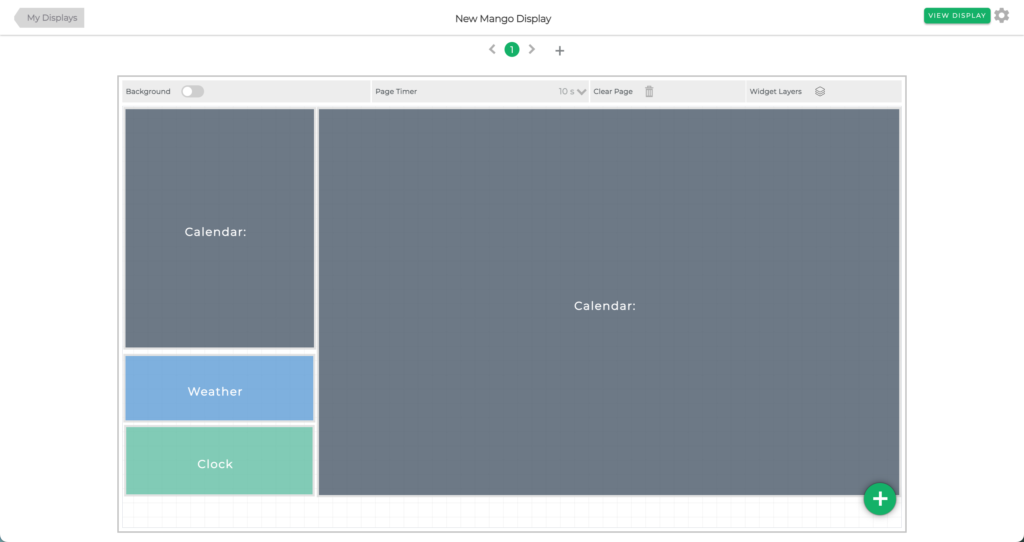
    7. Click the green ‘+’ symbol in bottom corner to add widgets. Drag the widgets around to rearrange them. Click each widget, then click the pencil icon to control how the information in the widget displays or click the trash can to delete the widget. My calendar looks like this:
    Screenshot - Mango Display - Home Command Center - cuttingforbusiness.com.

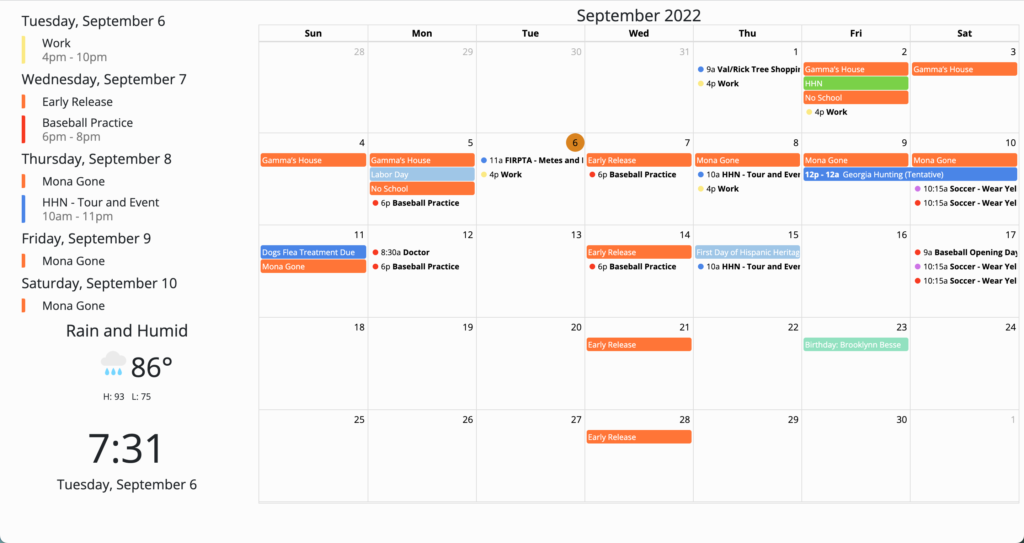
    My calendar when displayed looks like this:
    Screenshot - Mango Display - Home Command Center - cuttingforbusiness.com.

    The top left widget is a calendar that is displayed as a list. It displays the next handful of events. The widget below this is the weather. The widget below the weather is the clock. The large calendar is connected to my Google Calendar.

    9. To add events to my Google Calendar, I can either access calendar.google.com on a browser or through the phone app. I also added the Google Calendar app to my kid’s devices and they can add events as well. For our family of 6, it was easiest to use a family calendar on Google since we have a mix of Apple and Android phones.

    Pricing for Mango Display

    View full pricing options for Mango Display.

    Pricing - Mango Display - Home Command Center - cuttingforbusiness.com.

    So, will you be creating an electronic calendar? Or maybe you will just buy one? Or are you sticking with a more traditional calendar? Let me know in the comments.

    One more thing. This post is not sponsored by Skylight or Mango Display. I created an electronic wall calendar for my family and everyone that comes to our home asks about it. So, I’m sharing it with you.


  • 10 Ways to Keep Your Craft Business Running During Uncertain Times

    Small business owners, we are living in historical times and uncharted territory. The world has never experienced a pandemic with the same restrictions people are facing at this time. Several Cutting for Business readers have asked me what they should do in these challenging times.

    I took a few days to continue to gather new facts as they came in, and now I’m sharing some guidance with you.

    I’ll be honest: The current situation isn’t good for small businesses. Locally, I’ve already seen several newer businesses closing and selling their equipment for pennies on the dollar. However, as most Cutting for Business readers are online only retailers – I see everyone coming out the other end of this relatively unscathed.

    Let’s take a few minutes to talk about craft businesses – and how you can minimize the negative impacts to yours during this time. 

    10 Ways to Keep Your Craft Business Running During Uncertain Times

    1. If business has stalled, remember that you aren’t alone. Recognize that in times of hardship and disaster, people stop spending money on non essential items. Since craft businesses don’t sell essential goods, your business is likely to stall as well. Just know that you aren’t alone.
    2. Don’t sell your equipment. As I’ve mentioned a few times, consumers aren’t spending and you likely won’t get a good price for used equipment. Instead, hold onto it until this passes then decide whether or not you really want to sell it.
    3. Turn off your paid advertising campaigns. As I mentioned, the majority of customers aren’t buying anything outside of food, household supplies, and other necessities. There is no reason to exhaust your advertising budget when consumers aren’t spending.
    4. Do an expense audit to see what expenses you can cut. It’s simple: If your business isn’t bringing in money, you’ll want to cut out the amount of money leaving your business. Consider (at least temporarily) canceling any non essential subscriptions and programs.
    5. Turn to digital goods – and offer them deeply discounted or for free. If your products are digital like SVG cut files, fonts, or tutorials – now is your time to shine. Offer them free or at a deep discount to encourage sales. Why free? I strongly believe that if you take care of people in hard times they will remember your name and business during better times. If your business doesn’t have a digital component – there’s no better time to explore that than now. 
    6. Go live or make a video to teach followers something. Similar to number 5, use your business’ social media account to teach followers something new. With so many people confined to their homes, boredom is a real issue. Keep followers engaged and help them learn something new. If you normally teach classes related to the Silhouette or Cricut in person, get online and start teaching.
    7. Don’t stop posting on social media. Keep your business name in front of potential customers by continuing to post to social media. However, be selective with what you post. Posting 10 times a day that you’ve got a sale going on isn’t likely to be well received. Instead, share what is getting you through this challenging time. Share how you are making the best out of life right now. Engage with customers by getting them to share with you.
    8. Look to things you can control – like your business. You can’t control the outbreak, the media, or the choices other people are making. You can control your reactions and your exposure. I don’t know about you, but I’m kind of in media overload. So now, I check the news reports in the morning and only in the morning. Then, I get my day started. You can’t keep your business afloat without some sanity and self care. If the news is stressing you – turn it off or only check in once a day.
    9. Learn a new skill. Remember that time you said, “I’d love to learn XYZ but I don’t have the time!”? Well, you’ve got lots of time on your hands now. And many, many online course providers are providing free content. What about that website you’ve been wanting to start? Dig into some tutorials and learn as you go to create one.
    10. Get caught up or get ahead. Maybe your accounting is not up to date (guilty!), maybe you haven’t taken inventory in a long time, or perhaps your crafting space is a wreck. Again, you’ve got plenty of time to tackle some overdue business chores. Once you are caught up, get to crafting. Wouldn’t it be awesome if you could get all your Christmas products made, photographed, listed online, or packed away for the holiday craft show season? Get to it!

    Lastly, while not included on the list: Take a break from your business. I’m being totally serious. If you’ve been working hard for years, take a break. Spend the time with your kids. Write down your thoughts and feelings as we navigate through this pandemic to share with future generations. Unlike regular times, closing your office door and simply taking a break is unlikely to affect much in your business.

    Share in the comments – how are you making sure your business will sustain throughout this crisis?

    10 Ways to Keep Your Craft Business Running During Uncertain Times for Silhouette Portrait and Cameo or Cricut Explore, Maker, or Joy - by cuttingforbusiness.com

  • Crafting with the US Flag: What You Need to Know

    With summer upon us, buyers will be seeking patriotic products to celebrate. If you are thinking of crafting with the US flag, read on for some best practices.

    Crafting with the US Flag: What You Need to Know - cuttingforbusiness.com

    The Flag Code

    All rules and regulations having to do with the United States flag are handled through the Flag Code which was adopted on June 14, 1923. The Flag Code lays out how to fly a flag, the design of the US flag, how to dispose of a worn out US flag, and much more. However, the Flag Code does not impose penalties for misuse of the flag. This is handled on a state to state basis.

    Read the Flag Code.

    Crafting with the US Flag: Design Specifics

    • The US flag has 13 equal sized stripes. The top stripe should be red and alternate red and white.
    • The United States flag has 50, five point stars that should be arranged in 9 rows staggered horizontally and 11 rows staggered vertically.
    • The blue part of the flag is called the union. Whether you create your flag design vertically or horizontally, the union should always be in the top left corner. (The exception to this is when the flag is on the right side of a vehicle or a service person’s uniform. In these cases, the union appears on the right side.)
    • The bottom of the union should line up with the bottom of a red stripe.
    • The official hexadecimal colors for the US flag are: white: #FFFFFF, Old Glory Red: #B22234, and Old Glory Blue: #3C3B6E.
    • It’s acceptable to craft with previous versions of the US flag.
    • According to the Flag Code, the US flag should not be used on clothing, drapes, bedding, costumes, uniforms, and more. However, it’s become more popular in modern times to do this. Here’s a great discussion of flags on clothing.
    • Government works (such as the US flag design) are public domain.
    • It’s acceptable to make artistic renderings of the US flag.

    US Flag Design Diagram

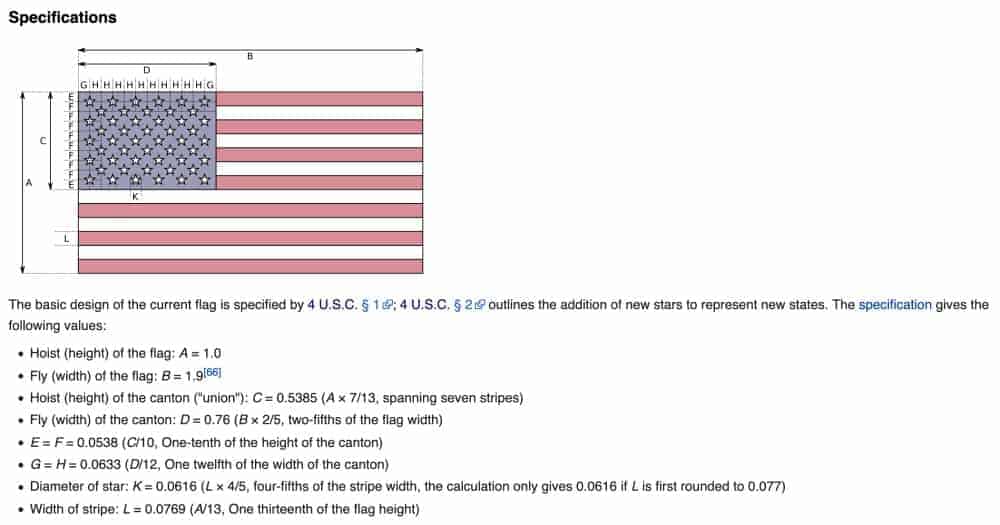
    I found this great diagram of the exact dimensions of the flag. While these specifications are only for official governmental use flags, I thought it was fun to share.

    Things to Know When Crafting with an American Flag Design - by cuttingforbusiness.com
    Image Source: Wikipedia

    Free Patriotic SVG Cut Files

    [mv_create key=”16″ type=”list” title=”Free Patriotic SVG Cut Files” thumbnail=”” layout=”hero”]
  • 10 Ways to Overcome Crafter’s Block & Find Your Creativity

    Imagine this: You’ve had your Silhouette, Cricut, Glowforge, or xTool machine for a while now.

    You’ve made it all: t-shirts, cups, cards, wood signs, doormats, ornaments, decals, and so on.

    Perhaps you run a business and are getting burned out making the same set of products over and over again?

    If you’ve been feeling in a rut with your crafting lately, let’s change your mindset and get rid of your crafter’s block!

    Today, I’m sharing 10 ways that I use to get my creative juices flowing and my mind back in the game.

    10 Ways to Overcome Crafter's Block & Find Your Creativity - cuttingforbusiness.com

    10 Ways to Overcome Crafter’s Block

    Window Shop at Home Decor and Craft Stores

    No need to buy anything, I usually use my phone camera to take pictures of things that inspire me. My personal favorites are: Homegoods, At Home, Michaels, and Joanns.

    Flip through the Latest Magazines and Catalogs

    They don’t have to be craft related. In fact, I wrote a whole post on how I use magazines and catalogs for inspiration. If you don’t subscribe to any, head to your library or local bookstore.

    Browse Pinterest

    It’s a no brainer for inspiration! Use caution though – Pinterest can become a rabbit hole and suck away your whole day!

    Head to a Craft Show, Co-op, or Market

    If there’s one going on in your area – head there. When I’m looking for inspiration for my own crafting, I usually skip the small talk with crafters and just browse. Be sure to ask before taking any photos, as it hurts some crafter’s feelings.

    Redo a Previous Project or Finish a Project You Started

    You know the ones I’m talking about: That crooked sign you made when you first got your machine or that glass etching that didn’t turn out the way you had hoped it would. Redo it and use your experience to make it better.

    Or, maybe you’ve got a nagging project you started ages ago – now’s the time to finish it.

    Clean your Craft Room

    I’m just as guilty as the next crafter – I buy things at craft stores and then stash them away. When I clean my space I rediscover the things I’ve previously bought. (Oh, buying supplies without a purpose is a big money waster for small businesses.)

    Take a Craft Class

    Whether you choose online or in person, doing one crafty thing usually leads me to more and more ideas.

    Create with Your Kids

    There’s that old saying about nothing is the same when seeing it through the eyes of a child. When I’m lacking creativity, I turn my kids loose in my craft space for a while. Sometimes by watching and helping them, it sparks my own ideas. But, be prepared for the mess!

    Get Together with Crafty Friends

    Plan an afternoon or night together to share crafty ideas over dinner out. No actual crafting needed, just bounce ideas off of each other.

    It helps to come prepared with inspiration on your phone. This way, you’ll be talking crafts the whole time and not searching your phone.

    Pack It Up for a While

    As much as I hate to say it, sometimes the best thing for me to do is to lock my craft room doors for a few days and stay away. In my time away, I do anything but think about crafts.

    Tell me in the comments: How do you get over crafter’s block?

  • 10 Sale Ideas for At Home Craft Businesses

    In this uncertain time, the easiest way to give your small business a boost is to offer a sale. Buyers want and need stuff right now, but many are being more savvy with their money right now. Today, I’ve brainstormed some sale ideas you can use in your Silhouette or Cricut craft business.

    10 Sale Ideas for At Home Craft Businesses

    1. Percentage discounts or fixed fee discounts. Offer a substantial discount in your store or offer substantial discounts on certain items in your store. Examples include 50% off when you spend $50, 40% off the entire store, or $10 off when you spend $75.
    2. Free products. Advertise a free product with a minimum purchase of $XX. Examples of inexpensive products include decals (personalized or generic), keychains, earrings, headbands, holiday ornaments, cupcake toppers, or greeting cards.
    3. Gift certificates/cards. Give a gift certificate with a minimum purchase. This is a great way to encourage shoppers to return at a later time. Example: Free $15 gift certificate with $100 purchase.
    4. Free shipping. Consider extending free shipping to customers. Remember, you don’t have to take a loss by offering free shipping. Instead, build the price of shipping into your product price.
    5. Exclusive limited time products. Create a product or design and sell it only during your promotion. Customers will impulse buy what they can’t get again. For example, if you sell digital cut files: offer a special design that will only be sold for a limited time.
    6. Bounce backs. Offer a “bounce back” offer when you ship your products. It is likely that you will get some new customers during your sale, so offer them a coupon code to shop in your store again in their box.
    7. Timed promotions. Consider having timed promotions throughout the day or weekend. For example, from 8am to 12pm have a sale on one product, from 12pm to 4pm offer a different product on sale, and from 4pm to 8pm offer yet another product. This is particularly effective if your shop is celebrating a milestone like first year in business or five year anniversary.
    8. Free stuff. Host a giveaway for your sale. The easiest way to accomplish this is everyone who buys from you on a certain day will be automatically entered into your giveaway.
    9. Exclusive bundles. This works better in some shops that it does with others. Create an exclusive money saving bundle. For example, if you sell painted wooden signs: Offer a large sign with a smaller sign as a bonus.
    10. Ship same day. In the days of free 2 day shipping and even same day delivery, impatient shoppers want their purchase immediately. If possible, offer a fast turnaround time.

    Was this post helpful? Save the image below to Pinterest.

    10 Sale Ideas for At Home Craft Businesses - Silhouette - Cricut - by cuttingforbusiness.com
  • Time Blocking: How I Use it to Be More Productive

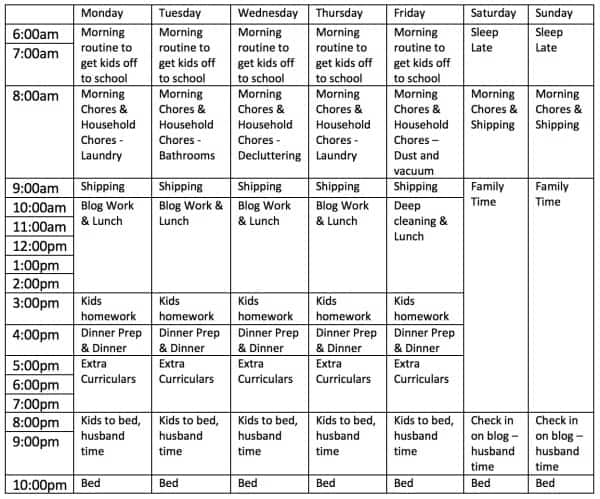
    I often get asked how I manage to get so much done each day. Not just by Cutting for Business blog readers, but by my friends and family. On the surface, I have a lot on my plate: I have a husband, four kids who have extra curricular activities 5 days a week, I sell on Etsy, Amazon, and a few stand alone websites, I write the Cutting for Business blog, and 98% of the time my house is as clean as a model home. Oh, I should mention that I am an absolute bear if I don’t get at least 8 hours straight of sleep.

    Today, I’m taking you into my time blocking schedule to show you how everything gets done.

    What is Time Blocking?

    Time Blocking is a time management strategy where you divide the hours in your day into ‘chunks’. Within each chunk of time, you schedule tasks to be done during that time. While working through your schedule each day, you only focus on the tasks assigned to that time block. When the time block is over, you move on to the next task.

    How I Use Time Blocking to Be More Productive

    Here’s a look at my real life schedule. Obviously, my schedule won’t work for anyone but me. However, you can create your own blocked schedule. Simply write down the time you wake up until the time you go to sleep. Then, begin putting your daily tasks into blocks. Your blocks can be as short as 30 minutes to as long as the whole day. It truly just depends on your needs. If you work a 9am to 5pm job, you may only need to time block your evenings and weekends.

    Time Blocking: How I Use it to Be More Productive - Great for small and craft business owners - by cuttingforbusiness.com

    What Happens If I Don’t Finish Something in the Allotted Time?

    If you are working on something that isn’t finished and your schedule switches to the next time block, you stop what you are doing and move on. When I first started with time blocking several years ago I scheduled one hour daily as catch up time. As I got used to time blocking and worked on my schedule, I was able to remove it.

    Looking for more information on time management? Head to my Pinterest board at this link.

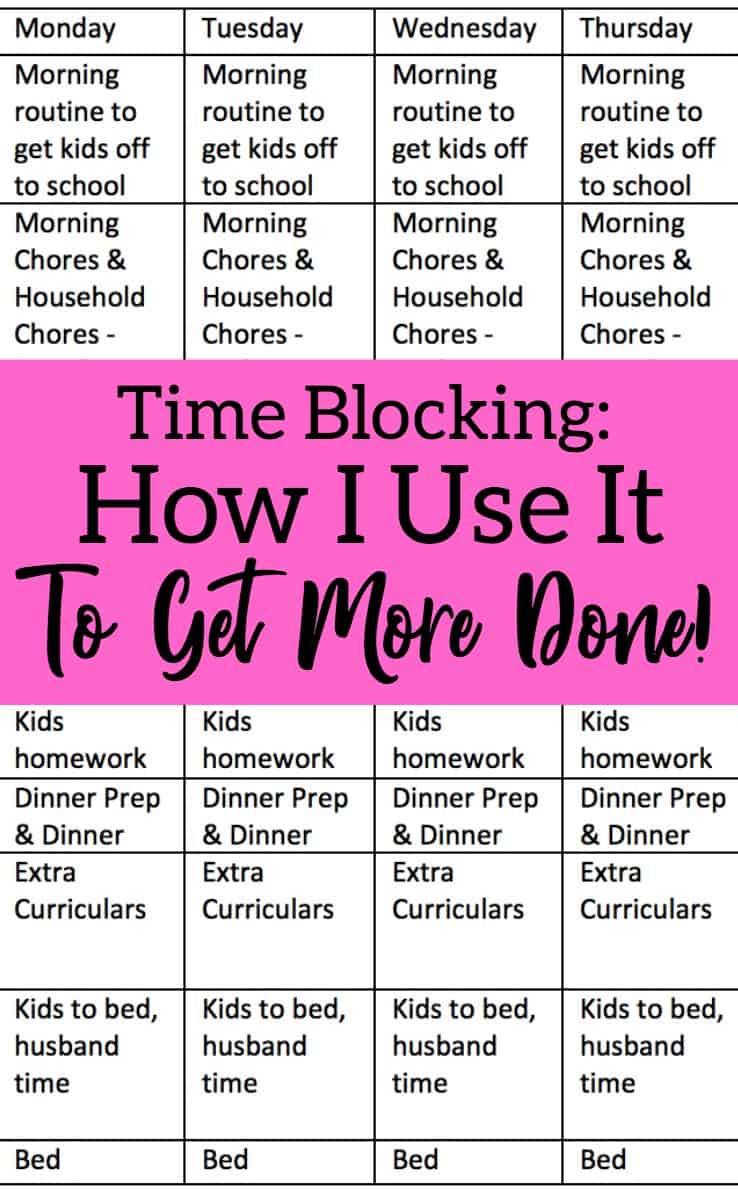
    Was this post helpful? Save the image below to Pinterest.

    Time Blocking: How I Use it to Be More Productive - Great for small and craft business owners - by cuttingforbusiness.com

  • How to Close Your Craft Business with Free Printable Checklists

    I talked about signs that it might be time to close your craft business. Today, let’s look at what you need to do to actually close your craft business.

    You’ve got two options: 1) Liquidate your supplies and inventory, or 2) Sell your business.

    In general, if your business is not profitable (you aren’t making any money) I’d recommend liquidating your supplies. If your business is profitable (making money) I’d recommend selling it to another crafter.

    How to Close Your Craft Business with Free Printable Checklists - cuttingforbusiness.com.

    How to Liquidate Your Craft Business

    1. Make the Decision to Close Your Business. Don’t take the decision lightly, and definitely don’t feel guilty about it.
    2. Sell Off All Unnecessary Supplies and Inventory. In other words, host a ‘Going Out of Business’ sale.
    3. Pay Off Any Remaining Business Debts. If your business is closing, you’ll want to make sure you get rid of debts and credit card balances related to your business.
    4. Say Goodbye to Your Customers. I recommend posting on all of your social media networks, posting a notice in your shop or store, and emailing your subscribers.
    5. Let Suppliers Know You are Closing. If you have relationships with wholesale suppliers, drop them an email to let them know you are closing.
    6. Delete Social Media Profiles. Decide whether you will unpublish or delete your social media accounts, then do it.
    7. Unpublish Your Website and Remove Product Listings Online. This includes any marketplaces you sell through like Etsy or Amazon Handmade.
    8. Stop All Automatic Billing Services and Close Your Accounts. Services that you might need to cancel include accounting programs, website hosting plans, photo editing software subscriptions, mailing lists, domain names, and so on. Additionally, don’t forget to close any business accounts you may have.
    9. Dissolve Your Company. If you are a registered company, you’ll need to contact your state, county, or city to find out how to dissolve your business. If you do not officially dissolve your business, you will still be responsible for tax and business filings.
    10. Keep the Records. You’ll want to keep all business records on hand for use the following tax year.

    How to Sell Your Craft Business

    1. Make the Decision to Close Your Business. Again, there’s no need to feel guilty about it.
    2. Decide on a Price for Your Business. Either sell off just the business or your business and your remaining supplies. Be prepared to back up your asking price with business documentation. Also, be clear on what is included with the business sale.
    3. List Your Business for Sale. You can sell it through crafting groups, online marketplaces, Etsy, or a business broker.
    4. Get Documents. Create or obtain documents that spell out the purchase price, date of transfer, and what is being transferred to a new owner. I’d recommend having an attorney draw up a document for you and your buyer.
    5. Let Customers Know. A quick note to your customers about the ownership changing hands is usually sufficient. Don’t forget to thank them for their support and get them excited about the new owner.
    6. Transfer Everything. After you’ve received a cleared payment, you’ll need to transfer your website or shop to the new owner. Don’t forget to also transfer social media pages, subscriptions, and email addresses.
    7. Cancel or Close Anything Not Being Transferred. If it isn’t being transferred to the new owner, don’t forget to close or cancel it. This includes bank accounts and credit cards.
    8. Dissolve Your Company. Depending on your agreement with the new owner, you may still need to dissolve your company in your state/county/city.
    9. Be Available for the New Owner. Likely, the new owner will need a little bit of training or support to get started. Be available for them for a predetermined period of time.
    10. Keep the Records. Of course, keep all records of your business and the sale filed away until the next tax season.

    Free Printable Checklists

    Closing your business can be a lot of work, but once it’s done you can return to your life. Or, move onto your next big thing. Either way, I wish you the best of luck.

  • 5 Signs That It Might Be Time to Close Your Craft Business

    Today, I’m sharing some signs that it might be time to close your craft business.

    Honestly, this post is hard to write. I blog about starting craft businesses and running and growing craft businesses. And I truly want everyone to succeed.

    However, I have to be realistic – running a craft business isn’t for everyone or even every season in life.

    5 Signs That it Might Be Time to Close Your Craft Business - cuttingforbusiness.com.

    5 Signs That it Might Be Time to Close Your Craft Business

    You No Longer Enjoy Running Your Craft Business

    If you no longer enjoy running your craft business, it is time to move on. I’m not talking about the occasional bad day here or there – everyone has those. I’m talking about disliking many aspects of your business, not enjoying working with customers, and finding it a chore instead of a joy to create products. The best business owners love what they do.

    You’ve Had a Life Change

    If you’ve had a life change that isn’t compatible with running a craft business, it may be time to close your craft business. Perhaps you started your craft business before you had a newborn at home, before you had multiple kids, before your husband or wife took on a new job, or before you moved to a different location.

    Maybe you are having health issues and can’t deal with your business right now? Whatever the reason, people and seasons of our lives change.

    Customer Don’t Love Your Products Anymore

    If customers are constantly having problems and complaining about the products you make, it may be time to close your business. Happy customers are good for business, and if every customer is unhappy – it might just not be right for you.

    There’s No Market For Your Products or the Market is Overly Saturated

    If there’s no market for the products you make, there’s no reason to keep at it. Either change your product lineup to more desirable products, or close down your business. Similarly, if you’ve been at it for a while and you can’t break into an overly saturated market, ask yourself if it’s really worth it. It might be a sign to close down your business.

    You Aren’t Making Any Money

    If you aren’t making any money, it might be time to close your craft business. If you’ve been at it a while (more than a year) and you are constantly spending more than you make, it might be time to call it quits. A business that constantly sucks money and doesn’t make any isn’t good for anyone.

    What to Do After You Decide to Close Your Craft Business

    If you’ve made the decision that it’s time to close your business, there’s still work to do to properly shut down your business. I’ve created a checklist to close your craft business.

  • 7 Tips for Fundraising for Disasters and Tragedies in Your Craft Business

    The world has had multiple crises lately. Since crafters are a caring, generous bunch who often jump into action to raise funds for various charities I wanted to give you some tips on how to fundraise successfully for disasters and tragedies in your craft business.

    7 Tips to Fundraising for Disasters & Tragedies in Your Craft Business

    1. Choose the causes that matter to you. Your small business is a reflection of you. When you choose to fundraise causes that matter to you; you will often be more successful. As part of your fundraising, share why you are raising funds. For example, do you live locally? Does your family live in the affected area? This is one situation where connecting with your buyers can be impactful. Also, be careful to not let current events or natural disasters interfere too much with your normal business dealings.
    2. Set a fundraising goal. When you start your fundraising campaign, let shoppers know how much you are trying to raise. Be realistic in your goals.
    3. Keep shoppers updated on your progress. You should regularly update your customers of your fundraising progress. This is easily done through social media or website updates.
    4. Set an end date and donation date. Using an end date for fund collecting as a call to action is helpful to get shoppers to buy sooner rather than later. (Don’t know what a call to action is? See this post.) You should also set and advertise the date you will donate the funds.
    5. Be transparent about the portion of sales to be donated. It is important to set out specifics of how much money or what percentage of money raised will go to a charity. For example: 100% of profits will go to XYZ charity. In this case, you subtract your supply and labor costs from the money you bring in and all profits are donated. In contrast, $10 of every sale goes to ABC charity. In this case, only a portion of the sale is going to the charity.
    6. Be cautious on social media. There’s a very fine line on social media when raising funds, especially if people have lost their lives. Be sure that you don’t use hashtags that are set up in memory of specific people or those reserved for news updates. If your followers think that you are using popular hashtags to profit, your business could be in jeopardy.
    7. Hold your business accountable. Unfortunately, as a single person home based business, it is easy to raise funds and not donate them. I recommend complete transparency by providing proof that the donation has been made by your business. If you are donating online, a screenshot of the donation confirmation is acceptable. If you are donating in person, a photo of the donation receipt or you handing the check over are both fine to use.

    Need help finding a reputable charity? Head to Charity Navigator.

    My thoughts and prayers to those still dealing with the disasters and tragedies of the last few months.

    If you feel like this is important information, feel free to share it on social media.

    7 Tips for Fundraising for Disasters and Tragedies in Your Silhouette or Cricut Craft Business - by cuttingforbusiness.com

  • Black Friday, Small Business Saturday, and Cyber Monday Sale Ideas for Etsy Sellers

    Cutting for Business readers – brace yourself – we are officially entering the holiday season. Next week is Black Friday, followed by Small Business Saturday, and Cyber Monday. If you are selling your crafts through Etsy, social media, your website, or anywhere else – I urge you to participate in at least one of their high traffic shopping days. Today, I’m giving you some quick ideas for you to use this week – and not go broke!

    2016 Dates

    • Black Friday is Friday, November 25th, 2016. It’s generally the kick off to the holiday shopping season.
    • Small Business Saturday is Saturday, November 26th, 2016. This American Express created event highlights shopping with small businesses. You can pick up Small Business Saturday logos, register your store, and get more information about the day at this link.
    • Cyber Monday is Monday, November 28th, 2016. Cyber Monday was created by marketers in 2005 as a way to lure shoppers to online retailers. Online retailers offer discounts on orders placed online.

    Sale Ideas for Small Craft Business Owners

    1. Offer a substantial discount in your store or offer substantial discounts on certain items in your store.
    2. Advertise a free product with a minimum purchase of $XX. Examples of inexpensive products include decals (personalized or generic), keychains, earrings, headbands, Christmas ornaments, cupcake toppers, or greeting cards.
    3. Give a gift certificate with a minimum purchase. This is a great way to encourage shoppers to return at a later time. Since many shoppers are buying gifts for the holidays, you can advertise a gift certificate to spend on themselves at a later date. Example: Free $15 gift certificate with $100 purchase.
    4. Consider extending free shipping to customers. This approach is especially good for Cyber Monday shoppers who will be offered free shipping at most big box retailers.
    5. Offer a “bounce back” offer when you ship your products. It is likely that you will get some new customers during your sale, so offer them a coupon code to shop in your store again.
    6. Consider having timed promotions throughout the day or weekend. For example, from 8am to 12pm have a sale on one product, from 12pm to 4pm offer a different product on sale, and from 4pm to 8pm offer yet another product.
    7. Host a giveaway for your sale. The easiest way to accomplish this is everyone who buys from you on a certain day will be automatically entered into your giveaway.
    8. If possible, operate on a fast turnaround time. Holiday shoppers are often impatient and want their items quickly!

    How to Advertise Your Sale

    • Use your business’ social media. Offer your coupon codes to your social media followers. Tip: If you make coupon codes unique to each social media network, you can see which campaigns were most successful. Encourage your followers to share your posts and help spread the word.
    • If you sell on Etsy, change your shop banner to a banner with information about your sale. While not officially used anymore, feel free to tag your products that are on sale with “Black Friday”, “Small Business Saturday”, and “Cyber Monday”.
    • Use hashtags relevant to the event on social media. For example, #blackfriday #blackfridaysale #shopsmall #smallbizsat #cybermonday.

    Don’t forget: If you want to schedule a sale for Etsy – check out this post about Etsy on Sale.

    I wish everyone a profitable week and weekend! I always host a sale on Cutting for Business – so be sure to follow the blog on Facebook and watch for it.

    Black Friday, Small Business Saturday, and Cyber Monday Sale Ideas for Etsy Sellers by cuttingforbusiness.com