Category: Your Own Website

  • 10 Things Your Craft Business Website Needs

    Recently, I’ve seen more and more Cutting for Business readers making the switch from selling on social media and marketplaces to selling on their own websites. Yay!

    If you take a look at my recommended path for craft sellers, you’ll see that this is my recommended end goal for everyone.

    If you are in the process of starting your own website, here’s a list of 10 things your craft business website needs.
    10 Things Your Craft Business Website Needs - cuttingforbusiness.com

    10 Things Your Craft Business Website Needs

    Clear, Crisp, Stunning Product Photos

    Simply put, great photos sell your products. Grab some tips for photographing your products in this post.

    Easy to Use Navigation

    Your website should be easy to navigate. If it isn’t, your customer may get frustrated and leave.

    Mobile Friendly Pages

    Mobile usage and traffic is at an all time high. If your site doesn’t have an easy to use mobile site, get one.

    A Frequently Asked Questions Page

    A FAQ page can help customers get answers fast, but it can also cut down on the amount of questions you receive.

    A Contact Page

    It’s so simple, but so many new website owners forget to put in a contact page. Also, a link to your contact page should appear on every page of your website.

    An About Page

    “Stay at home mom crafter, ready to make anything you can dream up!” This doesn’t cut it, readers. A well done, genuine About page helps your business connect with customers. Read more about crafting an effective About page in this post.

    You spent a lot of time building and working your social media, so don’t forget to include links to all social media networks on your website.

    Sign Up Form for Your Newsletter

    I feel like I keep repeating this, but your craft business needs a mailing list. Head here for reasons why you want one and ideas of what to include in it.

    Customer Testimonials

    Potential customers have come to rely on online testimonials and reviews while online shopping. Be sure your craft business website has testimonials on it.

    SSL Security

    Your website should be secure if you are selling products. In fact, Google is now including SSL security in their ranking algorithms. Google wants all websites secured.

    Take a few minutes today to head to your website and double check to make sure it has all ten things listed above.
  • Choosing an Ecommerce Platform for Your Craft Business

    Let’s recap what we’ve covered about starting a website for your Silhouette Cameo business. First, we went over basic web lingo, then I cautioned you about using a WYSIWYG website builder to start your website. Today, let’s talk about ecommerce platforms.

    I think using an ecommerce platform is a good option for starting a website for your Silhouette Cameo business. There are several ecommerce platforms available including 3D Cart, Big Commerce, Big Cartel, Indie Made, Made Freshly, Shopify, Squarespace, Store Envy, Ultra Cart, Volusion, plus a few more. All of these sites are considered hosted solutions. This means that your website hosting is included – and you’ll only need to pay your monthly fee to the ecommerce platform. The monthly fees vary greatly from free to a portion of your sales to a few hundred dollars per month, plus payment processing fees. Like the fees, the features will also vary greatly from one platform to another. So what should you look for in an ecommerce platform?

    Things to look for in an ecommerce platform for your Silhouette Cameo business website:

    • Cost per month of the platform, be sure to ask about any additional fees.
    • The features that they offer; compared to what you want your website to do.
    • What forms of payments you can accept. Are you limited to only Paypal or Stripe?
    • The support available if you have a problem – do they offer phone support, live chat, or email only support?
    • The number of products you can have. Some ecommerce platforms limit the number of items you can sell, while others have unlimited products.
    • The templates they offer. While some ecommerce platforms have a lot of templates you can use with your store, others have a limited amount. If you don’t want to use a template they provide, how much will it cost you to hire a designer?
    • Reviews from current customers.

    I’ve mentioned Shopify before on Cutting for Business, mainly because it is one of the leading ecommerce platforms, with the most amount of features, for a reasonable price per month. I have worked inside Shopify before and the design of the store admin area is user friendly – and there is plenty of help available if you get stuck along the way. I am confident in recommending Shopify as a way for a beginner to start a webstore for their Silhouette Cameo business if they are looking to get it set up quickly. Plus, Shopify has some awesome features like the ability to build a store that displays on your Facebook page (read the post here or see my demo store here) and the ability to offer Buyable Pins on Pinterest (see information on that here).

    The last solution to starting your own website is called a self-hosted solution. This requires setting up a website and installing a store. While a little more time intensive at the beginning, I ultimately think it is the best way to go – and the most cost effective because you eliminate the monthly ecommerce platform fees. To not overload everyone with too much information today, I’ll be covering a popular and beginner-friendly solution tomorrow on the blog.

    Save this post to Pinterest so you can find it when you need it:

    Choosing an Ecommerce Platform for Your Silhouette Cameo or Cricut Small Business - by cuttingforbusiness.com

  • How to Build Your Craft Business Website through WordPress

    Today we are winding down our discussion of starting your own website for your Silhouette Cameo business. We previously talked about basic web lingo, WYSIWYG builders, and hosted ecommerce platforms. The last solution to starting your own Silhouette Cameo business website is using a self hosted platform. This means that you create a website, install a store/shopping cart, and pay a monthly hosting plan. The solution costs more money upfront, and is more time intensive, but in the long run, it gives you the most flexibility and the cheapest price. Mainly, it eliminates paying transaction fees to a third party provider.

    There are several self hosted ecommerce platforms including Agora Cart, Magento, OpenCart, OS Commerce, X Cart, and ZenCart. Some of these solutions will require advanced programming experience – while others are easier to work in. The pricing on these solutions also vary greatly. In some cases, the ecommerce platform is free, while others make you pay for advanced features. I don’t feel that many of these are beginner friendly, so we are going to end the discussion on the above solutions here. I mentioned them in case you come across them online while doing some research.

    My preferred method of building a self hosted website and online store is through WordPress. WordPress is considered a CMS – or content management system – where you build a website using various themes, plugins, and widgets. Within WordPress, there are several plugins that allow you to add a store. My favorite is WooCommerce, because it is easiest for a beginner to navigate, is well documented, and it’s free! I know that this is a lot of information, so, where do you start?

    Steps to start a WordPress self hosted website and store:

    • Get a domain name. I’ve covered this in a previous post. I recommend (at the very least) that all small businesses at least register their domain name and get an email set up that is not gmail.com, yahoo.com, or anything similar.
    • Get a hosting plan. I use and recommend Hostgator.com. The Hatchling Plan at Hostgator is sufficient for most businesses and is as low as $3.96 per month.
    • Install WordPress. Most hosting companies provide step-by-step tutorials on how to install WordPress. If you choose to use Hostgator.com, you can find the tutorial here.
    • (Optional, but highly recommended.) Install the Genesis Framework for WordPress. This framework makes your WordPress site easier to customize, more tightly secured, simple to update, and search engine friendly.
    • Purchase a theme for WordPress and install it. If you’ve installed the Genesis Framework, you’ll be able to choose a theme here. Your theme should include instructions on how to install it, and here is a link to a beginner’s guide to the Genesis Framework.
    • Customize your new website with the pages you want your customers to see. Be sure to include information about you and your company, your refund policy, a privacy policy, and payment methods.
    • Install the WooCommerce plugin to set up your ecommerce platform on your website.
    • Enter your products, payment settings, and shipping information within WooCommerce.

    That’s it! This list is great, but a full tutorial of how to get your website started – including lots of photos would be even better, right?! Click this link to view it.

    Share this post to Pinterest before you start creating your own website:

    How to Build Your Craft Business Website through WordPress (Great for Silhouette Cameo or Cricut Crafters!) - by cuttingforbusiness.com

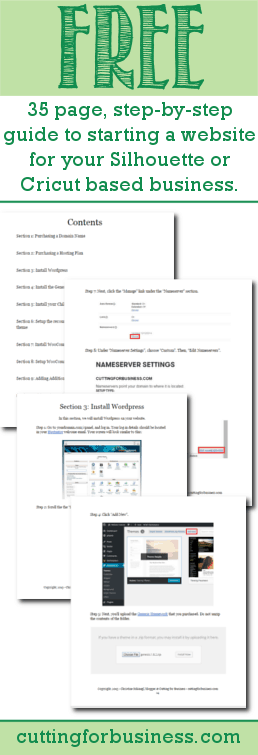
  • Free: 35 page guide to starting a website for your Silhouette or Cricut based business

    I am finally wrapping up my posts on starting a website for your Silhouette or Cricut based business. If you missed any of last week’s posts, they were:

    Like I mentioned on Friday, I’m giving readers a 35 page, step-by-step guide to starting a website using WordPress, my preferred method. And, it’s free!

    Go to the guide

    If you can create gorgeous products with your Silhouette or Cricut machine, I promise that you can start a website following the guide.

    I have also added a link to the guide from Resource Depot.

    Free: 35 Page Guide to starting a website for your #Silhouette or #Cricut based business by cuttingforbusiness.com

  • How to Start a Website for Your Silhouette or Cricut Business

    Once you’ve started selling products and getting yourself established as a business, it’s a good time to start a website of your own. On Cutting for Business this week and some of next, we are going to take baby steps through starting your own website. To start, we need to know some basic web terminology – in easy to understand language – and a little bit about each term.

    Beginner’s Web Lingo

    Domain: This is the address of your website. It tells users where on the internet your website is located. For example, my domain name is cuttingforbusiness.com. Domain names are unique and registered for a period of time measured in years. You must keep up with your domain name registration, or it will expire and your website will be removed. You should expect to pay between $10 – $12 on average per year for your domain name. New website owners can usually register a domain for only a few dollars if they look for a coupon code online. Currently, .com websites are the most popular, but there have been a lot of new TLD’s (which stands for Top Level Domain, and is the ending to your domain name) offered lately. I recommend everyone gets a domain, and I’ve written about domains in depth in this post.

    Registrar: This is where you register your domain name. Popular registrars include GoDaddy.com, Register.com, Namecheap.com, 1&1.com, and Name.com. Personally, I have used GoDaddy without issues for over a decade.

    Hosting: Hosting is the monthly fee you pay for the space your website takes up on the internet. Hosting plans include disk space (the amount of space you are alotted), and bandwidth (the amount of traffic your website can handle each month). The more disk space and bandwidth your website needs, the higher the cost you will pay per month. Some registrars offer website hosting; while others do not. You can expect to pay around $12 to $15 per month for your hosting of a small ecommerce website. Personally, I like Hostgator.com for hosting, and have used them for many, many years.

    Why? You may wonder why I choose to host my domains with GoDaddy and purchase my monthly hosting through Hostgator. Simple answer: It is cheaper for my needs. Be sure to price out your needs before you commit to something.

    WYSIWYG: This awkward acronym stands for “What You See Is What You Get” editor, also referred to as a “drag and drop” editor. Providers of WYSIWYG website building services allow you to build a website yourself, with no technical knowledge, and hosting is usually included in your monthly fee. Popular WYSIWYG services include Wix.com or Weebly.com. Plans range from free to $30+ dollars per month.

    Ecommerce Platform: These services allow you to build an online store that is managed through a dashboard. Your store operates on software the provider has built, and are generally fairly easy to navigate. Sites like Shopify.com and Storeenvy.com provide ecommerce platforms.

    CMS – Content Management Systems: This is exactly what it sounds like. These are systems that help you manage the content of your website. The most widely known (and my favorite!) is WordPress.com.

    HTML/XML/CSS/Javascript/PHP: These are various website programming languages that you may come across when starting your first website. The good thing is, you can run a website without knowing much about these languages. For now, just know that they exist.

    Alright, everyone still here? We got a great start today on basic web lingo. You can refer back to this page throughout the week if you forget.

    Here’s what to expect the rest of the week:

    I’ll let you know my thoughts on WYSIWYG editors – and why I don’t want you to use one.

    We will look at the pros and cons of ecommerce platforms.

    We will explore WordPress.com as a way to build your first website.

    Lastly, you can read my free 35 page guide on starting a website. Don’t worry, it’s beginner friendly and easy to follow.

    Save this post to Pinterest so you can reference it later:

    How to Start a Website for Your Silhouette Cameo or Cricut Business - by cuttingforbusiness.com

  • The Down Low on WYSIWYG Website Builders

    Continuing on from yesterday’s post, WYSIWYG – which stands for “What You See Is What You Get” or Drag and Drop – Builders are those created which allow the average, non-technical person to create a website. Companies featuring these types of websites include Wix.com, Weebly.com, Webs.com, Yola.com, Moonfruit.com, and more.

    First, some pros about these services:

    • Some offer free websites, but they often make their money by ads on your site. Some sites offer upgraded plans to remove the branding.
    • Some include domains in their package pricing.
    • Anyone can create them.
    • Many offer free templates.
    • Low learning curve compared to other solutions.
    • Support is available.

    Now, the cons:

    • Usually, the more features you need, the more you pay. Ultimately, this high price can be much more than other solutions.
    • Your website is likely to look similar to others built with the same builder or template.
    • Websites built with WYSIWYG builders generally cannot be moved to other providers as your needs grow or change.
    • You are generally limited to the features offered and cannot extend the functionality of your website.
    • If you set up your domain through the WYSIWYG provider, they may own your domain.
    • Your DIY website may turn out looking very DIY.

    My thoughts: WYSIWYG builders have come a long way since they started. If you are interested in building your own site quickly, they are one option. If you want more creative freedom and the ability to work with a web designer, a WYSIWYG editor may not be the best option.

    Stay with me for the rest of the week as we continue the discussion of starting a website for your Silhouette Cameo business. If you aren’t quite sure about anything in this post, be sure to read yesterday’s post on Beginner’s Web Lingo and see the schedule for the rest of the week. Continue on to read about ecommerce platforms.

    Don’t forget to pin the image below – because pinning it Pinterest is caring!

    The Low Down on WYSIWYG Website Builders for Your Silhouette Cameo or Cricut Small Business - by cuttingforbusiness.com

  • FAQ: What is a Domain Name & Why Do You Need One?

    What is a Domain Name?

    A domain name is a website address. For example, my domain name is cuttingforbusiness.com.

    Why Do I Need a Domain Name?

    Here are a few reasons you need a domain name:

    1. To prevent someone else from getting it. You should reserve the domain name related to your business. Even if you don’t want to use it now, you’ll want to own it so no one else gets it.
    2. To use for your email. I’ve mentioned before that I strongly recommend using your domain. It is more professional to have an email address of sarah@sarahscrafts.com than sarahscrafts@gmail.com. (And, if you want to use Gmail, you can forward your domain email to your Gmail account for free.)
    3. To redirect to your store. It’s tough for customers to remember ‘yourstore.etsy.com’ or ‘facebook.com/yourshop’. The easiest way to fix this is to purchase a domain, then forward from the domain to your shop.
    4. To grow into. You might not want your own website right now, but later in your business you might want one. Also, you don’t have to put a whole web store together right now. You could have a single page website with links to your store and social media.

    FAQ: What is a Domain Name & Why Do You Need One? - Craft Business Owners - cuttingforbusiness.com.

    How Much Do Domain Names Cost?

    Pricing varies for domain names. It is generally $10 to $15 per year for a domain name. Domain names have to be renewed yearly. If you do not renew your domain name on time, someone else can claim your domain.

    What is the Best TLD?

    TLDs are the ending of the domain. For example, .com and .org are widely known TLDs. I recommend you purchase the .com version, but there are hundreds of other options.

    Where Can You Purchase a Domain?

    Domain names are purchased at registrars. Some of them include: GoDaddy, Namecheap, Google Domains and more. Personally, I use and like GoDaddy. Mr. Cutting for Business uses and likes Google Domains.

    FAQ: What is a Domain Name & Why Do You Need One? - Small Business Owners - cuttingforbusiness.com.

    Tips for Buying a Domain Name

    Buying a domain name is similar to choosing a craft business name.

    1. Keep it short and sweet. Honestly, the shorter your domain name – the better. For example, a store called Tumblerific would use tumblerific.com instead of tumblerificstoreandgifts.com.
    2. Proofread it written out. For example, ‘thosewhoread.com’ is not a good domain name because of the word inside it. Unfortunately, social media networks and search engines will pick this up and it will become an issue.
    3. Skip the dashes. Dashes are hard to remember and awkward. Just skip them altogether. For example, I chose cuttingforbusiness.com rather than cutting-for-business.com.
    4. Consider adding a keyword. While it won’t be possible for all craft businesses, a keyword in your domain name can help customers know exactly what you sell. For example, I would expect glittertumblers.com to sell glitter tumblers. But, make sure your domain name and business name leaves room for growth. If you know you want to expand beyond glitter tumblers – don’t name your business glittertumblers.com.
    5. Steer clear of trademarks. You can’t use someone else’s trademark in your domain name (or business name). For example, onesiesbyme.com isn’t a good domain name since onesie is trademarked to the Gerber Company.