Blog

  • What is Silhouette Studio?

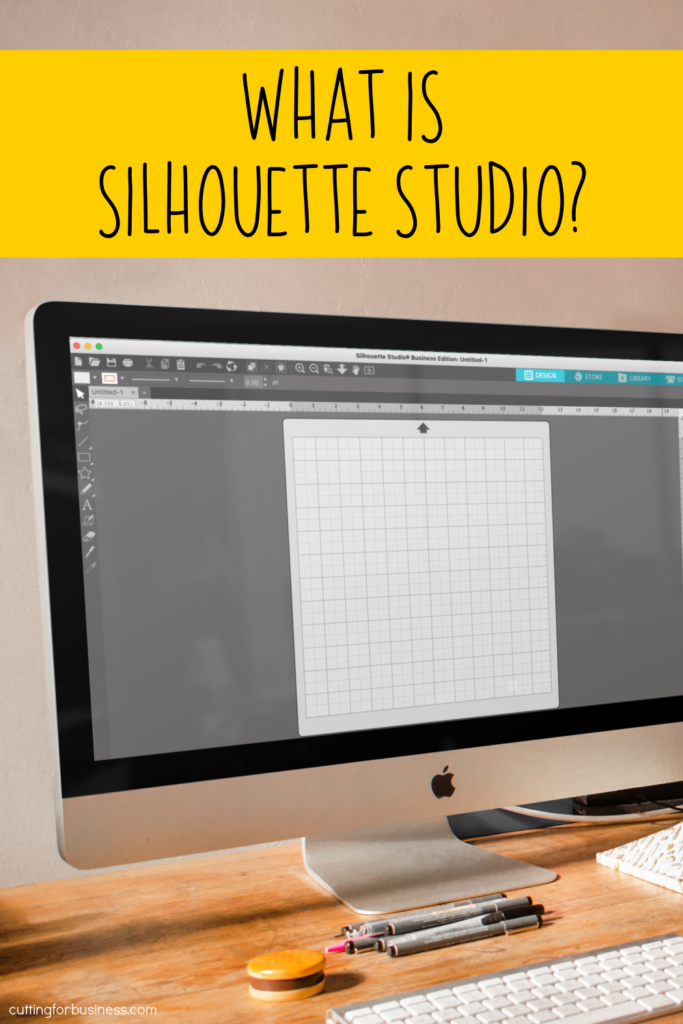
    Silhouette Studio is the name of the software design program that most crafters use to create designs with their Silhouette Portraits, Cameos, and Curios.

    Silhouette Studio Versions

    Silhouette Studio is available in four versions.

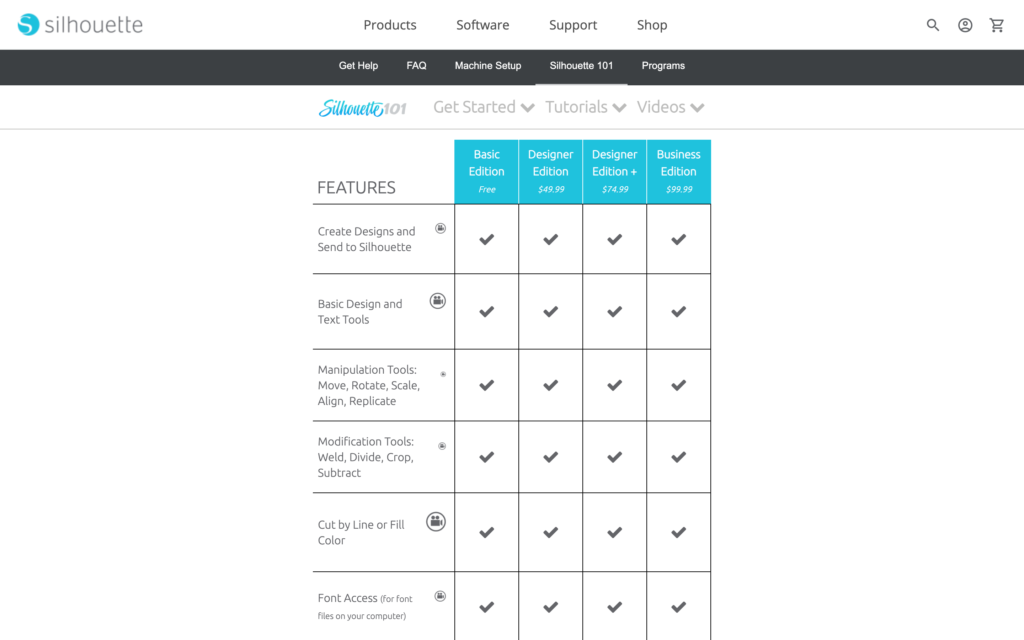
    • Basic Edition: Free. Silhouette Studio Basic Edition is available to anyone who wants to download it.
    • Designer Edition: $49. Silhouette Studio Designer Edition includes all the features of Basic Edition, plus additional
    • Designer Plus Edition: $74. Silhouette Studio Plus Edition includes all the features of Basic and Designer Edition, Plus a few extras. Most importantly, it includes the ability to open embroidery files. If you sew/embroider you’ll want this edition.
    • Business Edition: $99. Silhouette Studio Business Edition unlocks all features available in Silhouette Studio.
    What is Silhouette Studio? Version comparison and more. By cuttingforbusiness.com.

    Silhouette Studio Version Comparison Chart

    Silhouette America offers an awesome chart that lays out each feature of each edition. Silhouette Studio Version Comparison Chart.
    What Silhouette Studio Version is the Best?

    The best Silhouette Studio version depends what features you need. For example, if you need to be able to save as an SVG, you’ll need to purchase Business Edition. But, if you need to open embroidery files, you can purchase either Designer Plus Edition or Business Edition. And, if you are just getting started, feel free to stick to the Basic Edition until your outgrow it.

    Personally, I use and love Business Edition. Also, if you are interested in learning to design SVGs in Silhouette Studio Business Edition. I offer an online class called How to Design SVGs.

    Where to Buy Silhouette Studio

    You can download or purchase Silhouette Studio through Silhouette America, authorized resellers, or Amazon.

    Can I Use Silhouette Studio if I Don’t Have a Silhouette Machine?

    Yes. Lots of Cricut and Glowforge users use Silhouette Studio to create designs for their machines as well. As long as you have Silhouette Studio Business Edition and your machine takes SVG files – you can use Silhouette Studio to create your designs.

    Read more about the unique features of Silhouette Studio Business Edition and whether Business Edition is worth it.

  • How to Handle Large Orders with Your Silhouette or Cricut

    Have you received inquiries about making an extra large order for a customer with your Silhouette Cameo? If you haven’t, at some point, you probably will. A good small business owner knows the limitations of themselves – and the limitations of their cutting machine. For example, it isn’t cost effective to handle an order of 300 t-shirts with your Silhouette Cameo and heat transfer vinyl (HTV). Unfortunately, when you factor in the cost of the vinyl, the time to cut it, the time to weed it, the time to apply it, and the cost of supplies; you are likely to find out that your customer doesn’t want to pay a price that will leave you any room for profit. Generally, customers that order large quanities of items expect that they will receive bulk discounts for the large volume order. Luckily, you don’t have to simply pass on the potential large order!

    Here are two alternatives to handle an extra large order:

    Option 1) Order screenprinted (platisol) or digitally printed transfers. For my t-shirt example, you would create the t-shirt design to meet the needs of the customer. Then, you would order the transfers online. Once the transfers arrive, you apply the transfer to the shirts using a heat press. The process goes quickly, and you could probably do about one shirt every minute or two. I’ve had great luck ordering transfers through Transfer Express (by Stahls) when I did a large t-shirt order for a local non-profit. Transfer Express offers both custom and stock designs, and offers products for t-shirts, rhinestones, stickers, window decals, and much more. If you’d like to try them out before you jump into ordering transfers, Transfer Express offers a free sample pack, and you can learn more about the types of transfers and instructions for each here. You make money using transfers because you are able to save on supplies and the cost of the labor is lower – because you spend less time working on the order.

    Option 2) Use a direct to garment printing company. Using the t-shirt example again, you would create the t-shirt design for the customer. Then, you would order the shirt to be printed through companies like Printaura or Printful. These companies print your design onto your t-shirt and mail the final product directly to your customer. Both Printaura and Printful operate on a white label basis. This means that your company’s name will appear as the return address on the package, and all paperwork included with your order is branded with your company name. I used Printaura for a set of family reunion tees that I created and simply ran out of time to complete on my own. I was impressed by the entire process. In addition to t-shirts, both companies carry tote bags, canvas, posters, framed art, mugs, pillows, and embroidered goods. You make money using direct to garment printing companies, because the company charges you a set price for the product they create. You charge the customer a higher price for the product that includes your time to design it.

    What the biggest order that you would take on with your Silhouette or Cricut? Let me know in the comments. Then, share this post on Pinterest:

    How to Handle Large Orders with Your Silhouette Cameo or Cricut by cuttingforbusiness.com

    Disclosure: I received no compensation for this article and was not approached by any company mentioned in this article to write this article.

  • Why You Need an Email List for Your Craft Business + 15 Newsletter Ideas

    If you don’t have an email list for your craft business, this article is for you.

    While a mailing list may seem like another ‘to do’, email lists are the easiest way to reach your current and future customers.

    Why You Need an Email List for Your Craft Business - cuttingforbusiness.com

    What is an Email List?

    An email list is a list of customers and potential customers that have signed up to get updates directly from you and your company.

    You are probably subscribed to a number of email lists: Your favorite craft store, your favorite clothing store, updates from an app you use all the time, or even your kid’s schools or sports.

    You can use any email program to send emails to your subscribers, but an email list provider will help you create attractive looking emails and help you manage subscribers as your email list grows.

    Social Media & Search Engine Algorithms

    To understand why email lists are so great, you have to understand why search engines and social media can be limiting. Both search engines and social media are controlled by algorithms.

    Algorithms are the behind the scenes formulas that run search engine results and social media sites. If you’ve been on social media for a while, you know that these algorithms are constantly tweaked and updated. When an algorithm is changed, you’ll have to learn how to best work the new algorithm. Of course, this takes time. In addition to time, your small business may be seen less on the network.

    Search engines work using algorithms, too. After an algorithm change, you may notice your products or website pages aren’t ranking as high as they used to be as visible to customers as they once were.

    What’s So Great About Email Lists?

    Now, imagine a world without algorithms. Wouldn’t it be nice to simply have a direct line of communication with your current and future customers that didn’t depend on pesky algorithms to control who sees your content?

    Fortunately, when you use an email list, that’s exactly what you get! You don’t have to learn new systems. You can just keep on sending emails to your customers and reaching them.

    5 Free Email List Providers

    It’s not going to cost you anything to get started with your own email list, because there are a number of free email list providers. (So, you have no excuse to not get started building an email list!)

    Mailchimp

    Free for up to 500 subscribers and 1,000 sends per month.

    ConvertKit

    Free for up to 1000 subscribers.

    MailerLite

    Free for up to 1000 subscribers and 12,000 sends per month.

    Sendinblue

    Free for up to 300 emails a day with no subscriber cap.

    SendPulse

    Free for up to 500 subscribers and 15,000 sends per month.

    15 Email List Topic Ideas for Craft Businesses

    • New products or designs
    • Upcoming public sales (Available to anyone that visits your store, shop, or site.)
    • Exclusive sales (Available only to email list subscribers; usually promoted through a coupon code.)
    • Free shipping promotions
    • Company news and announcements (Have you expanded selling in other places lately? Are you closing for a vacation?)
    • Upcoming schedule for craft shows, fairs, or other events
    • Customer testimonials
    • Question and answer sessions/FAQ (Example: How does a custom order work?)
    • Contests or giveaways that you have running
    • Behind the scenes at your company
    • Short lists of best sellers that coordinate with the holiday/season/or common event (Graduation parties, Mother’s Day, Summer, Christmas)
    • Spotlight a single product. Highlight the cost, the available designs, and showcase photos of the product being used in different settings.
    • Share things that inspire you to create products
    • Simple DIY projects or tutorials for your email subscribers
    • Changes to your store or shop policies, newsletters, etc.

    Where to Get More Email List Ideas

    After you’ve run through my list above, head over to my article on ChatGPT. ChatGPT is a great way to find inspiration on email list ideas.

    My Number One Email List Tip

    Before you go, I want to leave you with one more piece of advice: Be consistent. If you send out a newsletter each week, be sure it is sent each week. In contrast, if you sent out a newsletter every three months, don’t start sending it once a week unless you notify subscribers ahead of time.

    Not a subscriber to Cutting for Business? What are you waiting for? I send out exclusive subscriber content regularly. Subscribe here.

    Reading this around the holidays? I’ve also got a list of email subjects for Christmas.

  • How to Sell Crafts on Instagram

    Whether you are looking for an alternative to Facebook or Etsy, or if you want to broaden your customer base, Instagram may be right for you. If you aren’t familiar with Instagram, it is an image and video social media site – utilized mainly from phones. Instagram boosts over 200 million registered users, and is a great place to offer items for sale. It is free, and best of all, the handmade community is exploding on Instagram.

    How to Get Started on Instagram

    1) Download Instagram from the App Store or Google Play.

    2) Register for an account.

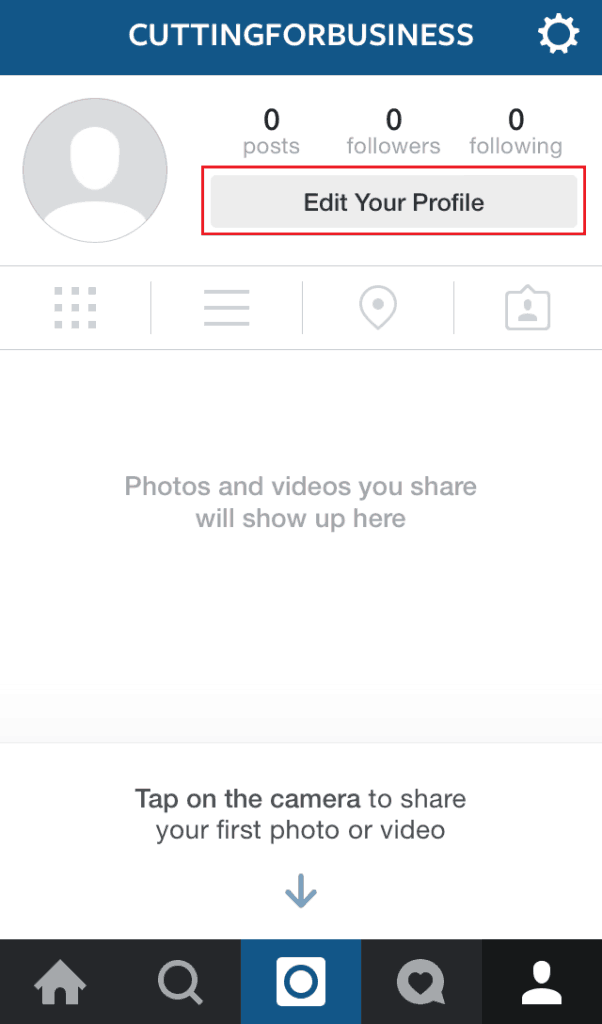
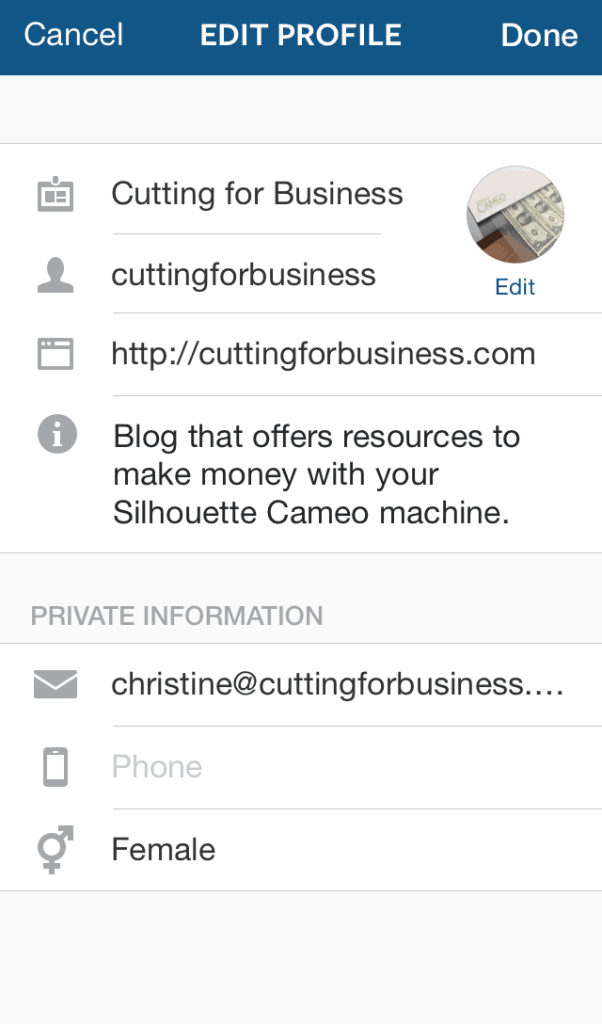
    3) After registering, the first thing you will want to do is update your profile. From the main screen, choose “Edit Your Profile”. You’ll want to add your business name, website address or store URL, and a short description about your company. This is the only place on Instagram you’ll be able to list your business details, so be sure to fill it in.

    Sell your Silhouette Cameo crafts on Instagram - cuttingforbusiness.com Sell your Silhouette Cameo crafts on Instagram - cuttingforbusiness.com

    4) That’s it! Your account is ready to go!

    Best Practices for Instagram

    Don’t be intimidated by Instagram. Once you get the hang of it, it’s really easy to use.

    • Instagram is highly visual, and beautiful photos perform best.
    • The text that accompanies your picture is referred to as a caption.
    • All images must be square. Update: All images do not have to be square.
    • Filters are overlays that can be applied to your photos when you upload them to Instagram. Try not to drastically change the look or feel of your photo by using filters. Personally, I skip using filters most of the time.
    • Hashtags are a must. A hashtag is merely a keyword with the “#” sign before it, and a way to categorize images across all of Instagram. When you put a hashtag in your caption, other people can tap on it and see all the other images that have the same hashtag.
    • Your profile must be public to run a business. Put simply, people can’t follow your business if it is set to private.

    An additional method to set up a store on Instagram

    There are also a number of websites and apps that will integrate with Instagram to help you sell, keep track of orders, and some accept payments for you. The easiest one to use based on my quick trial of a handful of them is Instaorders. Setting it up and getting running takes just a few minutes. I won’t add a full tutorial, as there isn’t much to it. First, visit instaorders.com. Next, sign in with your Instagram log in information, and fill out your profile, then price your items. That’s it! Publish your new store link to Instagram and start collecting orders!

    Ready to really rock hashtags on your new Instagram account? Head to this post for an easy to implement strategy.

    Save this post to Pinterest:

    How to Sell Crafts on Instagram - Great for Silhouette Cameo or Cricut small business owners - by cuttingforbusiness.com

    Disclosure: I received no compensation from the companies mentioned in this article, nor was I approached by any company to write this article.

  • How to Grow Your Craft Business using Magazines, Newspapers, and TV Shows

    Has your Silhouette or Cricut craft business gotten a point where you are trying to aggressively grow it? One way to grow a home based business is to get your business featured in the press. If you are thinking this might be difficult or expensive; keep reading because it isn’t!

    How to Grow Your Business Using Magazines, Newspapers, and TV Shows

    There is a free mailing list called HARO or Help a Reporter Out. HARO allows journalists, bloggers, and tv casting departments that are looking for people to interview, appear, or be quoted for an article or show to post a “wanted ad”. Each weekday, three times per day, HARO mails out their list of wanted ads to subscribers. Subscribers can read through the requests, and email the journalist or other person directly. Learn more about HARO and sign up (it’s free!) at Help a Reporter Out.

    What Else Do You Need to Know About HARO?

    • You will want to make sure that you have experience selling, a decent amount of feedback, and many items for sale before jumping into media requests.
    • You should realize that you have the potential for your business to be featured and seen by thousands or millions of potential customers. Have everything in tip top shape from your social media to your shop. Be ready for a potential onslaught of orders.
    • HARO has a great list of information you should know before answering queries. Read it here.
    • There are subscriptions available for HARO with a varying number of different features that you can find at this link. For the average Silhouette or Cricut craft business owner, I don’t think these are necessary.

    Was this post helpful? Save the image below to Pinterest.

    How to Grow Your Craft Business using Magazines, Newspapers, and TV Shows - Great for Silhouette Cameo and Portrait or Cricut Explore or Maker - by cuttingforbusiness.com

  • Do You Have a Craft Hobby or a Business?

    Happy Tax Day! Do you ever wonder if your side hustle is a hobby or a business? Let’s take a look from the eyes of the IRS.

    While you might call yourself a hobbyist – you’d better be sure that the IRS agrees with you. Today, I’m sharing criteria about how to IRS defines a business, and I’m giving you a list of benefits if you decide to incorporate your business.

    Did you know that in many states you can register a new business online – without the help of an attorney!

    IRS Criteria for Businesses versus Hobbies

    “In making the distinction between a hobby or business activity, take into account all facts and circumstances with respect to the activity. No one factor alone is decisive. You must generally consider these factors to establish that an activity is a business engaged in making a profit:

    • Whether you carry on the activity in a businesslike manner.
    • Whether the time and effort you put into the activity indicate you intend to make it profitable.
    • Whether you depend on income from the activity for your livelihood.
    • Whether your losses are due to circumstances beyond your control (or are normal in the startup phase of your type of business).
    • Whether you change your methods of operation in an attempt to improve profitability.
    • Whether you or your advisors have the knowledge needed to carry on the activity as a successful business.
    • Whether you were successful in making a profit in similar activities in the past.
    • Whether the activity makes a profit in some years and how much profit it makes.
    • Whether you can expect to make a future profit from the appreciation of the assets used in the activity.” Source

    Benefits to Registering or Incorporating Your Business

    • Reputation: You are no longer just a person that crafts at home, you are a registered business. For many potential customers, this increases your credibility.
    • Tax deductions: All the supplies that you’ve been buying become tax deductions!
    • Legal protection of your name: Once registered, another company cannot legally use your business name (this varies state to state).
    • Loans and grants: Once you have a registered business, you may be able to qualify for small business loans or small business grants to help grow your business.
    • Liability: Rather than being personally liable for the products you make, in many cases, the business becomes liable.
    • Wholesale pricing: Registered businesses and companies can apply for tax ID numbers which allow you to purchase from select wholesale sites, or buy items for resale and not pay taxes on them.
    • Credit card processing: Businesses can often negotiate better credit card processing rates – which will ultimately allow to you save money.

    How to Register Your Business or Incorporate It

    Unfortunately, each state is different for registering a business and requires different forms and fees. Head to this post for links to where to go in your home state. If you are not confident about the process of starting a business in your state, or don’t want to take a chance of omitting something, I have used incorporate.com in the past. They make it really easy and it’s fast – generally a few business days.

    Was this information helpful? Save the image below to Pinterest.

    Do You Have a Silhouette Cameo or Cricut Explore or Maker Craft Hobby or Business? - by cuttingforbusiness.com
  • How to Deal with People Asking for Crafting Secrets

    Once you start selling your handmade Silhouette Cameo crafts, other crafters (or new crafters) will eventually stumble onto your page and one might ask you where you got your supplies for a certain project. Similarly, maybe you’ll get a customer that wants to start their own cutting business and they ask you – either publicly or privately how you create your items. How do you handle it? Here’s a few options for gracefully handling these requests:

    • You could tell them. There’s no harm in sharing a few of your “secrets” and everyone needs more good karma in their life.
    • If the person is local (or you can manage to teach them online), offer to teach them how to operate the machine and make items. You can charge the crafter for your time and materials. This becomes a win-win situation: the crafter that asked the questions get their questions answered, and you make some extra money.
    • You can ignore and/or delete the comments. If the comment about your supplies or secrets is posted on your social media accounts, you can always delete it.
    • You can answer vaguely. If you get a question about what machine you use to create your items, feel free to be vague. For example, I use a Silhouette Cameo for most of my items. If someone asks what machine I use and I don’t feel like sharing, I tell them I use a plotter. This is the truth, as the Silhouette Cameo is a desktop plotter.
    • Lastly, you can always find a picture of the biggest, most expensive plotter on the market and send it to them. Most people won’t want to invest several thousands of dollars and the conversation will be over quickly.

    Ultimately, the choice of how to handle an aspiring crafter or competitor asking questions is yours, but I urge you to stay professional no matter how you handle it. Your response is a direct reflection of not just you, but of your small business.

    Help out another crafter by sharing this post on Pinterest:

    How to Deal with People Asking for Crafting Secrets in your Silhouette Cameo or Cricut Small Business - by cuttingforbusiness.com


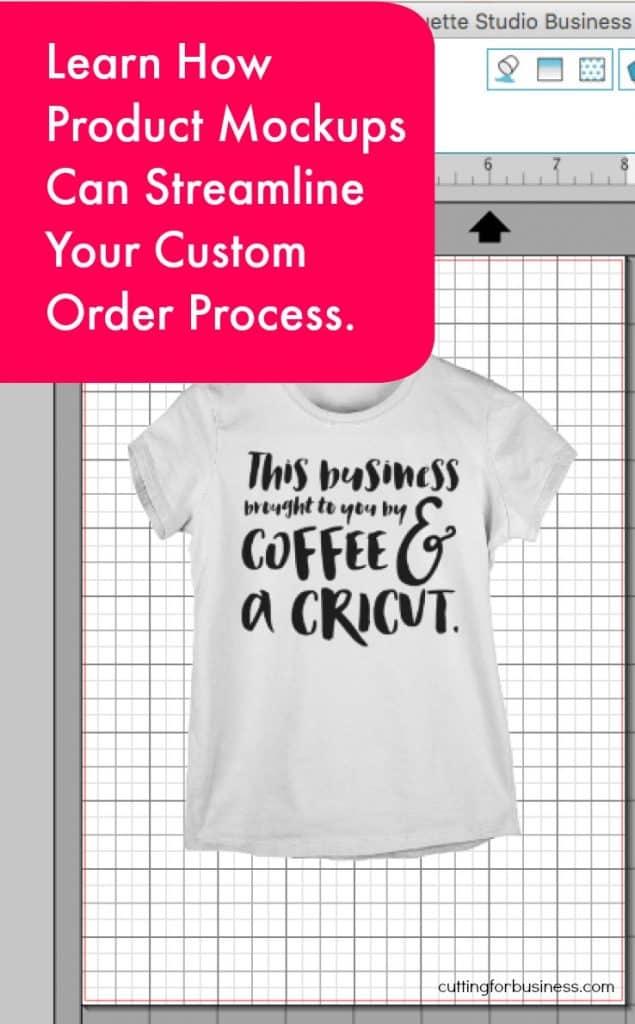
  • How to Use Product Mockups for Custom Orders

    In my last post, I shared a tutorial on how to use Silhouette Studio to create product mockups to help stock your store. Product mockups can also be used when you create custom items for your customers.

    Sometimes as crafters, it is difficult to get our ideas across to non-crafters. The next time you are creating a custom item for one of your customers, create a mockup in Silhouette Studio and email them a copy of the mockup – before you begin creating the item. Ask them to respond to the email with any changes they want before you actually begin creating the item, if there are no changes to be made, they would email you back stating that the design is what they wanted.

    4 Benefits to Using Mockups:

    1. In the event that a customer is unhappy with their item, you have written proof that they approved the design before you created it. This may help you in the event that they file a chargeback with their credit card company or any other type of claim against you.
    2. If the customer chooses to make design changes after the mockup is approved by them, you can charge them for your time to make the design changes.
    3. Mockups help the customer visualize the item before it is actually made – which can save on supplies, time, and redos.
    4. Using mockups, you can give them a choice of design variations. Feel free to send 2 or 3 mockups, and have them choose their favorite.

    Need a mockup management system? Read this post.

    Share this post on Pinterest:

    How to Use Product Mockups for Custom Orders in Your Silhouette Cameo or Cricut Small Business - by cuttingforbusiness.com

  • 7 Local Pick Up Tips for Craft Business Owners

    Some crafters don’t like to ship their handmade Silhouette or Cricut crafts to their customers and offer local pickups instead.

    The most important thing to remember if you are doing customer meet and greets to sell your crafts is SAFETY.

    7 Local Pick Up Tips for Craft Business Owners

    1) Offer a set day and time. Consider offering a set pickup day, time, and location where you can meet with everyone whose orders are complete. For example, if your Thursday evenings are generally free offer pickup at 6:00pm in the police station parking lot. This saves time to have everyone meet with you at one time, plus it can be advertised when the order is placed. Anyone that misses the pickup can choose to have the item shipped or wait until the next pickup day.

    2) Always meet in a public place. Many police stations offer local pickup meet and greets in their parking lot or inside their lobby. You do not need to make special arrangements with the police department.

    3) Always have your customers prepay for their items. No one wants to create an item and then have a customer disappear without paying!

    4) Use your porch. If your customers are family or friends, consider placing a decorative box on your front porch or step. Once their item is completed, drop it in the box and let them know they can pick it up at their leisure from your porch.

    5) Don’t get discouraged! Customers will not always follow through, even if they have paid for an item. There is no need to arrange special pickup times, dates, or places. If a customer keeps “forgetting” to pick up their items, simply contact them and tell them the items will be shipped after payment is received due to multiple no shows.

    6) Deliver for a fee. If you have an extra large item and the customer needs it delivered, charge them a fee for delivery, which can be either flat rate or flat rate plus millage ($10 for the first 10 miles and $1 for each additional).

    7) Set rules and follow them. Last, create a list of ground rules and stick to them. I don’t sell many of my craft items anymore, but my personal list is: 1) I only meet customers that I know, meaning friends and family. 2) All items are left on my porch on the day of pickup. I would have already collected payment for the items, so no payment would be needed. 3) After 2 no show days, items are mailed at the expense of the customer.

    Oh! Before you go – skip using your mailbox for pickups at home. It’s actually against Federal laws in the US to use your mailbox for any deliveries or pickups not done by the USPS.

    If you’d prefer to ship your items instead, head to this section of the blog.

    7 Local Pick Up Tips for Craft Business Owners - Silhouette & Cricut Crafters - by cuttingforbusiness.com.
  • How to Ship Packages from Home

    Did you know that you don’t have to go to the post office to ship your handmade products? Yes, you are too busy for that! Instead, you can ship packages from home by printing shipping labels online.

    If you are selling through an online marketplace, you can usually print postage from your order screen. If you did not sell your item through a marketplace or service, you can visit the United States Postal Service at usps.com and print a shipping label through their website.

    Alternatively, if you have a Paypal account you can ship any package – even if the customer didn’t pay through Paypal using the link below. Be sure to bookmark the link, as it is not published by Paypal.

    https://www.paypal.com/us/cgi-bin/webscr?cmd=_ship-now

    Information on How to Ship Packages from Home in Your Craft Business - cuttingforbusiness.com.

    Supplies Needed to Ship Items

    • Digital postal scale – See inexpensive shipping scales on Amazon. I use a scale with an external weight display, because reading it is easier with large or bulky packages. (This is the exact scale I have.)
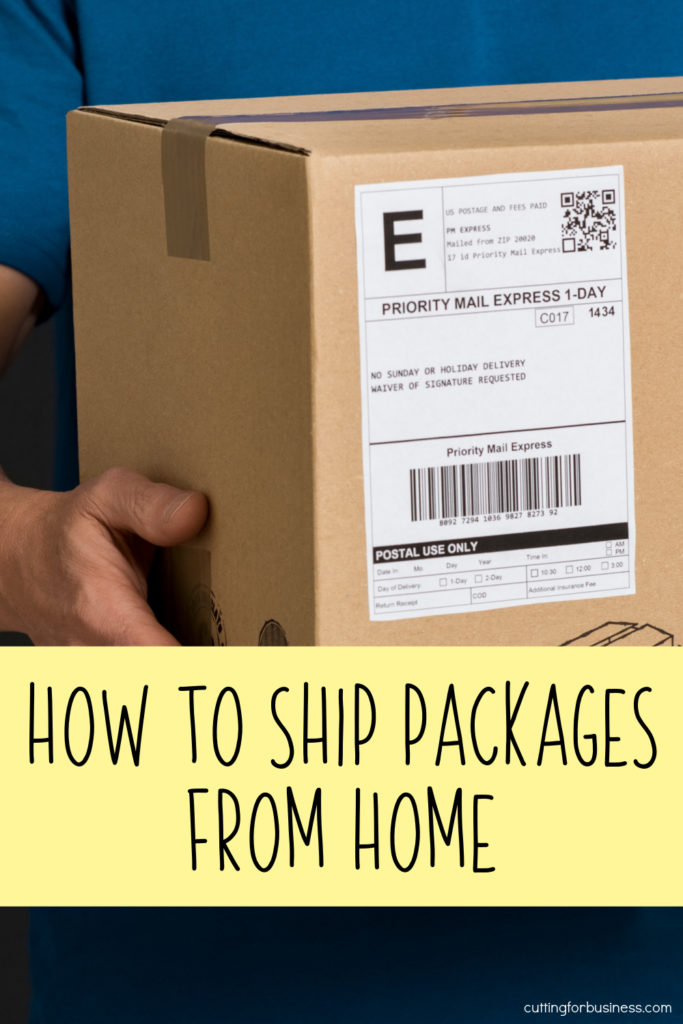
    • Boxes or envelopes to ship items – Used boxes are fine, as long as they are in good condition. If you feel your customers may be turned off by a recycled box, create a sticker that says, “This box has been recycled. Please consider reusing it.” If you’d like to borrow my sticker design, head to this post for a free download. If you are shipping non-breakable items, consider poly mailers. Poly mailers don’t add weight to your item, hold up well, and are available cheap on Amazon.
    • Measuring tape or ruler – Some classes of mail need to be measured to ship online.
    • Packing materials – Bubble wrap, tape, tissue paper, etc. Always pack fragile items well. Sadly, if the USPS can find a way to damage something, they probably will.
    • Self adhesive labels or paper to print the labels – You’ll need to print the shipping label and stick it to the box or envelope. If you tape the label to the box or envelope, be careful not to tape over the barcodes. Buy peel and stick labels online, you’ll need the half page ones. If you plan to do a lot of shipping, invest in a label printer.
    • Business cards or advertising materials – Always remember to add a business card or two to each package you send out.
    How to Ship Packages from Home in Your Silhouette or Cricut Small Business - cuttingforbusiness.com.

    Quick Shipping Tips

    Want free boxes? If you choose to ship your items through the USPS Priority Mail service, the USPS will provide free boxes. You can pick them up at your local post office or order online. Remember, these boxes can only be used to ship USPS Priority Mail.

    Don’t want to buy a shipping scale? If you do not want to purchase a shipping scale, consider using USPS Flat Rate Priority Mail boxes. USPS Flat Rate boxes are available for free in several sizes. Each size has a predetermined price, so as long as your item fits inside the box, it’ll ship for a flat rate price and include insurance and tracking.

    Will you be mailing mostly small items? If you are mostly mailing small items, I recommend investing in a scale and shipping through the USPS First Class Mail. First Class Mail is good for items 16 ounces and under and includes free tracking.

    Don’t want to haul your packages to the post office? If you have at least one USPS Priority Mail Package that you are mailing, you can schedule a free next day pickup until 2am online by visiting USPS Package Pickup or through their app. On the day of your package pickup, leave the items inside your mailbox or at your front door and your mail carrier will pick them up. If you are only shipping First Class Mail packages, you can put them in your mailbox for pickup or drop them in any community mailbox without scheduling a pickup.

    If you’d prefer not to ship items, you can also coordinate local pickups or deliveries.