Category: Growing Your Business

  • 42+ Back to School Products for Crafters to Make and Sell

    With July coming to an end, it’s time to start selling Back to School products in your craft business.

    Today, I’m sharing a few ideas with you of Back to School Products for crafters to make and sell. With many of these product ideas, you’ll be able to use your Silhouette, Cricut, laser cutter, sewing machine, and other craft supplies you probably already have.
    42+ Back to School Products for Crafters to Make and Sell - cuttingforbusiness.com

    42+ Back to School Products for Crafters to Make and Sell

    • Personalized School Supplies
      • Customized notebooks and journals with unique covers.
      • Decorated pencils, pens, and pencil cases with fun designs.
      • Hand-painted or embellished backpacks and lunch boxes.
      • Customized school supply labels and vinyl decals.
    • Classroom Decorations
      • Inspirational posters with motivational quotes for classrooms.
      • Alphabet and number wall art for younger students.
      • Bunting, banners, and garland to hang around the classroom.
    • Teacher Appreciation Gifts
      • Personalized mugs or tumblers for teachers.
      • Customized lanyards.
      • Earrings shaped like school symbols (school supplies, etc.).
      • Back to School greeting cards with space for a gift card.
      • School themed tote bags.
      • Personalized clipboards.
      • Customized stationery, “From the Classroom of Ms. or Mr…”
    • School Spirit Accessories
      • Handmade bracelets, necklaces, and keychains in school colors.
      • Spirit-themed hair bows and headbands.
      • Earrings shaped like school symbols (apples, rulers, etc.).
      • Customized shirts, sweatshirts, hoodies, sweatpants, or socks.
      • Backpack hang tags, customized with school or sports colors.
      • Custom Croc charms.
    • Lunch Gear
      • Fabric lunch bags or reusable snack pouches.
      • Customized water bottles with names.
    • Classroom Decor
      • Posters and printables with uplifting messages and illustrations.
      • Acrylic pour paintings in school colors or patterns.
    • Classroom Door Decor
      • Themed and colorful door wreaths/welcome signs.
      • Personalized name plates for teachers’ classroom doors.
    • Creative Bulletin Board Packs
      • Create themed bulletin boards, along with a video or guide on how to assemble it. Sell them as a kit.
    • Classroom Passes & Reward Systems
      • Handpainted passes for the bathroom, nurse, or office.
      • Themed classroom treasure boxes filled with rewards.
    • Digital Goods
      • Back to school coloring pages, word searches, crossword puzzles.
      • School related SVG cut files.
      • Daily or weekly planners, either digital or printable.
      • Lesson plan templates.
      • Printable games or escape rooms.
      • Digital Meet the Teacher templates.
      • School themed seamless backgrounds.
    • Photography Props
      • First/last day of school boards/chalkboards.
      • Back to School photo booth props and/or backgrounds.
      • School year photo frames.
    • Locker Decorations
      • Magnetic photo frames to personalize lockers.
      • Fabric covered locker mirrors with fun patterns.
    • Food & Baking Related
      • Back to School themed cookie cutters.
      • Themed cupcake picks or cake toppers.

    Before you go, I urge you to think not only of products related to teachers. You might find a niche in making and selling products geared towards coaches, cafeteria staff, office support staff, bus drivers, and janitors.

    Psst! I’ve got a list of Back to School sayings.
  • What is the Pay What You Want Model & How Can You Implement It in Your Craft Business?

    What is the Pay What You Want Model?

    The Pay What You Want model is a promotional pricing strategy that advertises to customers that they can set their own price for your product. You may have also been seen it called ‘Pay What You Can’ or the ‘Value for Value’ model.

    While this ‘new’ concept has been gaining traction lately, it’s not new at all. If you have ever gone to a dealership and purchased a new car, you’ll know that many dealerships put a price on a car. However, the customer doesn’t usually pay the ‘sticker price’ – that’s the just the price listed. Instead, you haggle with the salesman to get a lower price… or the price you want to pay.

    Similarly, if you’ve ever bought online through Ebay or Mercari, you’ll know that both marketplaces, along with many others, allow sellers to accept offers on their listings. As a buyer, when you submit an offer, you are essentially paying what you want if your offer is accepted.

    Why Does the Pay What You Want Model Work?

    Put simply, the Pay What You Want model works because it makes people feel good. When you make customers feel good about the deal, customers will buy from you.

    Will I Lose Money with the Pay What You Want Model?

    No. You will set a minimum price for your product. Customers will be able to pay the minimum price or higher. Obviously, your minimum price should be a price you don’t mind selling the product for.

    How Do I Implement the Pay What You Want Model in My Craft Business?

    How you implement a Pay What You Want model in your business will depend on what platform you use to sell your products.

    I’ve gathered some links for you below to begin implementing a Pay What You Want Model in your craft business.

    • Etsy: Etsy does not have a way to implement Pay What You Want for customers.
    • Shopify: There are a number of apps in the Shopify App Store to implement Pay What You Want functionality.
    • Woocommerce: There’s a great roundup of Pay What You Want extensions on this blog.
    • Square: This help center article walks you through setting up a Pay What You Want model for your customers.
    • Ecwid: This help center article helps you set up a Pay What You Want model in your store.
    • Amazon Handmade: I couldn’t find a way to implement Pay What You Want on Amazon Handmade.

    Need help pricing your products? I recommend this article on pricing and this article on static and dynamic pricing.

    Do you use a Pay What You Want model in your craft business? How is it working out? Let us know in the comments.

    What is the Pay What You Want Model & How Can You Implement it in Your Craft Business? - Silhouette - Cricut - cuttingforbusiness.com
  • 5 Ways to Improve the Workflow in Your Craft Business

    We’ve talked a lot about craft shows this week. There is one thing in common that every craft show has: You have to stock up your inventory before you go. Stocking up inventory while getting out every day orders, managing accounting and social media promotions, and running your daily life can be a challenge. However, if you do a few things regularly you can make the process easier.

    5 Ways to Improve the Workflow in Your Craft Business

    1. Organize your craft space so that it is efficient. I talked about this in depth and even showed you how I made my own craft space more efficient in this post. Being more efficient cuts down minutes. Wasted minutes add up and can affect your productivity. Put simply, you’ll be able to create more products when you don’t waste time.
    2. Maintain an accurate inventory. While setting up inventory can be a daunting task, it’s something you need to do. When you have an accurate inventory of every supply you have in your craft room, you don’t have to stop crafting to make a trip to the store or place an online order. I mean, having to stop crafting because you ran out of supplies puts a definite stop in your workflow. You can use a simple spreadsheet to keep track of each supply or use your accounting program if an inventory feature is offered.
    3. Keep your craft space clean and organized. If I’ve ever been guilty of giving advice that I don’t always stick to, it’s keeping my space clean. Unfortunately, there is no point in keeping an accurate inventory of your craft space if you can’t find the supplies when you need them. Have fun with your organizing: Use your Silhouette or Cricut to decorate and label your space. Need some tips from professional organizers? Jump to this post.
    4. Set a schedule. I prefer to work in time blocked days. You can read more about how I personally structure my day in this post. If time blocking doesn’t work for you, find another way to organize your days – then stick to it.
    5. Start and end with a note. When I first arrive in my craft space, I write a detailed list of everything I want to get done. I work my way through the list while I’m in my space. When I’m ready to end my day, I write the list for the next day. This saves time so that when I arrive in my space, I already know what I need to do and I can get started right away.

    If you have the luxury of time when you are prepping for a craft show, you can try my sell one, stock one method as well. Read more about it in this post.

    Were these tips helpful? If so, save the image below to Pinterest.

    5 Ways to Improve the Workflow in Your Silhouette or Cricut Craft Business - by cuttingforbusiness.com


  • 19 Tasks a Virtual Assistant Can Do in Your Craft Business

    Since 2020, virtual working and virtual assistants have been all the rage. If you get bogged down in your craft business with day-to-day tasks, a virtual assistant might be perfect for you.

    If you’ve never considered a virtual assistant for your craft business, read on for a list of tasks you could have a virtual assistant do.

    19 Tasks a Virtual Assistant Can Do in Your Craft Business - cuttingforbusiness.com

    19 Tasks a Virtual Assistant Can Do in Your Craft Business

    Social Media

    From posting on Instagram or Facebook to creating pins for Pinterest, a virtual assistant can handle these tasks. If you aren’t confident in letting someone take over your social media, have them schedule the messages so you can look over them before they post.

    Answering Emails

    Emails take a lot of time away from creating. And of course, it is best to answer emails as quickly as possible. Have your virtual assistant take over for you.

    Video Editing

    A virtual assistant can edit videos into reels, stories, or TikTok content. All you have to do is upload raw video and let your virtual assistant get to work.

    Creating Invoices

    Creating invoices can be time consuming. For your business to keep running, you obviously need to send them out to get paid. Have your virtual assistant help you out.

    Input Listings

    Virtual assistants can list products on Etsy, Shopify, or your website. The time you would have spent doing this can be used for creating.

    Proofreading and Editing

    Not the best with grammar? Have your virtual assistant read and edit materials before you post them online.

    Printable or SVG Creation

    Whether you want to add a line of printables to your store or need SVG cut files created, a virtual assistant could help with these tasks.

    Newsletter Creation

    We know that emails sell. Use a virtual assistant to create a newsletter and email it to your list.

    Event Planning

    Whether you are hosting a craft night out or a weekend long retreat, a virtual assistant can do everything from researching event spaces to menus, and registration to printed materials.

    SEO Audits and Updating

    Search Engine Optimization can be time consuming. Why not put your virtual assistant on it?

    Website Maintenance

    After your virtual assistant completes an SEO audit, have them get to work on editing or updating your website.

    Researching Help for Services

    If something is out of the realm of your virtual assistant, he or she can hit the internet and find someone that can help you out.

    For example, if your virtual assistant isn’t familiar with SEO tactics, they can surely scour the internet looking for the best priced service to complete the task.

    Placing Supplier Orders

    I don’t know about you, but when I sit down to order supplies I search several websites for the best deal. Obviously, this is time consuming. Put your virtual assistant on the job!

    Creating Advertising

    If you use Facebook Ads, Google Ads, Etsy Promoted Listings, or Pinterest Ads you can have your virtual assistant create and manage those ads for you.

    Market Research

    If you are trying to break into new demographics, put your virtual assistant on the job! He or she can dig into the internet and see what is selling and what is not.

    Entering Data

    Working on inventory in your craft room? Write it down one a piece of paper and snap a picture. Let your virtual assistant organize the information into a nice and tidy spreadsheet for you. He or she can also help you keep it up to date.

    Bookkeeping and Accounting

    A virtual assistant can manage invoices, track expenses, reconcile accounts, and prepare financial reports for you to review.

    Survey Creation and Analysis

    Want to know something from your customer base? Use a virtual assistant to design a survey, collect responses, and analyzing the survey data.

    Honestly, a virtual assistant can do anything that can be done offsite using a phone or a computer.

    Online Course Creation and Management

    If you’ve always wanted to create a course but don’t have the time, use a virtual assistant to help create and manage the course and other educational materials.

    Where to Find a Virtual Assistant?

    When hiring a virtual assistant, you’ll need to decide whether you will hire an assistant to complete a single job, or a day-to-day assistant.

    I’ve hired virtual assistants for help along the way while maintaining Cutting for Business. I’ve successfully used Upwork. You can sign up and post a job, or simply look through the users. They list their specialities and their price per hour. You’ll find that prices vary greatly; but remember – the quality of work is directly tied to the price you pay.

    Not ready to hire a virtual assistant but need to save some time in your craft business? See if ChatGPT can help.

  • 9 Ways to Scale Your Craft Business

    What do you do when your business is going well, you are getting regular orders, you have happy customers, quality products, growing social media numbers, and an awesome website – but you still want more? You start working to scale your craft business.

    Today I’m sharing 9 ways you can scale your craft business.

    9 Ways to Scale Your Craft Business - by cuttingforbusiness.com.

    9 Ways to Scale Your Craft Business

    Get Your Products Into Stores

    Everyone has local stores around them that carry handmade products. Get my tips for getting your products into stores.

    Team Up with Other Small Businesses

    If getting your products into stores isn’t up your alley, team up with other small businesses that need what you make.

    For example, realtors always need gifts.

    Similarly, landscaping, plumbing, and similar trades always need shirts.

    Add Video Marketing to Your Business

    Have you been noticing a trend that more and more companies – both big and small – are using video marketing? Add videos to your business with my video marketing tips.

    Use Paid Advertising

    If people don’t know about your business, how can they buy from you? There is paid advertising available on Google, Etsy, Facebook, Instagram, TikTok, and Pinterest. Figure out which platform your potential customers are most likely to use – and set up some advertising campaigns.

    Take on Brand Reps or Enthusiasts

    Brand reps and enthusiasts are like super fans that use your products and help you promote them on social media. Instead of paying them in money, they are usually compensated in product. Read more about brand reps.

    I wrote about Help a Reporter Out (HARO) recently. It’s a source to connect with journalists, TV producers, news stations, and bloggers who are looking for new stories.

    Connect with a Blogger/TikToker/Internet Personality

    Bloggers, TikTokers, and other internet personalities can be a great way to reach new potential customers. Expect to pay for the exposure they can provide. Learn more in this post.

    Get into a New Niche

    If you do work in a small niche, broaden it with a new line of products.

    For example, if you mainly make shirts for kids – break into the adult niche. Similarly, if you make wood signs – consider making Christmas tree ornaments.

    Choose something in your local town to sponsor. But, don’t just sponsor anything! Sponsor something where potential customers will notice you.

    For example, if you make jerseys and kid’s sports products, sponsor a local sports team. Similarly, if your products revolve around breast cancer, you might sponsor a 5K breast cancer walk.

  • Tips for Bundling Products in Your Craft Business

    Yesterday I talked about bundling Christmas products like elves, but don’t forget that you can bundle other products, too! I mentioned yesterday that one way to increase the amount of money that your craft business is making is to upsell through bundling. Here are my additional tips for bundling products in your business.

    Tips for Bundling Products in Your Craft Business

    • Give a discount on your bundled products. If the savings are small, express the discount in terms of a percentage rather than a monetary dollar amount.
    • Offer products separately, too. Continue to offer your products not in the bundle for customers that want to buy them ‘a la carte’. Of course, be sure they are priced higher than inside the bundle.
    • Give them top placement. Feature your bundles in ‘Featured Listings’ spots on your website or shop.
    • Don’t bundle things together that don’t work together. Only bundle products together that make sense. For example, a small bundle of monogrammed products like a tumbler, a large decal, and a small decal make sense. Alternatively, a set of adult shoes, an infant bib, and a wood sign don’t make much sense.
    • Don’t put too many products together. Keep your bundles small. Ideally 2 to 5 products work well together.
    • Name your bundle. Consider giving your product bundle a catchy name.
    • Offer bundles on a time limited basis. I’m sure you’ve seen various font resellers offering limited time bundles on groups of fonts. Consider doing the same with your bundles.
    • Put them all in one picture. Photograph your bundled products together in one shot; rather than creating a collage. This helps your listing look intentional and not thrown together.
    • Know when to sell bundles. Bundled products sell especially well around the holidays. You can see this in action in many large retailers who offer bath sets, coffee cups and coffee, snack baskets, and more.
    • Pretty packaging will help them sell. Pay attention to the packaging of your bundle. Similarly to photographing your products together, package the products together.

    Are these tips helpful? Save the image below to Pinterest.

    Tips for Bundling Products in Your Silhouette or Cricut Craft Business - by cuttingforbusiness.com

  • Fall Marketing Themes & Ideas for Your Craft Business

    Crafty friends, fall is coming. If you’ve got a craft business – it is time to switch from Summer and all things Back to School and head into Fall.

    Good news though: Fall is usually a high time for consumer spending. Shoppers spend quite a bit on Halloween and Thanksgiving as they head into the ultimate spending period: Christmas. Today, let’s take a look at the themes you can market around for the coming months.

    Fall Marketing Themes for Craft Businesses - by cuttingforbusiness.com.

    Fall Marketing Themes

    Use these marketing themes throughout the Fall months in your products, social media posts, and promotions.

    Fall Icons

    Design with leaves, pumpkins, hay, gourds, apple, pies, and more all sell well.

    Cooler Weather

    As the temperature drops, keep the thoughts of warmth in your marketing. Use words like cozy, warm, or toasty in your text and captions. This works especially well if you are advertising throws, pillows, hoodies, and other gear for cooler months.

    Youth Sports

    The start of school means the start of football, hockey, golf, soccer, and more. Sell non-trademark infringing spirit wear to local teams. Better yet? Get yourself a contract with one of the sports teams to handle their gear.

    Cool Colors

    Use browns, deep reds, dark yellows, and burnt oranges in your product designs and marketing colors. Consider making fall banners with deep, rich colors to spruce up your shop.

    Time Change

    Use the time change (1 hour backwards) to host a sale. Text like, “You might lose an hour today, but you’ll gain XYZ at (name of business)” will work well.

    Halloween

    Think all things spooky and scary. Halloween is always a large spending time for consumers. For Halloween, purples, greens, blacks, and oranges work well in both products and marketing.

    Thanksgiving

    Consumers express gratitude around this time. Share things you are grateful for in your social media. Continue the grateful theme in your product lines.

    Christmas

    Of course, you can’t forget that Christmas is coming. Begin listing Christmas products during Fall time for the early bird shoppers looking to get a jumpstart on the holidays. Wording like, “Only XX shopping days left before Christmas” is a great call to action to use.

  • 25 Goal Ideas for Craft Businesses

    Know that you have to set goals for your craft business, but not sure what kind of goals to set? Today, I’m sharing a list of goal ideas for craft businesses.

    25 Goal Ideas for Craft Businesses - cuttingforbusiness.com.

    25+ Goal Ideas for Craft Businesses

    Financial Goal Ideas for Craft Businesses

    • $xx dollars in sales per week/month.
    • Reduce expenses in your craft business. You can start this by doing a spending audit.
    • Stay up to date with business accounting.
    • Make your business official with your city, state, or county. While I can’t tell you exactly how to do this – it differs in every state – view my list of where to go to start a business in your state.
    • Keep impulse buying in your business to a minimum. Read more about money wasters.
    • Pay off business debts and keep your business out of debt. Debt is no good – read how to keep your business out of debt.
    • Set up an automatic draft from your business bank account to a business savings account.

    Marketing Goal Ideas for Craft Businesses

    • Post regularly to social media.
    • Create a profile on a new-to-you social media network and start using it.
    • Start using a content calendar. I’ve got more information about content calendars.
    • Network with other small business owners to promote your products together.
    • Start marketing to a new demographic. If you currently make products primarily for moms, broaden your marketing to include other sets of people.

    Growth Goal Ideas for Craft Businesses

    • Get off the marketplace and start your own website.
    • Increase your customer loyalty with a loyalty program. Remember, the easiest customer to get is one you already have! Here’s my sample loyalty program.
    • Improve your branding. This could include your logo, brand colors, packaging, and so on.
    • Sign up for a business related course. One thing I commonly hear from small business owners is ‘my product pictures are bad’. Make it a goal to improve them!
    • Interact more with your customers to find out what they really want. Whether this is through social media or surveys, the best product is the one that fills a need.
    • Start something new. If you make and sell wood signs, consider hosting parties where others can make them, too. Pick up my 15 Parties ebook at this link.
    • Set up popup shops throughout the year to raise awareness about your business. When you set a goal, think of how many you could attend for the year – one a month? One per quarter? Here are ideas for popup shops.

    Time Management Goal Ideas for Craft Businesses

    • Improve your work life balance by setting regular office hours and sticking to them. Read my commentary on the importance of office hours.
    • Hire help in your craft business. From social media assistance to creating and packaging, take some of the burden off of you.
    • Plan a vacation. While it may seem counterproductive, all business owners need time to escape the reality and recharge. If you haven’t gone on vacation in years – plan on it this year. Even better? Use money from craft business to fund it.

    Productivity Goal Ideas for Craft Businesses

    • Set a number of products to produce each week or month. This could be digital or tangible products.
    • Switch your shop from custom made to ready to ship. Read my opinion on custom made products.
    • Purge your craft area of things you don’t need and keep it clean this year. While this may be wishful thinking, an uncluttered, organized workspace will improve your productivity. Read about my DreamBox.

    Spend some time today drafting up some goals for your Silhouette or Cricut craft business. Then, head over and grab my printable goal worksheets.

  • How to Achieve Your Craft Business Goals (+ Free Printable)

    Let’s build on my recent post on goals. Hopefully by now you’ve had time to draft up a few business goals for your Silhouette or Cricut business. If not – do that first – then come back here and work through this post.

    I see this happen the beginning of every year: Everyone sets a bunch of goals, throws the paper aside, and never looks back on it again. Sound familiar? I can only talk about the way I set and achieve goals – but – it works! Here’s my step-by-step method:

    How to Achieve Your Craft Business Goals

    1. Download and print my goal worksheet at this link. You’ll need one goal worksheet for each goal you have.
    2. Identify the top goals. I typically choose 1 – 3 goals that I want to work towards at the same time. Write one of your goals at the top of the worksheet.
    3. Next, write concrete steps you can take to achieve your goal. Be sure to set a deadline for each step. For example, if I want to increase the sales in my craft business I might set a goal for specific promotions tied to major holidays. My deadline for each would be near each holiday.
    4. Hang your goals worksheet somewhere you will see each day. It could be the wall of your workspace, your refrigerator, or even your bathroom mirror. I also usually set an alert on the calendar of my phone to remind me of the deadlines.
    5. After your key deadlines, complete the goal check in section of the worksheet. At this point, if you are not making progress on your goal, you may need to reevaluate it or the steps you are taking.
    6. Record the goal results. Once your time is up or you’ve completed your goal, fill in the Goal Results section of the worksheet.
    7. Create a follow up goal. If you haven’t achieved your goal, modify the goal, record it in a new worksheet and start working towards it again. If you have completed your goal (CONGRATS!), write a followup goal and repeat the process with a fresh goal worksheet.

    Was this post helpful? Save the image below to Pinterest.

    How to Achieve Your Craft Business Goals (+ Free Printable) - Silhouette Portrait or Cameo and Cricut Explore or Maker - by cuttingforbusiness.com


  • Everything You Need to Know About Selling on Mercari

    I first covered Mercari on the Cutting for Business blog in 2019. Now, in 2024, Mercari remains a popular app to sell things – including crafts.

    I posted on Facebook at the end of March about Mercari eliminating all selling fees. I promised I’d follow up. Now, I’m following up.

    If you are already familiar with selling on Mercari, jump straight to the New Policies on Mercari section.

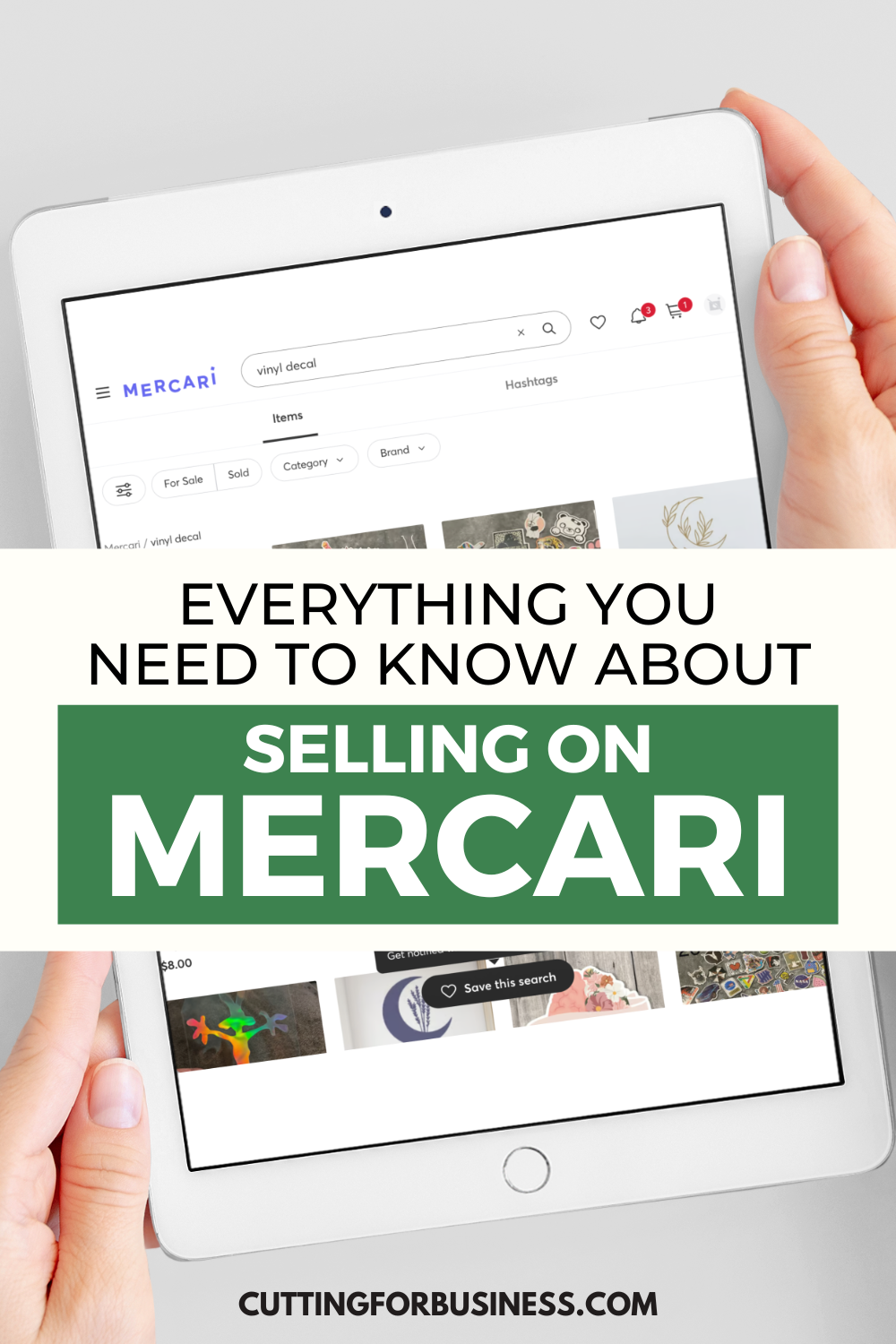
    Everything You Need to Know About Selling on Mercari - cuttingforbusiness.com

    What is Mercari?

    Mercari is a marketplace app available for phones. I’d compare it as being similar to Facebook Marketplace. However, unlike most Facebook Marketplace transactions, most Mercari transactions are shipped from seller to buyer.

    Mercari – The Good

    • There’s a handmade section in the app. There are a decent number of well made craft products for sale.
    • Mercari has been promoting on billboards around my local area. This suggests they are growing.
    • It’s easy to list: Snap a picture, write a description, add a price, and list it.
    • Mercari listings are free. If your item sells, there is a flat 10% fee. As of March 27, 2024, there are no selling fees.
    • You have 3 days to ship your item after a sale is made.
    • There’s a built in shipping label generator.
    • It’s safer than meeting up with strangers around your town.
    • In the event of problems, Mercari will act as a mediator between you and the buyer.

    Mercari – The Bad

    • Sellers don’t get paid until the buyer rates the product. If the buyer doesn’t rate the product, there is a system of checks and balances built into the app so that sellers still get paid.
    • Mercari isn’t somewhere that you can build your business. You don’t have a shop – just listings. I’ve found it good for one off sales – but it definitely isn’t a place to get your business name out.
    • Buyers on marketplace apps are often looking for a deal. In fact, Mercari advertises to buyers “… save up to 70% on millions of new and used items”. Buyers looking for a deal aren’t always compatible with the handmade market as a whole.
    • Mercari users can make offers on your listings. I find it annoying, but others might not mind. To deal with the offers, I always set my price a little higher than I want to sell it at. When the buyer submits an offer, they can then get my ideal selling price.

    Mercari Best Practices

    If you want to use Mercari in your craft business, here are a few recommendations:

    • Use actual product photos of the exact product the buyer will receive rather than mockups. Since the buyer has to rate you before you are paid, you need it to be clear exactly what they will receive.
    • Don’t do custom orders through Mercari. I always recommend to receive payment before a custom product is made. Since Mercari doesn’t do payments this way – there’s nothing worse than getting stuck with a custom product that you might not be able to resell.

    New Policies on Mercari

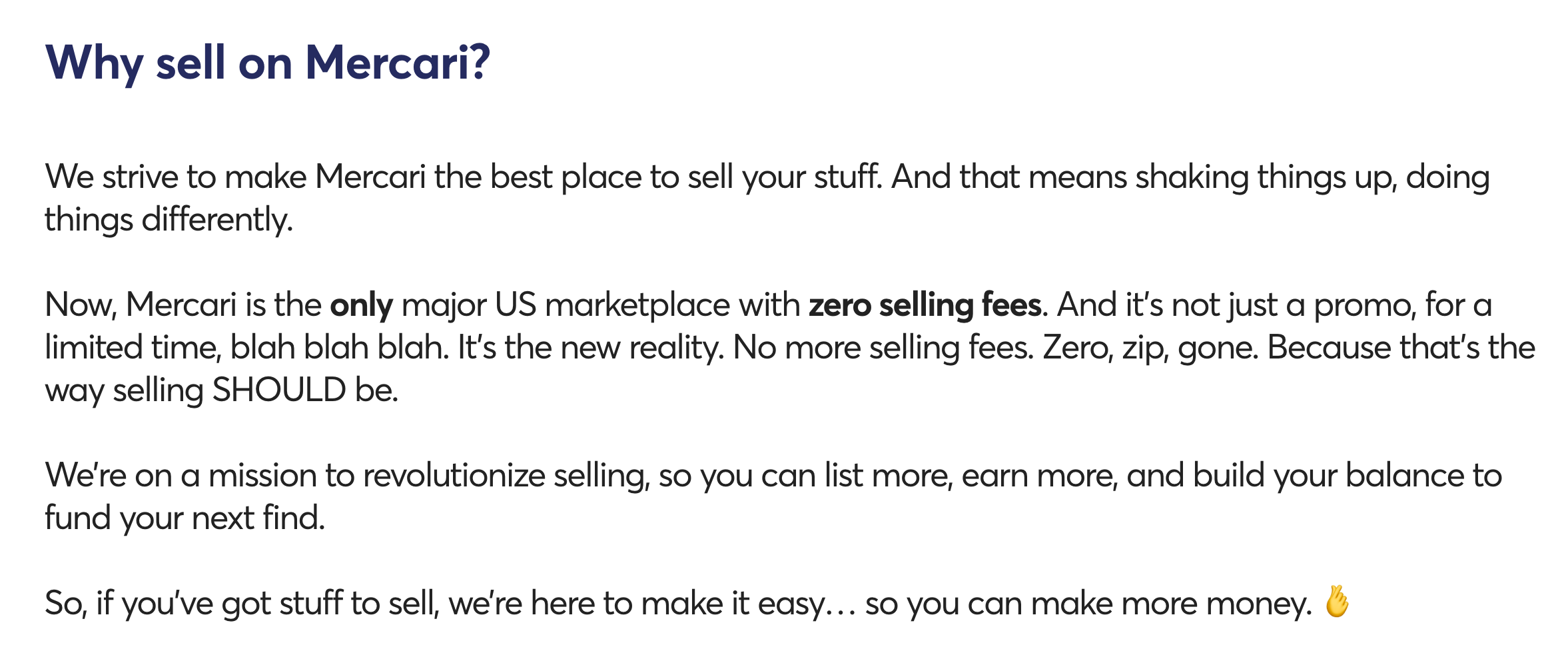
    But, there’s something new on Mercari. On March 27, 2024, Mercari announced that they were eliminating seller fees. They are marketing themselves as the first US marketplace to be fee free for sellers. As a seller, I think this is awesome! But… and there’s a huge but.

    Mercari screenshot - cuttingforbusiness.com

    Who Pays Fees on Mercari Now?

    Mercari has passed many of the fees from the seller side to the buyer side. Let’s look at the specifics.

    Seller Fees on Mercari

    1. Balance Transfer Fee: There is now a Balance Transfer Fee each time you take your earnings out from Mercari. It is $2 for an ACH deposit and $3 for an Instant Transfer.

    Buyer Fees on Mercari

    1. Service Fee: The Service Fee varies based on the category, but it appears to be between 9% and 10% for many categories. I couldn’t find the specifics spelled out on Mercari anywhere.
    2. Payment Processing Fee: $0.50 plus 2.9% of the transaction price (which includes the item price, shipping, service fee, and sales tax). This fee may not be refunded for returned or canceled orders. If you are paying with a balance in Mercari, the payment processing fee is waved.

    Mercari Checkout Screenshots

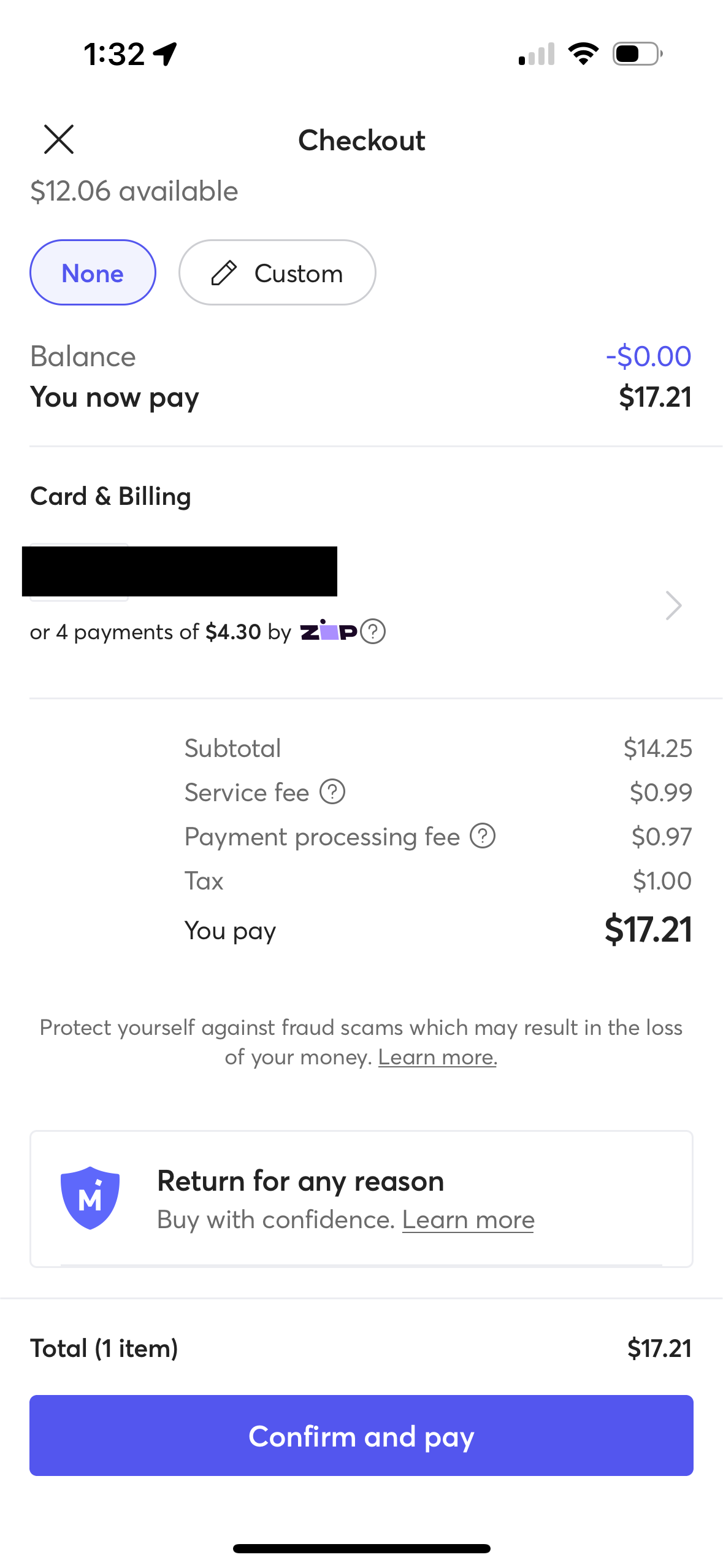
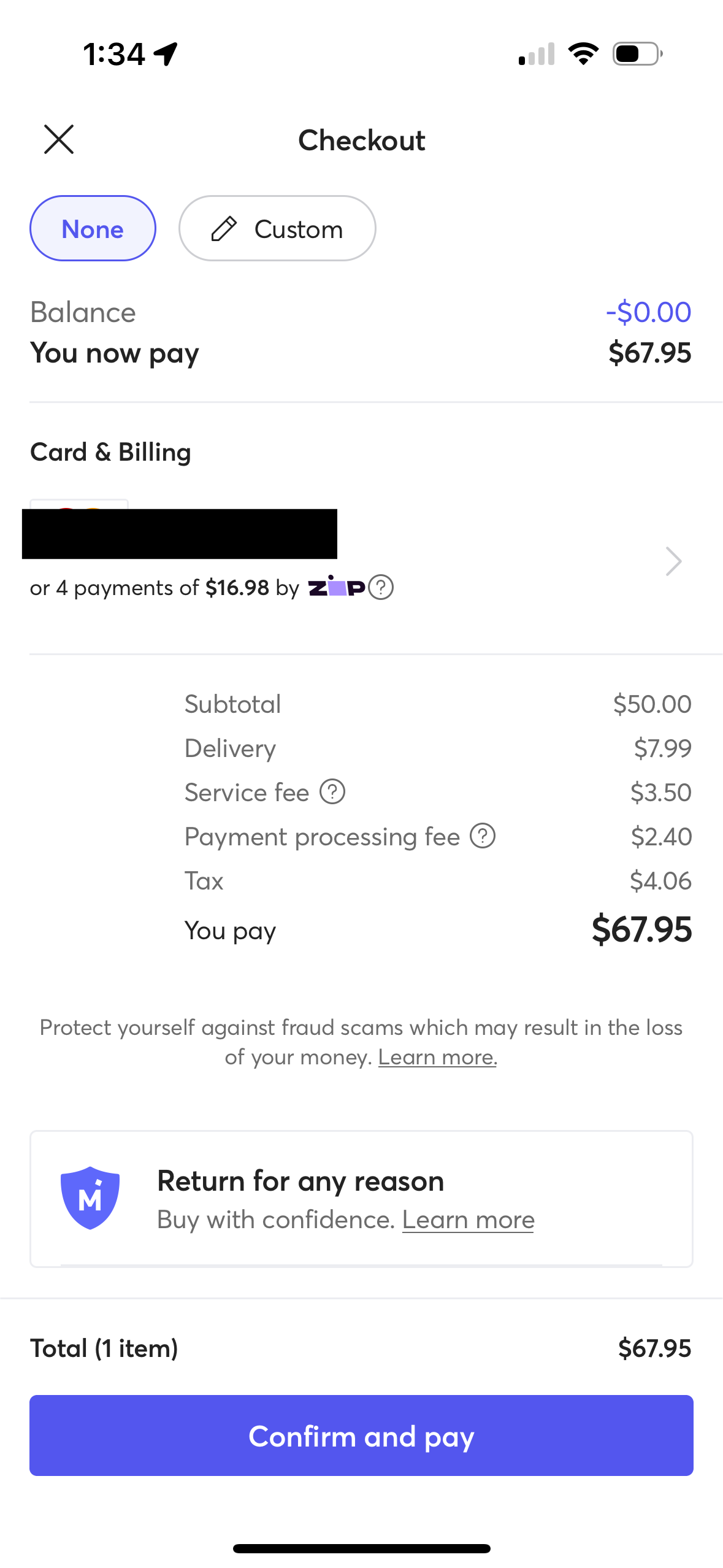
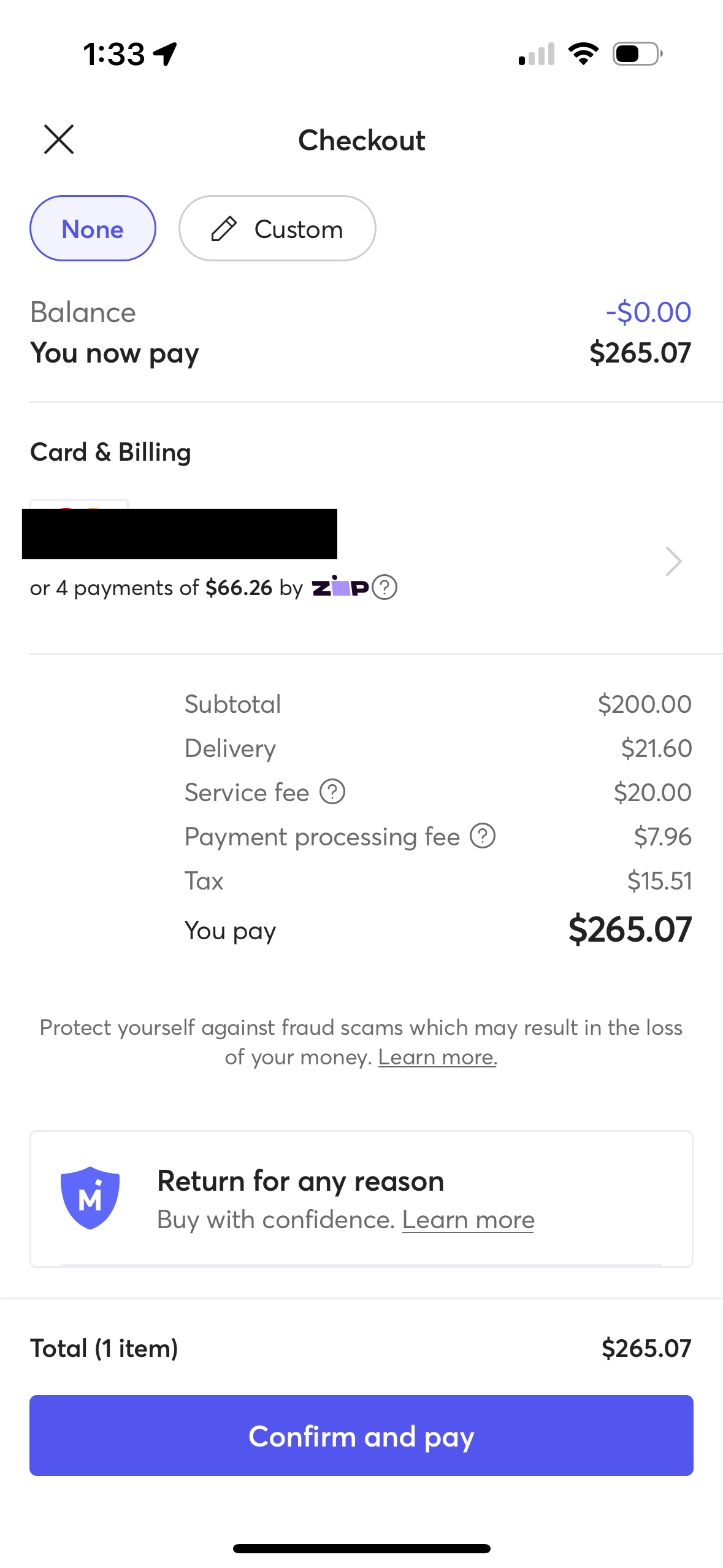
    Let’s check out how much these fees add to the buyer’s price.

    On a $14.25 item, buyer pays $1.96 in fees. (Note: If paying with a Mercari balance, the fees would be $0.99. Also, fees may vary by category.)

    Mercari screenshot 1 - cuttingforbusiness.com

    On a $50 item, buyer pays $5.90 in fees. (Note: If paying with a Mercari balance, the fees would be $3.50. Also, fees may vary by category.)

    Mercari Screenshot 2 - cuttingforbusiness.com

    On a $200 item, buyer pays $27.96 in fees. (Note: If paying with a Mercari balance, the fees would be $20.00. Also, fees may vary by category.)

    Mercari Screenshot 3 - cuttingforbusiness.com

    What Do You Think of Mercari’s New Fee Structure?

    Will this move by Mercari bring more sellers and less buyers on the platform? Let me know what you think in the comments.

    Read about the new fees on Mercari.