Category: Growing Your Business

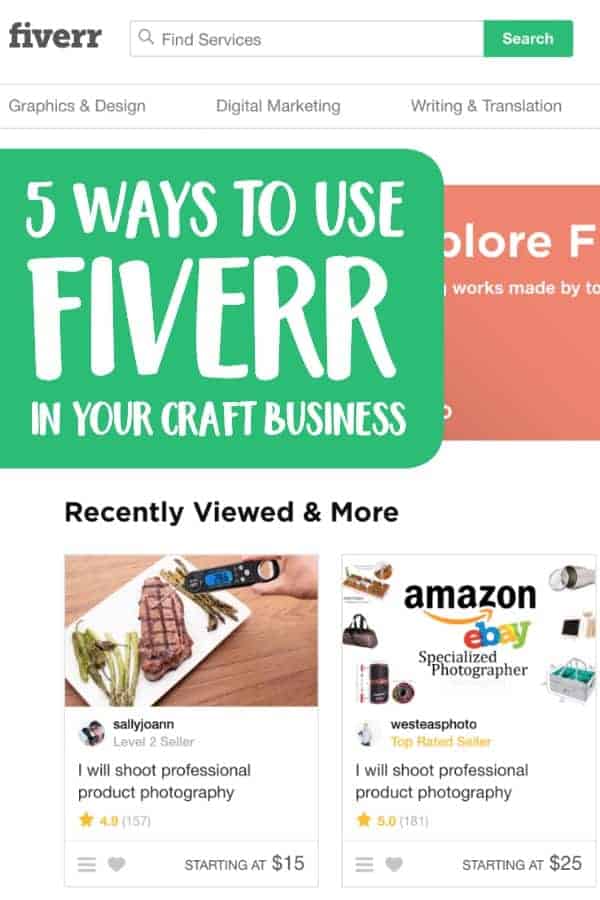
  • 5 Ways to Use Fiverr in Your Craft Business

    I hear from Silhouette and Cricut small business owners that they are often overwhelmed with some of the day to day operational tasks of running a business. While a lot of tasks can’t be outsourced in a craft business, there are plenty of small, one off things you can outsource.

    Let’s look at Fiverr.com today. If you aren’t familiar with Fiverr, it’s a marketplace where users sell services. You can hire individuals to remotely complete odds and ends tasks – and it is great for small business – since the pricing starts at just $5. Let’s look at some examples of how to use Fiverr in your Silhouette or Cricut small business.

    5 Ways to Use Fiverr in Your Craft Business

    1. Graphic design. Whether you need a new logo, promotional graphics for an upcoming sale, custom illustrations that you can turn into cut files, or ads to promote your business, Fiverr is a great alternative to hiring a full time graphic designer.
    2. Video and slideshow creation. I’ve told you before that videos are a great way to ramp up your social media efforts (see here). But, if you don’t want to be in the spotlight, you can always create a video or slideshow that shows off your products. Don’t have the time or technical ability? Hire it out!
    3. Product descriptions. I laid out everything a good product description should have in it a while back (read it here). I recognize though that not everyone is a good writer. If writing isn’t your strength, hire out copywriting on Fiverr.
    4. Social media. I know that as a small business owner, you know that social media is a great way to build your brand’s presence. But, if you struggle with creating social media posts or can’t keep up, there’s plenty of ways to outsource it on Fiverr.
    5. Product photography. If you’ve never listened to any advice I’ve offered on this blog before, listen to this: good product photos sell your products. Unfortunately, I know that not everyone has the ability to take great photos or even the equipment to attempt it. One of the newer categories offered on Fiverr is product photography. In these cases, you send your products to the photographer. They then photograph and mail your products and photos back to you. For the non-photographers – it’s a win win!

    With any marketplace where sellers buy from individuals, it’s always best to read the descriptions of the services completely, ask questions before buying, and look up the reviews from previous users.

    Was this post helpful? Save the image below to Pinterest so another craft business owner can read it.
    5 Ways to Use Fiverr in Your Silhouette Cameo or Cricut Explore or Maker Craft Business - by cuttingforbusiness.com

  • How to Turn Etsy Favorites into Buyers

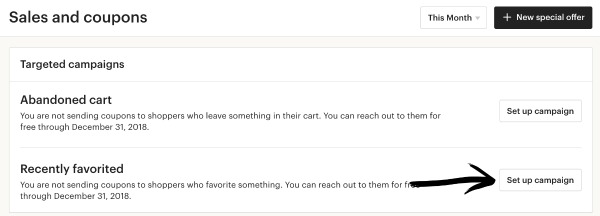
    Does your Etsy Shop get a lot of favorites but not as many sales as you’d like? If so, I’ve got the perfect tip for you today: Etsy now allows you to automatically send coupon codes to shoppers who favorite your shop. Let’s take a look at how this works.

    Tutorial: How to Automatically Send Coupon Codes to Shoppers Who Favorite Your Etsy Product or Shop

    1. Log into your Etsy account and navigate to ‘Marketing’ on the left hand side, then choose ‘Sales and coupons’.
    2. Next to ‘Recently favorited’ click the ‘Set up campaign’ button. How to Turn Etsy Favorites into Buyers with Coupon Codes - by cuttingforbusiness.com
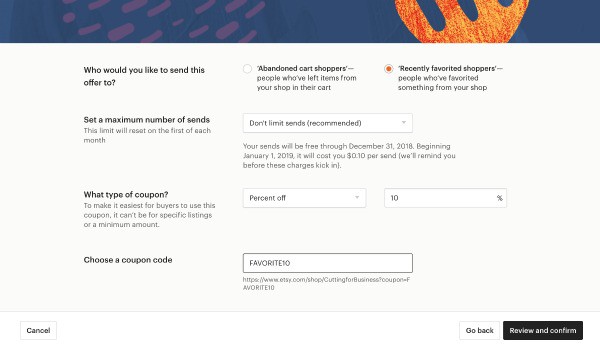
    3. Fill in the details of your promotion in the pop up window. You’ve got a few options to choose from, including ‘Abandoned Cart shoppers’ or ‘Recently favorited shoppers’. I have a hunch that ‘Recently favorited shoppers’ will reach more people, but ‘Abandoned cart shoppers’ may have a better conversion rate as these are likely more serious shoppers. However, that is just my thoughts. Continue on and fill in the maximum number of sends. This service is free through the end of 2018, but will cost $0.10 per email sent beginning in 2019. I left my setting at unlimited, but will change it once the fees start. Last, decide what type of coupon to offer. How to Turn Etsy Favorites into Buyers with Coupon Codes - by cuttingforbusiness.com
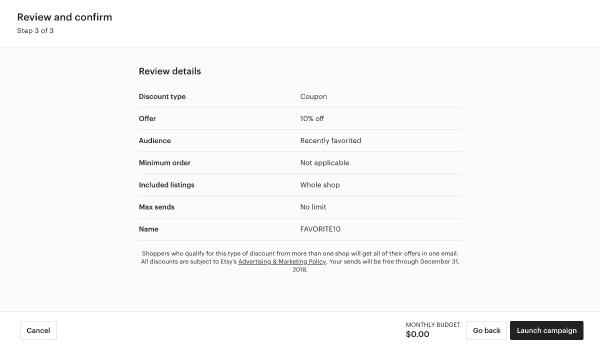
    4. That’s it! Click the ‘Review and confirm’ button. Once you are happy with the details, start the promotion by clicking the ‘Launch campaign’ button.How to Turn Etsy Favorites into Buyers with Coupon Codes - by cuttingforbusiness.com

    Was this post helpful? If so, I’d love for you to save the image below on Pinterest.

    How to Turn Etsy Favorites into Buyers with Coupon Codes - by cuttingforbusiness.com

  • Production Partners on Etsy: An Easy Way to Expand Your Product Lines

    Have you ever heard of production partners on Etsy? If not, they are Etsy’s way of allowing you to outsource work in your craft business – but still sell on Etsy. And, I love them because they are a great way to expand your product line with related products that you cannot/do not make yourself.

    Put simply, production partners are companies/manufacturers that you’ve teamed up with for product creation. Let’s take a look at how you can use production partners to expand your Silhouette or Cricut based Etsy shop.

    Production Partner Examples

    • If you sell planner stickers and goods, find a production partner to create a few planner related coffee mugs or tee shirts with planner related sayings.
    • If you sell tee shirts, find a production partner to make custom printed leggings.
    • If you sell cards, find a production partner to offer high quality prints or canvas.
    • And so on. The key here is to expand your current Etsy shop by finding products that complement your existing ones.

    How to Set Up Production Partners on Etsy

    Setting up production partners is easy:

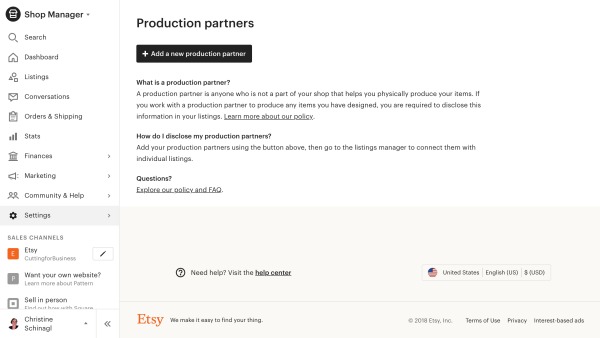
    1. Log into your Etsy account and navigate to ‘Settings’ on the left hand side, then ‘Production partners’.
    2. Click the ‘Add a new production partner’ button.Production Partners on Etsy: An Easy Way to Expand Your Product Lines - A good read for Silhouette and Cricut Small Business Owners - by cuttingforbusiness.com
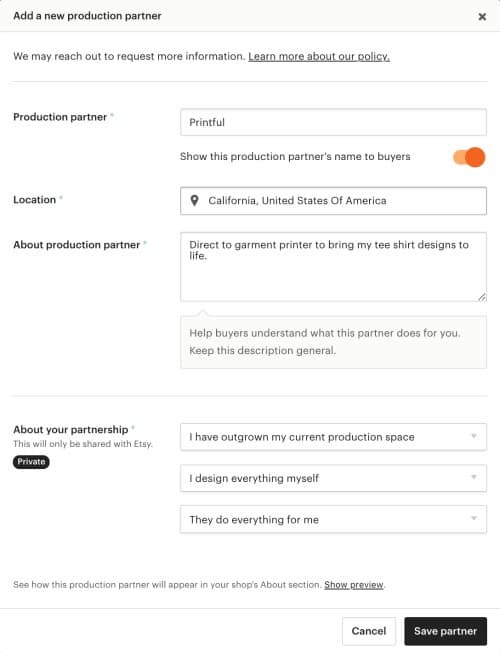
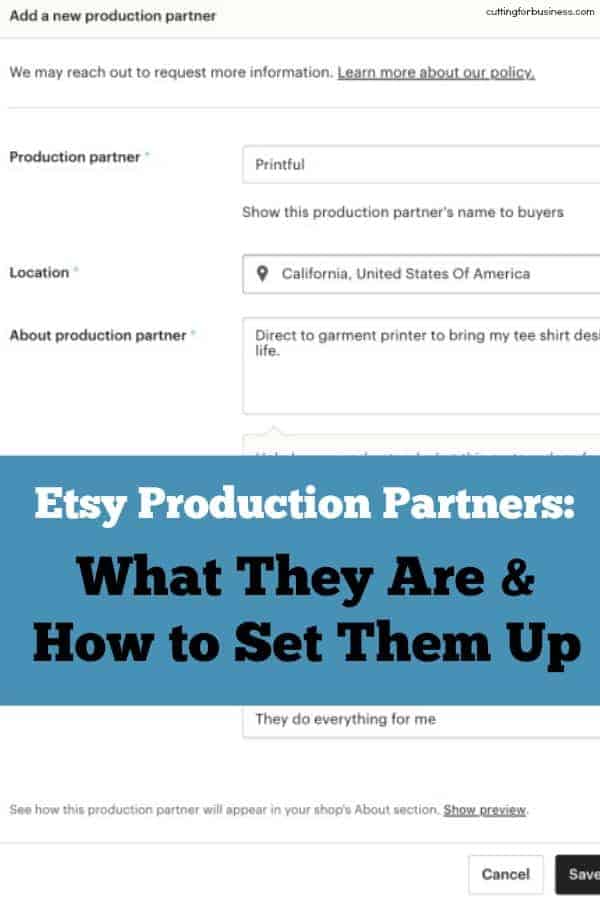
    3. Fill in the information on the pop up screen by adding your production partner name and basic information. In this example, I’m using PrintfulProduction Partners on Etsy: An Easy Way to Expand Your Product Lines - A good read for Silhouette and Cricut Small Business Owners - by cuttingforbusiness.com
    4. That’s it! When creating new Etsy listings, you’ll choose your production partner when creating the listing. Production Partners on Etsy: An Easy Way to Expand Your Product Lines - A good read for Silhouette and Cricut Small Business Owners - by cuttingforbusiness.com

    Who Can Be Your Production Partner?

    You can add anyone who does manufacturing for you as a production partner. After following the steps above, Etsy may reach out to you for additional information about your partner. Most importantly though, Etsy wants to make sure that your production partner follows their Ethical Expectations and that you design the products.

    Off the top of my head, Printful, Art of Where, and Gooten are popular Etsy production partners.

    This post is just an overview of what production partners are and how to set them up in your Etsy shop. On Wednesday, I’ll go through an example showing you how to create your first listing using Printful.

    Was this post helpful? Save the image below to Pinterest.

    Production Partners on Etsy: An Easy Way to Expand Your Product Lines - A perfect read for Silhouette Cameo and Cricut Explore or Maker Small Business Owners - by cuttingforbusiness.com

  • Step-by-Step Tutorial to Use Printful in Your Craft Business

    Last time on the blog, I introduced you to production partners on Etsy. Today, I’ll walk you through creating a Printful store. I chose to use Printful as it is a popular Etsy production partner. However, Printful is also available for Shopify, WooCommerce, SquareSpace, Amazon, and more.

    How to Create a Store on Printful

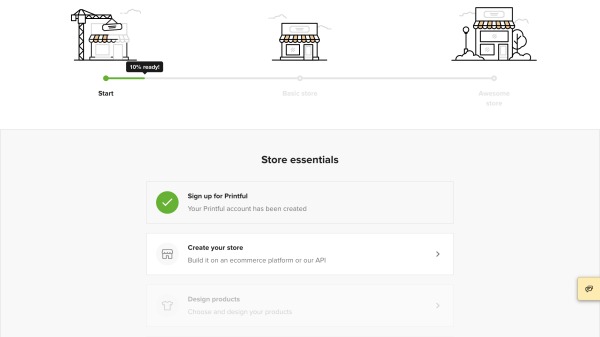
    1. Create an account at Printful.com and log in.
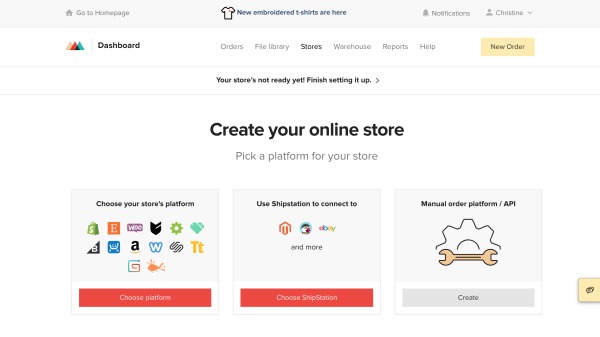
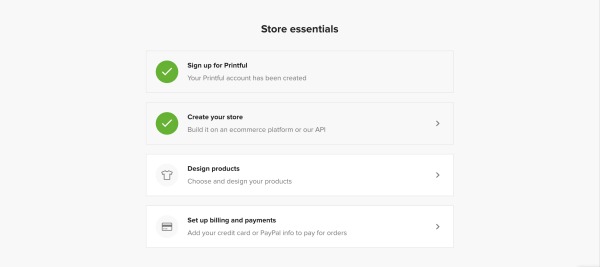
    2. From your dashboard, scroll down and click ‘Create your store’. Step-by-Step Tutorial to Use Printful - A great way for Silhouette Cameo and Cricut Explore Businesses to Expand - by cuttingforbusiness.com
    3. Choose where you sell and follow the provided instructions on Printful to connect your shop.Step-by-Step Tutorial to Use Printful - A great way for Silhouette Cameo and Cricut Explore Businesses to Expand - by cuttingforbusiness.com
    4. After connecting your shop, head to the ‘Design products’ link. Step-by-Step Tutorial to Use Printful - A great way for Silhouette Cameo and Cricut Explore Businesses to Expand - by cuttingforbusiness.com
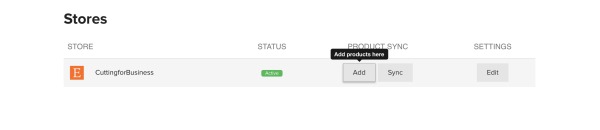
    5. Click the ‘Add’ button to start your first product.  Step-by-Step Tutorial to Use Printful - A great way for Silhouette Cameo and Cricut Explore Businesses to Expand - by cuttingforbusiness.com
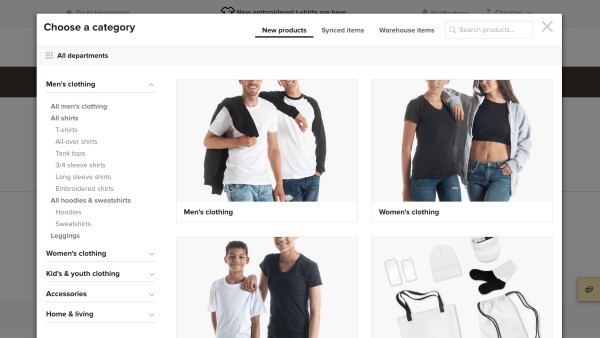
    6. Choose a product. Step-by-Step Tutorial to Use Printful - A great way for Silhouette Cameo and Cricut Explore Businesses to Expand - by cuttingforbusiness.com
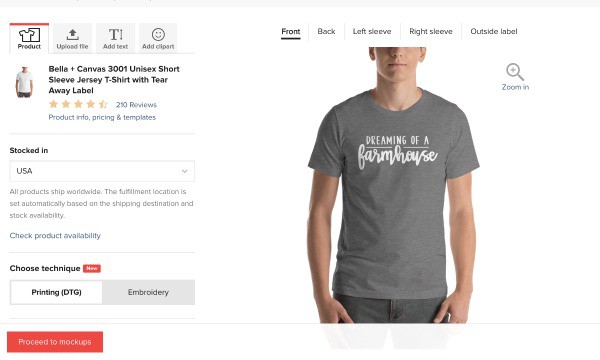
    7. Choose your colors, sizes to offer, and upload your design. Your design should be 300 dpi resolution. Click the ‘Proceed to mockups’ button when you are finished.Step-by-Step Tutorial to Use Printful - A great way for Silhouette Cameo and Cricut Explore Businesses to Expand - by cuttingforbusiness.com
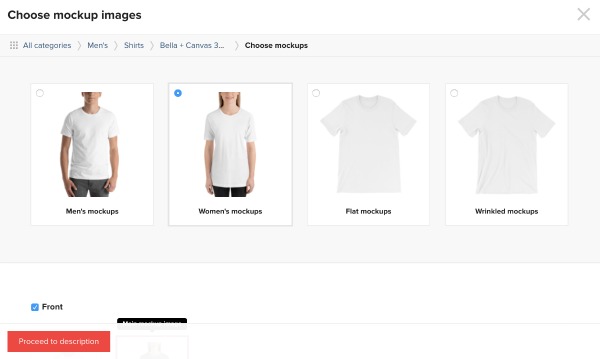
    8. Create your mockups and click the ‘Proceed to description’ button. Step-by-Step Tutorial to Use Printful - A great way for Silhouette Cameo and Cricut Explore Businesses to Expand - by cuttingforbusiness.com
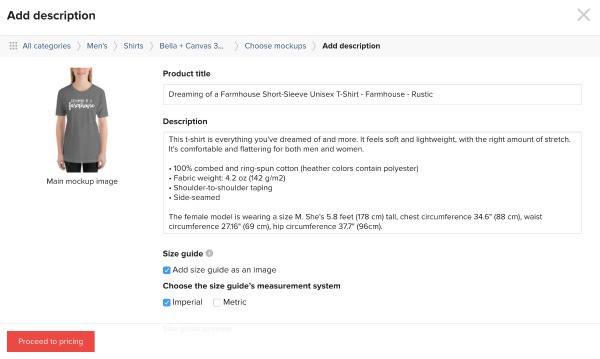
    9. Add your description and tags and click the ‘Proceed to pricing’ button. Step-by-Step Tutorial to Use Printful - A great way for Silhouette Cameo and Cricut Explore Businesses to Expand - by cuttingforbusiness.com
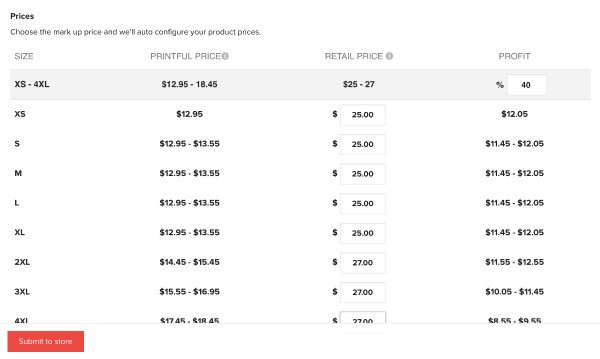
    10. Set your pricing. The first column is how much the shirt will cost you, the second is how much your customer will pay, and the third is your profit. Finally, click the ‘Submit to store’ button. Step-by-Step Tutorial to Use Printful - A great way for Silhouette Cameo and Cricut Explore Businesses to Expand - by cuttingforbusiness.com
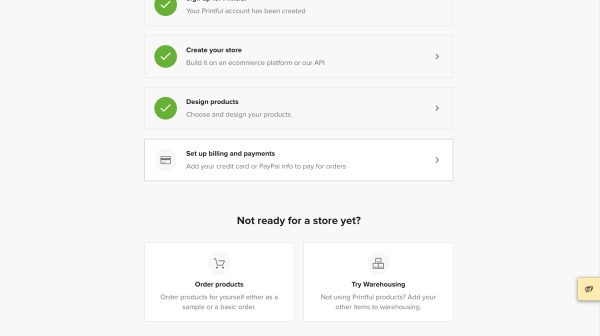
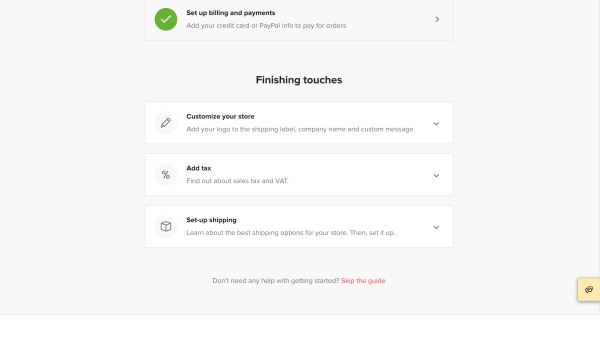
    11. After you’ve designed your first product, set up the billing. You can connect a credit card or Paypal account.Step-by-Step Tutorial to Use Printful - A great way for Silhouette Cameo and Cricut Explore Businesses to Expand - by cuttingforbusiness.com
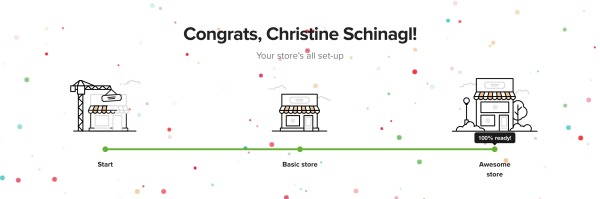
    12. Last, but equally as important, add your logo, tax rates, and shipping. After these three are set up, Printful will automatically sync your listing Etsy’s draft section. You can log into your Etsy account and publish it.Step-by-Step Tutorial to Use Printful - A great way for Silhouette Cameo and Cricut Explore Businesses to Expand - by cuttingforbusiness.comStep-by-Step Tutorial to Use Printful - A great way for Silhouette Cameo and Cricut Explore Businesses to Expand - by cuttingforbusiness.com

    What Happens When a Customer Places An Order?

    While the process differs from platform to platform, here has been my experience using Printful during a test run:

    1. Set up the listing in the Printful dashboard and sync it to Etsy as shown in the tutorial above.
    2. Customer places an order.
    3. Customer’s order is sent directly from my Etsy Shop to Printful.
    4. Printful creates the order and white label (using my branding rather than theirs) ships the order to the customer.
    5. Customer receives it (and loves it)!
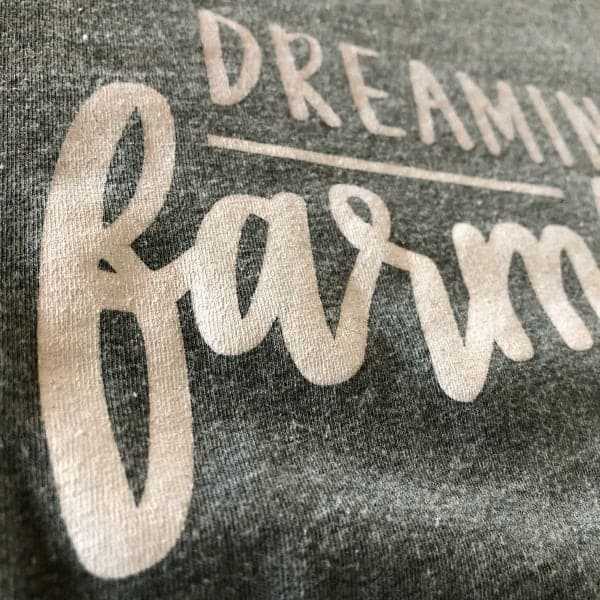
    6. Here’s a close up of the print quality of the shirt from Printful. To write this tutorial, I set up a dummy Etsy shop. So, if you’d like to order one of the shirts in the tutorial click here.Step-by-Step Tutorial to Use Printful - A great way for Silhouette Cameo and Cricut Explore Businesses to Expand - by cuttingforbusiness.com

    That’s it! Using a print on demand service like Printful is a great way to complement your existing products. And remember, Printful is way more than tee shirts – they also carry mugs, leggings, backpacks, hats, phone cases, and more.

    Was this walkthrough helpful? Save the image below to Pinterest.

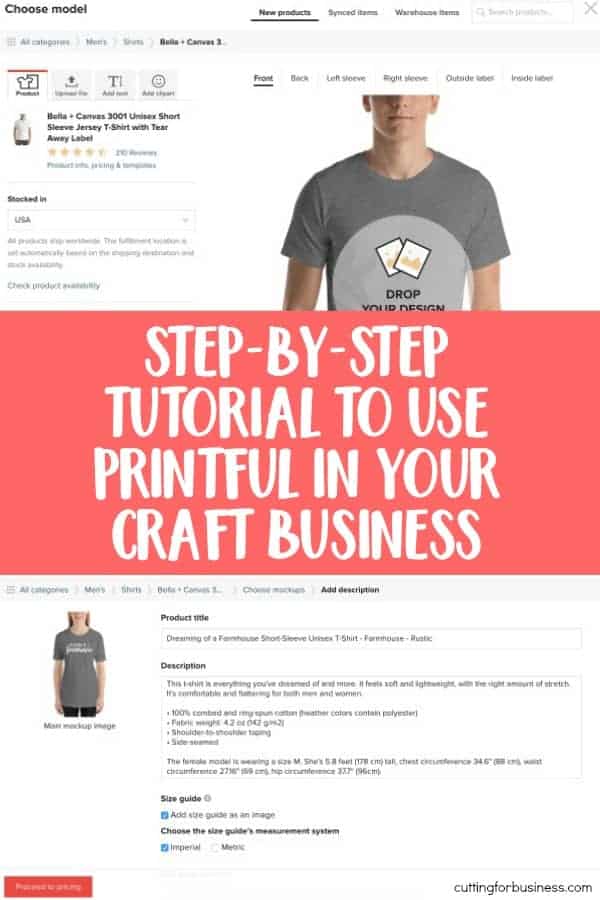
    Step-by-Step Tutorial to Use Printful - A great way for Silhouette Cameo and Cricut Explore Businesses to Expand - by cuttingforbusiness.com

  • What is TalkShopLive™?

    I’ve gotten several reader questions about a new selling platform called TalkShopLive™. Today, let’s sort out this new service.

    What is TalkShop™ Live?

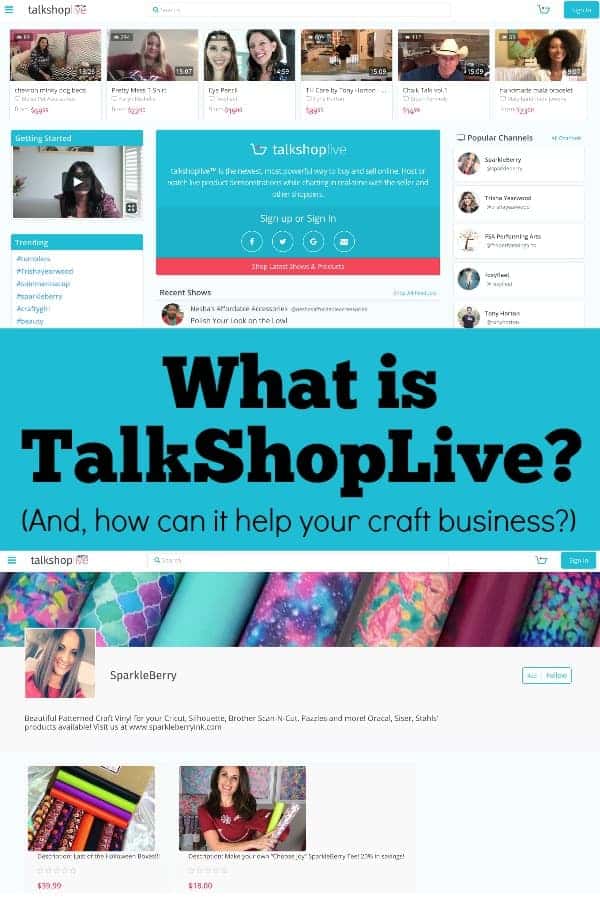
    TalkShopLive™ is a selling platform that launched in March 2018. It boasts itself as the first of it’s kind, “…live streaming, social buying and selling platform for anyone, anywhere.”

    In easier to understand terms: Think of TalkShopLive™ as your own Home Shopping Network or QVC show. You do live shows and promote your products to viewers in up to a 15 minute show. People watching can interact with you during the show using a chat box.

    TalkShopLive™ Cost

    TalkShopLive™ is free to use, you only pay when you sell an item. The fee is 10.25% plus $0.30. This fee is built into the retail cost of the product.

    Facebook Live or YouTube vs. TalkShopLive™

    If you are thinking that TalkShopLive™ sounds a lot like Facebook Live, you are right. The biggest difference is that TalkShopLive™ gives you a one click button for customers to order then and there – with just a click. In contrast, for Facebook Live or YouTube, you have to direct viewers where to go to purchase the product. Also, your TalkShopLive™ shows can be accessed in one easy to view page called your channel profile.

    TalkShopLive™ Beta

    TalkShopLive™ is currently still in the beta testing phase. If you aren’t familiar, beta testing means that the service was just released. Some features may not work correctly and access to the site may go down as they are sorting out details.

    See TalkShopLive™ in Action

    I’ve taken the time to start exploring the TalkShopLive™ platform, but Mandy from Sparkleberry Ink uses it frequently. Check out her channel profile to view her shows or shop the Sparkleberry Ink website.

    I’m excited for this new service and think that everyone from a shop owner selling their own products to a instructor selling kits or supplies can use it. It’s definitely one that I will keep my eye on. Before you go live for the first time, read these tips.

    Was this post helpful? Share it on Pinterest!

    What is TalkShopLive? An overview for Silhouette and Cricut crafters. By cuttingforbusiness.com.

  • 8 Money Wasters in Your Craft Business

    Be honest with yourself: When was the last time you did a spending audit in your business? If you cant say recently, you need to go do one. And, if you don’t know what a spending audit is – or how to do one – I’ve written about spending audits in this article.

    Now that that is out of the way, let’s talk money today.

    There’s a fine balance between spending money wisely versus wrecklessly in your craft business – especially when you are first starting it. Today, I’m sharing my opinions on eight things that you shouldn’t waste money on.

    8 Money Wasters in Your Craft Business - cuttingforbusiness.com.

    8 Money Wasters in Your Craft Business

    New Equipment

    I’d never buy a new piece of equipment without first looking around for it used. You can save hundreds or even thousands on everything from a second or third cutting machine to heat presses and fancy printers if you find someone getting rid of theirs. My favorite places to look are: Craigslist, local Facebook groups, Mercari, Offerup, and LetGo.

    Digital Design and Font Bundles

    Gasp! I said it. The same rule we used above for supplies works for digital purchases, too. There’s no reason to buy a bundle of 30 or 40 designs for your Silhouette or Cricut if you only have a plan for a few of them. Price them out individually and see if you can save yourself a few dollars.

    Supplies that You Don’t Have a Plan For

    At the craft store and see a supply you love? Awesome! If you have a plan for it – buy it. If you don’t – take a picture of it and make a plan for it. Then, come back and purchase it later. Bonus: This also reduces clutter in your work and storage space!

    Expedited Shipping for Your Online Purchases

    With a little planning ahead of time, you shouldn’t ever need to pay for expedited shipping of anything. While it is usually only a few dollars here and there, it can really add up.

    Software Subscriptions

    Like equipment, for almost every piece of paid software out there, you can find something that does the same job for free.

    If you do need a specific software for a task, see if they offer a free trial. But, be sure to set a reminder to cancel the free trial before you get billed.

    Fancy Desk Supplies

    If you are like me and work from home, I promise you that you don’t need colored paperclips, shaped thumb tacks, or fancy staples. Stick to the basics, they work the same.

    Credit Card Interest

    If your craft business can’t afford it right here and now, don’t buy it. You should strive to pay off your business expenses before interest starts accruing. Read more about starting your craft business without debt.

    I’ve seen many small businesses throw money at paid advertising without a solid marketing plan. Yes, paid advertising can be a great way to reach customers. In most cases, craft businesses can thrive with a good social media plan. There’s no need to pay for additional social media exposure unless you have a well thought out marketing plan behind it.

    Tell me: What have you found to be a money waster in your Silhouette or Cricut business?

  • 5 Ways to Stand Out in a Saturated Craft Market

    Let’s look at a few different ways to stand out in a saturated craft market.

    Surely you’ve noticed that so many crafters buy a Silhouette or a Cricut and then decide to go into business. While I’m one of their (and yours!) biggest fans and cheerleaders, the amount of new home based craft businesses opening in the last few years is high. Unfortunately, this leads to market saturation.

    While I’ve warned you before about some of the most overcrowded markets in the past, what do you do if you really want to sell in a saturated market?

    5 Ways to Stand Out in a Saturated Craft Market - cuttingforbusiness.com.

    5 Ways to Stand Out in a Saturated Craft Market

    1. Go Above and Beyond

    Think of the last time you had an amazing experience with a company. What made the experience amazing? Was it the personalized customer service? Extras they included with your order? Whatever the reason you loved them, there are two things that are likely to happen: 1) You remember their name and products and 2) You recommend them to others.

    Strive to go above and beyond so that you’ll gain word of mouth recommendations.

    2. Brand Yourself Well

    Of course you’ll need a business name and a logo, but your branding should go beyond that. Branding includes the colors you use in your business, the packaging you create, and the feel of your social media outreach.

    When you are selling in a marketplace, like Etsy, your branding must be top notch to stand out among other similar sellers. Remember, you want your customer to remember your business name – not that they purchased it on Etsy.

    Here’s an example conversation I see all the time: Person 1: I love your XYZ thing. Where did you get it? Person 2: I got it on Etsy. All the makers out there can groan now. You want your customer to remember that they bought from you – a seller on Etsy – not just Etsy.

    Take time to truly invest in your brand.

    3. Be Unique – But Not that Unique.

    In a saturated market, make your products unique. For example, let’s think towards Christmas. During the Christmas season, many Silhouette and Cricut small businesses make and sell personalized plush elves. If you’d like to jump on this successful bandwagon, consider finding a different blank elf to use to help stand out from everyone else or create a bundled product to attract attention. What you don’t want to do is be too unique. If you’ve identified elves as a product you want to sell – don’t go making Christmas dragons and thinking they will sell.

    4. Zero in on Your Niche

    I’ve talked niches on the blog before – here and here. If you’ve identified a saturated niche as your thing, you’ll have to work a but harder to get seen. For example, let’s take t-shirts. There are so many creators making and selling t-shirts. So, you’ve got to find yourself in the t-shirt niche by zeroing in on less served markets. (Every niche has less served markets within the niche.) These could be: Group event t-shirts, family reunion t-shirts, cancer survivor t-shirts, occupation related t-shirts, dance team t-shirts, sports mom t-shirts, and so many more. Whatever you decide on, become the expert in it.

    5. Watch the Market for New Craft Materials and Use Them

    That’s right, if a new material is released and it financially makes sense to use it in your craft business, go for it! Early adapters have the benefit of not having as much competition as there might be after the craft material has been on the market for a year.

    As an added bonus, new things often get shared on social media. And, who doesn’t want a little extra social media boost?

    Tell me, how do you stand out in a saturated market?

  • 15 Ways to Get Your Craft Business Ready for the Holidays

    For many small business crafters, December’s holiday season is the busiest time of year. Between all the orders, the craft shows, the holiday parties, shopping for your own family, and so much more – things can get overwhelming.

    But, I think I can help.

    I put together a list of 15 things you can do today, before the rush, to help get your craft business ready for the holidays.

    How to Get Your Craft Business Ready for the Holidays - Great for Silhouette, Cricut, and Glowforge crafters - by cuttingforbusiness.com.

    15 Ways to Get Your Craft Business Ready for the Holidays

    1. Sign up for holidays fairs, shows, and markets. I hear it all the time – ‘I wanted to do some craft fairs, but they are all full!’ Want to know why the shows are full? You waited too late to sign up. So, get to it. Need some help finding shows? Head to this link.
    2. Arrange for extra help. If you think your craft business will be out of control busy this year, get some help lined up. Whether you call on friends and family or hire an employee – get to it – early!
    3. Plan your promotions now. Right now, sit down and determine your best selling products. Choose a handful of them and get marketing banners, ads, and sales ready to focus on the things you know will sell.
    4. Write out your holiday email newsletters. Email newsletters remain a great way to get customers to your shop and get your products bought. Of course, there’s no need to send them now, just save them as a draft or schedule them to be sent later. Need ideas for your emails? Anything related to gifts works great, and there are more ideas in this post.
    5. Plan a holiday giveaway or contest. It’s pretty obvious – but customers like free. Even the opportunity to get something for free. Before you start planning a giveaway or contest though, understand the legalities of it. Read more in this post.
    6. Make stock now. The holiday season is often a chaotic time in our lives – from the kids being out of school, to our personal shopping, and family events – there is so much going on. Take time now to make ready to ship items to sell during the holidays. I shared an easy way to stock up ahead of time in this post.
    7. Get your shipping methods in order and set order by deadlines. Do the research you need to find out the best methods to ship your products to your customers. Price out expedited shipping and decide on your cutoff date for holiday orders to arrive in time for Christmas. In an ‘Amazon fueled world’ free shipping is best if you can swing it – just build the shipping price into your product price.
    8. Figure out gift wrap. If you don’t currently offer gift wrapping services in your craft business, sit down and take the time to figure it out now. Order the supplies you’ll need and add the service to your shop. If you can offer gift wrapping services for free – it’s a great promotion!
    9. Give your shop a holiday theme. Create an overlay for your website to get shoppers in the holiday season or a new banner for your Etsy shop. There’s no need to upload it until later in the season. If you need some stock images to help you, head to this post.
    10. Plan to do good. People like to do good around the holidays and love when businesses also spread joy. Pick a cause to support over the holiday season and, if necessary, get in touch with them. Also, create some marketing materials to show how your business is helping others during the season.
    11. Add a gift category to your website or shop. In this section, you can highlight which of your products are perfect for gifting. Consider categories like ‘For her’, ‘For him’, ‘Under $20’, ‘Under $100’, and so on.
    12. Make sure your website is mobile friendly. The amount of users accessing websites on their mobile devices continues to grow. If you have a standalone website, don’t miss out on eager holiday shoppers because your site isn’t mobile friendly.
    13. Consider offering returns or exchanges. For non personalized or custom orders, get a policy together for returns and exchanges and advertise it to customers. This helps boost customer confidence in your products and small business.
    14. Offer gift cards or certificates. I know I’ve got a lot of ‘hard to buy for’ people on my Christmas list. I usually get them gift cards. Don’t forget to offer them in your craft business.
    15. Start your own holiday shopping. Without the stress of rushing to get your own shopping done, you’ll have more time to work on your business. Bonus: You’ll probably end up spending less when you shop early and plan ahead of time!

    Remember, the time to start planning for a successful Christmas and holiday season is now – not in a few weeks, a month, or when you ‘have time’.

  • 25+ Creative Email Subject Lines for Christmas in Your Craft Business

    Looking for creative email subject lines for Christmas? I’ve got you covered.

    I’ve said it over – and over – and over again: Email newsletters are a great way to get (and stay!) in front of your customers. If you haven’t read my previous posts on email newsletters, go check them out:

    Why You Need an Email List for Your Craft Business and 3 Ways to Build an Email List without a Website.

    A list of 25+ Creative Email Subject Lines for Christmas in Your Craft Business - Perfect for Silhouette, Cricut, and Glowforge crafters - by cuttingforbusiness.com.

    25+ Creative Email Subject Lines for Christmas

    The most wonderful time of year… Coupon inside!

    Our Ultimate Gift Guide Enclosed

    The best stocking stuffers? Handmade ones!

    Don’t show up empty handed, hurry and grab a hostess gift.

    Open this email for holiday savings!

    GIFT-MAS is here, check out our recommended gifts.

    Looking for a Unique Gift? We’ve got you covered.

    Hurry in for handmade gifts!

    50% (or 40%, 30%, and so on) off everything! Coupon code inside.

    Forget the Fruitcake! Grab our (name of best selling product)!

    Yule love our holiday products!

    Better than Christmas cookies? Our holiday sale!

    Our Sale is so Big, Santa’s Coming!

    Picked the perfect tree? Put the perfect gift under it.

    We wish you a Merry Christmas (with these special deals!)

    Stay in your pajamas and shop our sale.

    It’s too cold to go out! Cozy up with these deals.

    Psst, Santa says he shops at (name of shop)! Get an exclusive offer inside.

    Make a new holiday tradition: Shopping our website!

    Free Shipping, Free Gift Wrap, and a Coupon Code!

    Santa Approved! New Products are Now Available.

    Don’t be a Grinch, shop early and save!

    Our elves are working overtime! Last minute gifts available.

    ‘Tis the Season – To Save! Sale details inside!

    The Best Christmas Gifts? Personalized Ones!

    Announcement: Our Biggest Holiday Sale Starts Now!

    How’d I come up with these sayings? For many of them, I used this ‘formula’: Catchy saying/Pun + Deal. The first half is a cute, creative, or catchy play on words to get the customers attention in their inbox. The second part is a deal/coupon/sale/new product announcement. After you’ve gotten their attention in their inbox, you give them a reason to open the email.

    So, get out there and try it! Need more help getting your shop ready for the holidays? Read this article on how to get your business ready for the holidays.

  • What is Etsy Plus?

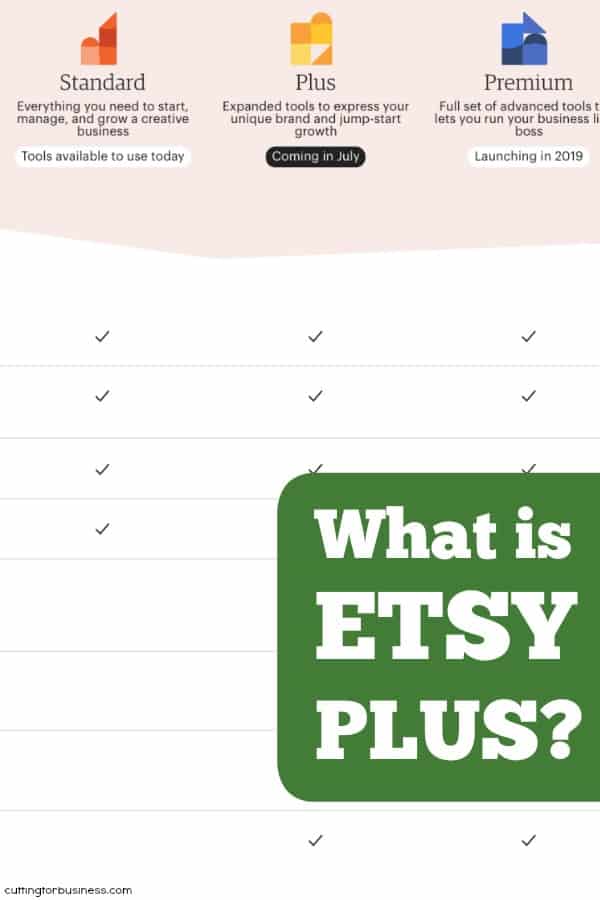
    Over the summer, Etsy has made a few changes. First, they’ve slowly rolled out a new service called Etsy Plus. Etsy Plus is the first step in their new pricing format which will be subscription based and tiered. Etsy Standard (what you’ve always been used to), and Etsy Plus are now available. In 2019, Etsy Premium will launch.

    Now, I’ve noticed some questions and concerns about Etsy Plus from craft business owners. Today, let’s look at what it is… and isn’t!

    FAQ: Etsy Plus

    What is Etsy Plus?

    • Etsy Plus is an optional subscription plan that gives you credits and extra features. You are not required to subscribe to Etsy Plus to have an Etsy shop.

    What is Included with Etsy Plus?

    • Etsy Plus subscribers receive:
      • 15 free Etsy listings per month (savings of $3 per month).
      • $5 per month in free promoted listings (savings of $5 per month).
      • Discounts on a web domain through Hover. Personally, I’ve been telling you to do this for years. Here’s a link to a blog post tutorial on how to do it – without the need for Etsy Plus.
      • Advanced customization abilities within your shop:
        • Linking banners. You will be able to link your banner to a specific product of section of your shop.
        • Ability to choose from a banner, carousel, or multiple product photos on the front page of your shop.
        • A new featured area.
      • Restock Requests – I love this feature! Basically, when someone visits a listing that is out of stock in your shop, they can sign up to receive a notification when you restock it.
      • Shipping box discounts for USA, Canada, European Union, and the United Kingdom.
      • 30% discount with Moo.com for business cards and other promotional materials.

    How Much Does Etsy Plus Cost?

    • Now through December 31st, 2018, Etsy Plus costs $10 per month. After that, Etsy Plus will cost $20 per month.

    Is Etsy Plus Worth It?

    This will be a personal decision for each craft business owner. My favorite feature is the restock requests, but I do like the advanced customizations, too. I don’t see much value in the other offerings unless you order often from Moo.com, or can’t find good pricing for boxes on your own. The domain through Hover isn’t a feature that makes me bat an eye. Personally, I like the $10 per month price point, but think that $20 is high without more additional features. Since Etsy Premium isn’t yet available, we will have to see what other features it offers.

    Want to read more about Etsy Plus? Here’s the official link.

    Was this post helpful? Save it to Pinterest:

    What is Etsy Plus? By cuttingforbusiness.com.