Blog

  • Tutorial: How to (and Why You Should!) Claim Your Instagram, YouTube, and Etsy Accounts on Pinterest

    Have 5 minutes to spare today? (I know you do!) This new feature on Pinterest will literally take you less than 5 minutes to set up. What is it? It’s the ability to claim other social media accounts on Pinterest. Currently, you can ‘claim’ your Instagram, YouTube, and Etsy accounts. Basically, when you ‘claim’ your other accounts you are connecting other places you promote your business to Pinterest.

    Why You Should Claim Your Instagram, YouTube, and Etsy Accounts on Pinterest

    Before you get started, why would you want to do this ‘claiming’ thing anyway? Here’s two good reasons:

    1. When you or another Pinterest user pins something from your Instagram, YouTube, or Etsy accounts, your name and profile picture will be shown under it. This is helpful to help get your name out there, and has the possibility of increasing your Pinterest views and followers! That’s a win/win!
    2. You have access to additional analytics in your Pinterest account. Not only will you be able to see the analytics of pins you pin, but you’ll be able to see the analytics of pins saved from your claimed accounts on other user’s boards. While I don’t put much stock into constantly scoping out how particular pins are doing – it’s nice to know I could.

    Great! Now that I’ve convinced you to claim your accounts, let’s look at how to do it.

    How to Claim Your Instagram, YouTube, and Etsy Accounts on Pinterest – Pinterest App

    1. Open your app and navigate to your profile. Tutorial: How to (and Why You Should!) Claim Your Instagram, YouTube, and Etsy Accounts on Pinterest - Great for bloggers and craft business owners - by cuttingforbusiness.com
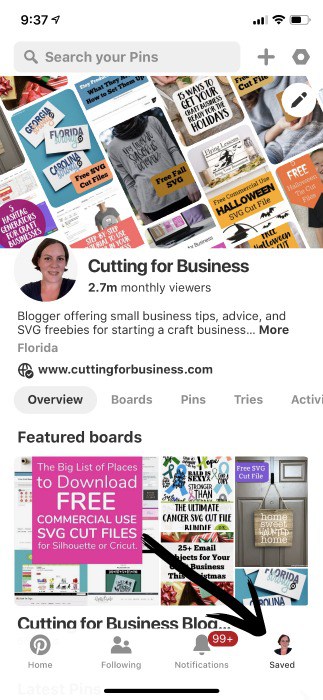
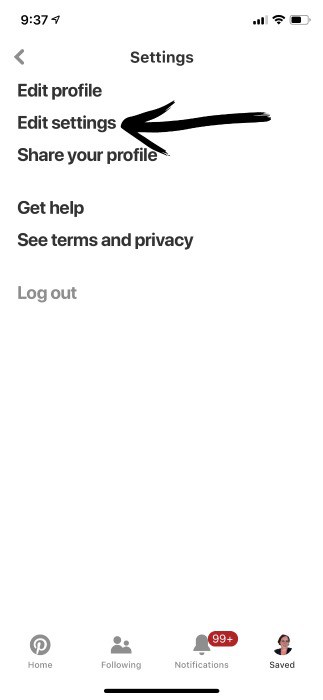
    2. Tap ‘Edit Settings’. Tutorial: How to (and Why You Should!) Claim Your Instagram, YouTube, and Etsy Accounts on Pinterest - Great for bloggers and craft business owners - by cuttingforbusiness.com
    3. Toggle the switch next to the networks that you’d like to connect. You’ll then authenticate each of them. Tutorial: How to (and Why You Should!) Claim Your Instagram, YouTube, and Etsy Accounts on Pinterest - Great for bloggers and craft business owners - by cuttingforbusiness.com
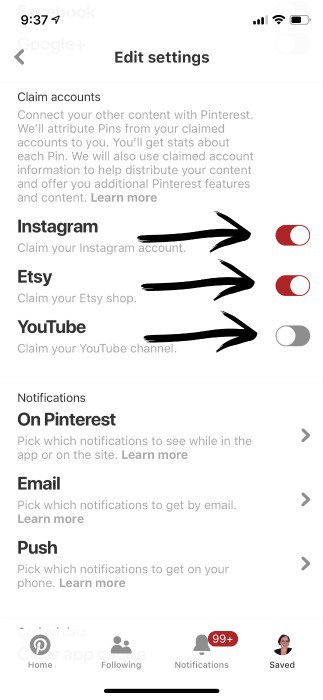
    4. That’s it! That probably didn’t even take 5 minutes!

    How to Claim Your Instagram, YouTube, and Etsy Accounts on Pinterest – Desktop Version

    Note: You must have a Business Account on Pinterest to claim accounts.

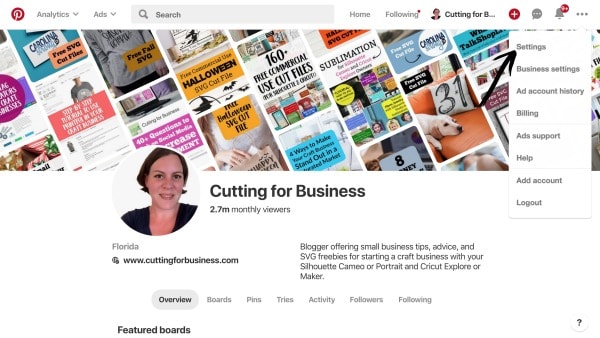
    1. Log into your Pinterest account.
    2. Click the three dots in the top right corner and select ‘Settings’. Tutorial: How to (and Why You Should!) Claim Your Instagram, YouTube, and Etsy Accounts on Pinterest - Great for bloggers and craft business owners - by cuttingforbusiness.com
    3. Navigate to ‘Claim’. Now, select the red ‘Claim’ button next to each platform you want to connect. After you hit the button, you’ll be asked to verify your account. Tutorial: How to (and Why You Should!) Claim Your Instagram, YouTube, and Etsy Accounts on Pinterest - Great for bloggers and craft business owners - by cuttingforbusiness.com
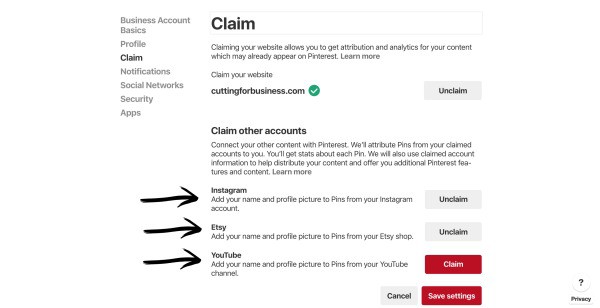
    4. That’s it! Your accounts are claimed! While you are on the same page, better make sure that you also claim your website if you have one.

    Was this tutorial helpful? Save the image below to Pinterest.
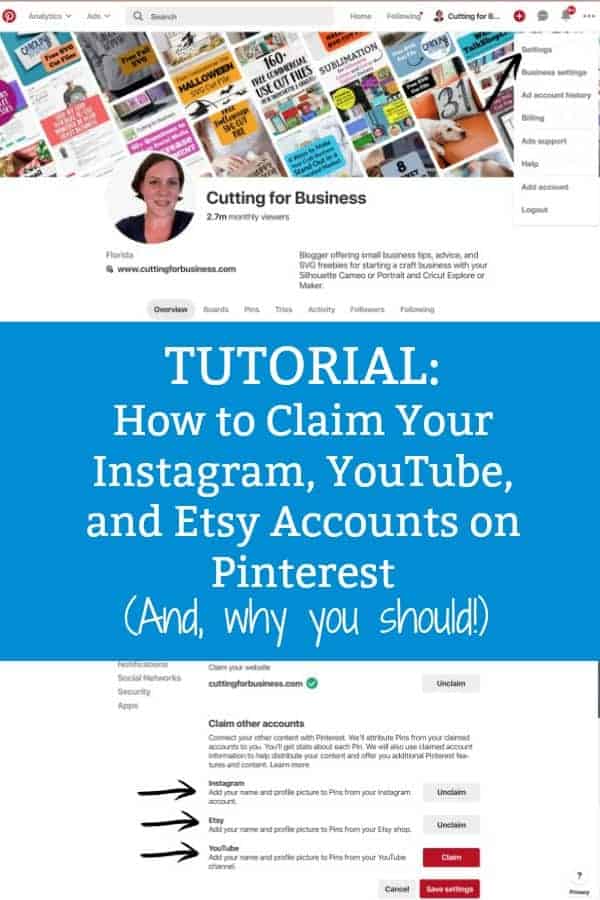
    Tutorial: How to (and Why You Should!) Claim Your Instagram, YouTube, and Etsy Accounts on Pinterest - Great for bloggers and craft business owners - by cuttingforbusiness.com

  • 4 Places to Buy Blank Mockup Images

    Any experienced small business crafter knows that mockups – or computer made photos of your products – can save a lot of time and supplies. By creating mockups, you can show a customer what their custom order will look like, give customers color and design options to choose from, and even create professional looking product photos for your shop without ever taking a picture.

    On the Cutting for Business blog, I’ve written about mockups several times. However, one thing I’ve never shared is where to buy blank photos to use to make mockups. Today, I’m sharing that list.

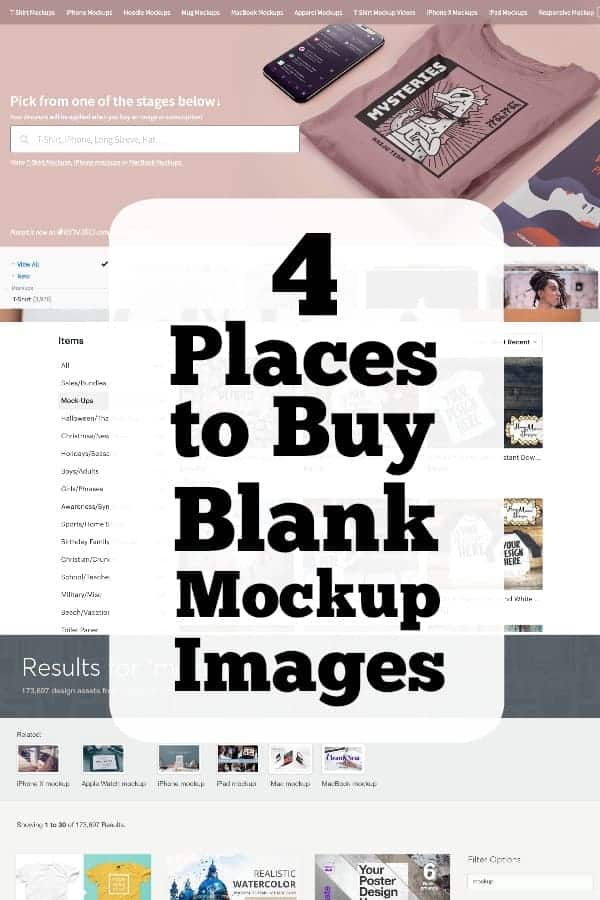
    4 Places to Buy Blank Mockup Images

    1. Any stock photo site. Adobe Stock is my personal favorite, but I have a list of stock photo sites at this link.
    2. Creative Market. This often overlooked site for fonts and digital goods has 100,000K plus listings for mockups. A quick caution: Be sure to read what type of program you need to have to use the mockups. Some will require Adobe Photoshop or Illustrator.
    3. Placeit.net. I love Placeit and use it often for the free cut files on Cutting for Business. I think it’s perfect for anyone that doesn’t have technical photo editing skills – and no interest in learning them. Head to this blog post if you want to learn more. Click here if you want to save 15% off (exclusive to Cutting for Business!).
    4. Etsy. I have purchased from and particularly like these sellers:

    Hoop Mama mockups

    MidniteMot: Apparel related

    MidniteMot: Frame related

    MockupCentral

    SUBLIMEStyledStock

    Pixomize

    TheUrbanDesignCo

    InspireMockupsPhoto

    StyledProductMockups

    I’ve told you where to buy blank mockup photos to use in your crafting business, but what if you need help creating the mockups? No problem! Head to this link on the blog.

    Was this post helpful? Save the image below to Pinterest.
    4 Places to Buy Blank Mockup Images - A good read for Silhouette Portrait or Cameo and Cricut Explore or Maker craft business owners - by cuttingforbusiness.com

  • Retiring Forever: The Ultimate Cancer SVG Cut File Bundle

    Retired Content: This bundle has been retired. My family and I thank you again for the tremendous support of everyone during our time in need. It makes me proud of the Cutting for Business community I have built over the years.


    “No evidence of disease.” On Monday, these powerful words were shared with Will by his oncology team. 615 days ago, when my husband was diagnosed with Stage 4 Diffuse Large B Cell Non Hodgkins Lymphoma we didn’t know if we’d ever hear these words. But now, Will is cancer free.

    It’s time to retire The Ultimate Cancer SVG Bundle. And, what better way to retire it than send 100% of the remaining proceeds to the Leukemia and Lymphoma Society? The Ultimate Cancer Bundle will be available on the Cutting for Business blog until February 29th. After that, it’ll be gone forever – hopefully just like Will’s cancer.

    What’s Included in The Ultimate Cancer Bundle:

    • 21 different original SVG cut files for Silhouette or Cricut.
    • A font key which includes links to each font used in the designs.
    • Commercial use, meaning you can sell products made with a designs.

    Click here to purchase The Ultimate Cancer SVG Bundle for $10.
    The bundle will arrive in your email immediately after payment has been made.

    Making a Difference

    • 100% of the proceeds from each bundle sale ($10 total) will be donated to the Leukemia and Lymphoma Society. This organization was invaluable to us in giving us more information about the disease and treatments.

    Click here to purchase The Ultimate Cancer SVG Bundle for $10.
    The bundle will arrive in your email immediately after payment has been made.

    Here’s the really mushy part: Thank you. I am forever indebted to all the loyal and generous Cutting for Business readers that sent their prayers and well wishes. Some helped set up meal trains for our family, some sent greeting cards, gift cards, and handmade gifts; while others lent their time and talents to make sure Cutting for Business remained online. If you’ve got a second today, please also visit these sites run by truly amazing women:

    • Terri Johnson of Terri Johnson Creates. Thank you for picking up the phone. I doubt you even heard the words I was saying through my tears, but it meant the world to me. Thanks for the endless support online, through texts, and emails. I love you.
    • EllyMae Habets of Silhouette Secrets+. Thank you for sharing so many of my posts and sending so many cards. After the Montana post card, we’ve added Montana to our list of places to visit with the kids.
    • Karen Kroupa of Seaver Brook Designs. Thank you for loving and supporting us. Thank you for watching my social media and cooking us yummy food.
    Retiring Forever: The Ultimate Cancer SVG Cut File Bundle - Silhouette Cameo and Portrait or Cricut Explore or Maker - by cuttingforbusiness.com
  • 5 Hashtag Generators for Craft Businesses

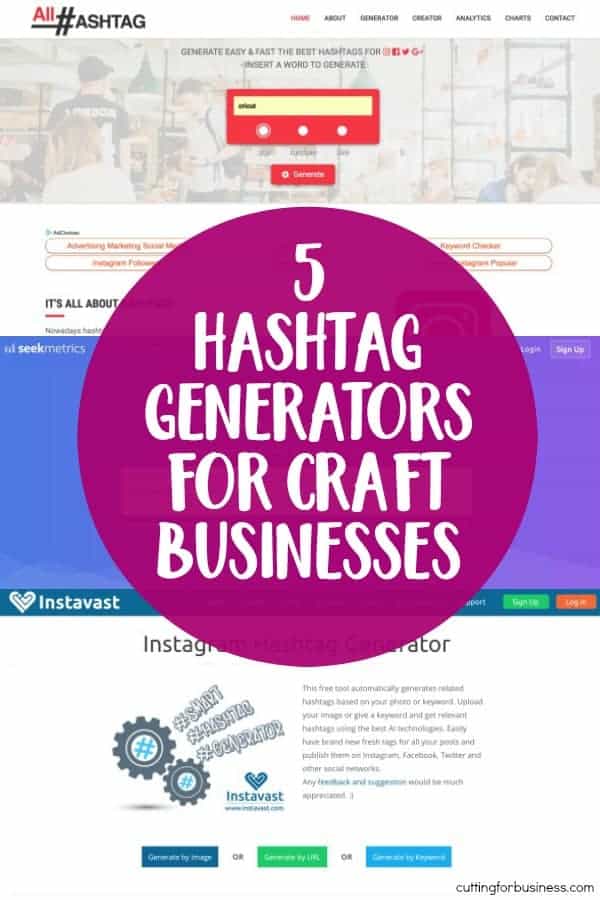
    One thing that I get asked often about from Cutting for Business readers is where to find hashtags. I’ve previously laid out a strategy for using hashtags on Instagram in this post. But, what if you can’t think of hashtags to use that are related to your small business or crafting? Good news for you: There are generators to help you come up with hashtag ideas! Here’s a look at five of them – and they are all free!

    5 Hashtag Generators for Craft Businesses

    1. All Hashtag – Searching for the ‘Top’ hashtags seems to be most effective. 5 Hashtag Generators for Craft Businesses - Perfect for Silhouette Cameo and Cricut Explore or Maker Crafters - by cuttingforbusiness.com
    2. Seekmetrics – Easy interface and works well. 5 Hashtag Generators for Craft Businesses - Perfect for Silhouette Cameo and Cricut Explore or Maker Crafters - by cuttingforbusiness.com
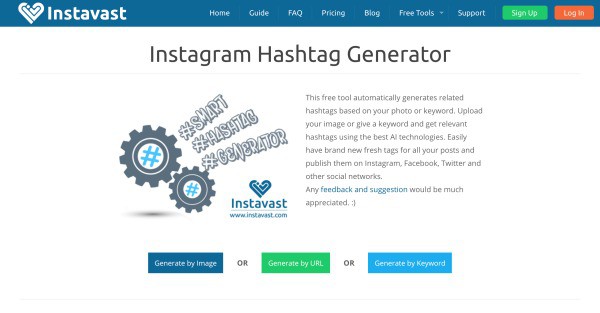
    3. Instavast – This site offers three different ways to search for relevant hashtags. I didn’t find the URL or image search helpful. The keyword search worked well. 5 Hashtag Generators for Craft Businesses - Perfect for Silhouette Cameo and Cricut Explore or Maker Crafters - by cuttingforbusiness.com
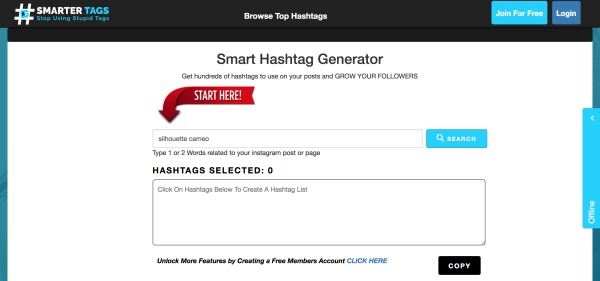
    4. Smartertags – Works well. Suggested hashtags that the other sites did not.5 Hashtag Generators for Craft Businesses - Perfect for Silhouette Cameo and Cricut Explore or Maker Crafters - by cuttingforbusiness.com
    5. Hashtag Generator #Hashme – The generators above are all websites. There are also a number of smartphone app hashtag generators. The one that I liked the best of the four I tried was Hashtag Generator #Hashme available in the Apple App Store and Google Play. The app is free, but can be upgraded to Premium from within the app.5 Hashtag Generators for Craft Businesses - Perfect for Silhouette Cameo and Cricut Explore or Maker Crafters - by cuttingforbusiness.com

    Now, it’s easier for you to rock your Instagram posts and get your Silhouette or Cricut business out there. Do you follow me on Instagram? If not, get to it! @cuttingforbusiness

    Love this post? Save it to Pinterest!

    5 Hashtag Generators for Craft Businesses - Perfect for Silhouette Cameo and Cricut Explore or Maker Crafters - by cuttingforbusiness.com

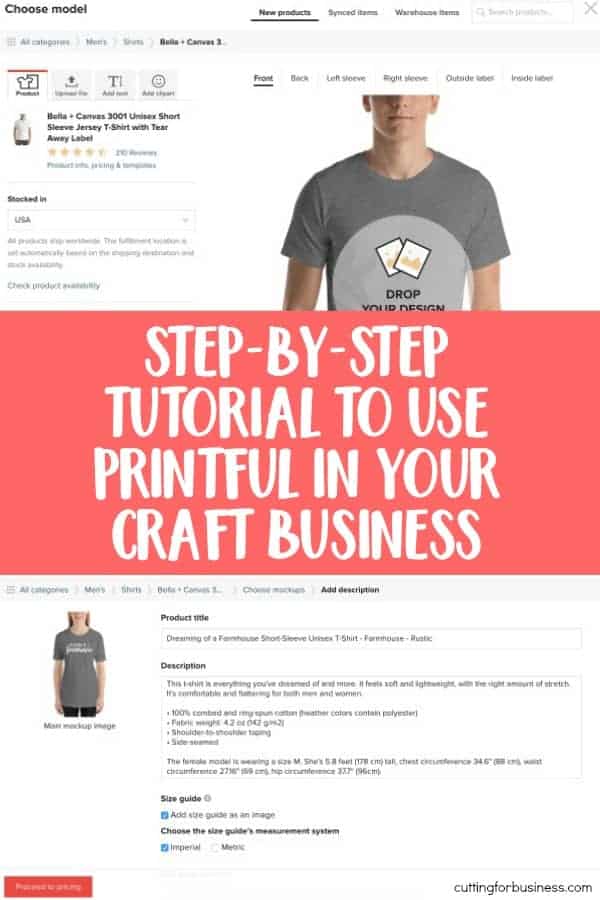
  • Step-by-Step Tutorial to Use Printful in Your Craft Business

    Last time on the blog, I introduced you to production partners on Etsy. Today, I’ll walk you through creating a Printful store. I chose to use Printful as it is a popular Etsy production partner. However, Printful is also available for Shopify, WooCommerce, SquareSpace, Amazon, and more.

    How to Create a Store on Printful

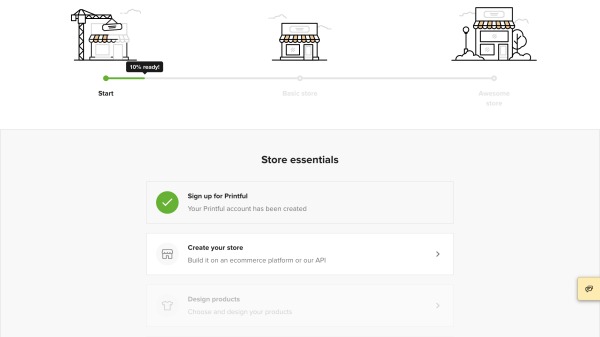
    1. Create an account at Printful.com and log in.
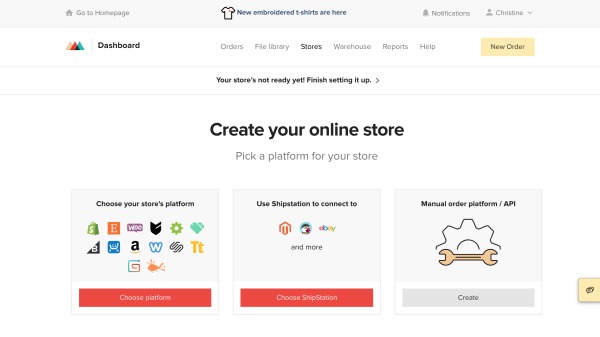
    2. From your dashboard, scroll down and click ‘Create your store’. Step-by-Step Tutorial to Use Printful - A great way for Silhouette Cameo and Cricut Explore Businesses to Expand - by cuttingforbusiness.com
    3. Choose where you sell and follow the provided instructions on Printful to connect your shop.Step-by-Step Tutorial to Use Printful - A great way for Silhouette Cameo and Cricut Explore Businesses to Expand - by cuttingforbusiness.com
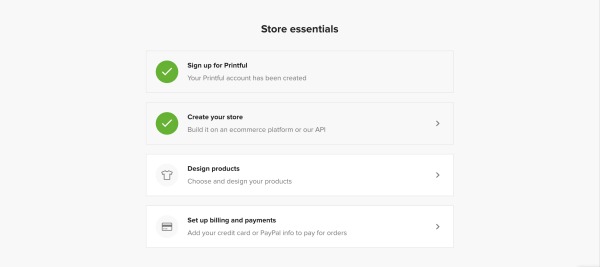
    4. After connecting your shop, head to the ‘Design products’ link. Step-by-Step Tutorial to Use Printful - A great way for Silhouette Cameo and Cricut Explore Businesses to Expand - by cuttingforbusiness.com
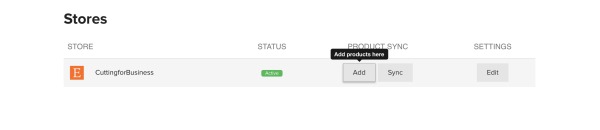
    5. Click the ‘Add’ button to start your first product.  Step-by-Step Tutorial to Use Printful - A great way for Silhouette Cameo and Cricut Explore Businesses to Expand - by cuttingforbusiness.com
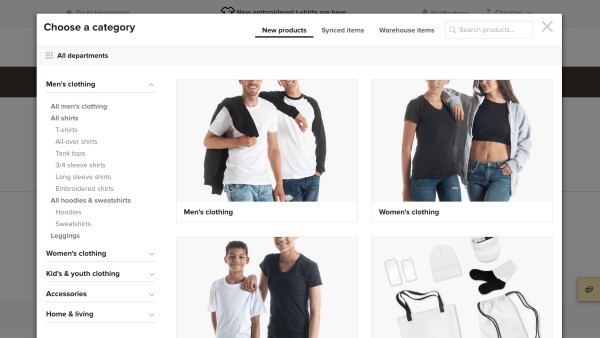
    6. Choose a product. Step-by-Step Tutorial to Use Printful - A great way for Silhouette Cameo and Cricut Explore Businesses to Expand - by cuttingforbusiness.com
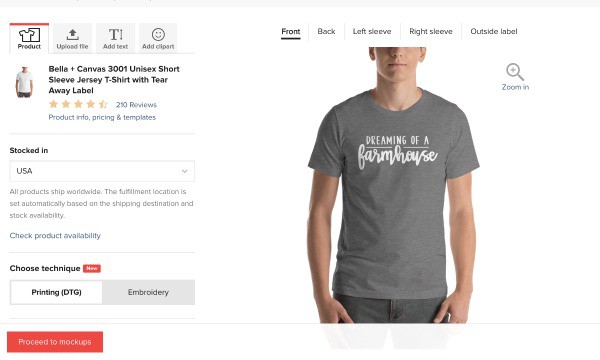
    7. Choose your colors, sizes to offer, and upload your design. Your design should be 300 dpi resolution. Click the ‘Proceed to mockups’ button when you are finished.Step-by-Step Tutorial to Use Printful - A great way for Silhouette Cameo and Cricut Explore Businesses to Expand - by cuttingforbusiness.com
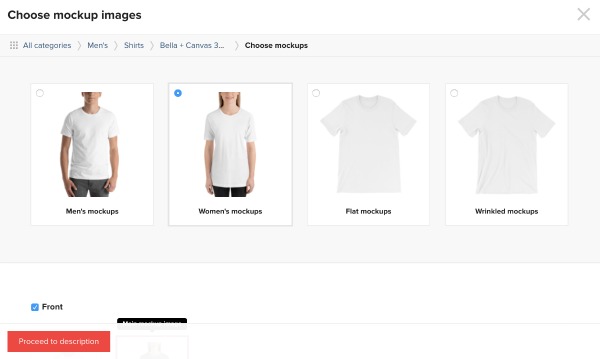
    8. Create your mockups and click the ‘Proceed to description’ button. Step-by-Step Tutorial to Use Printful - A great way for Silhouette Cameo and Cricut Explore Businesses to Expand - by cuttingforbusiness.com
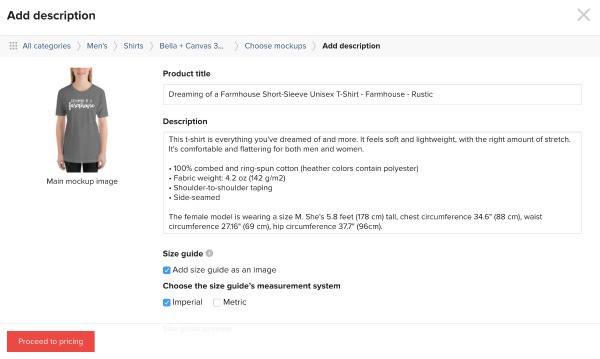
    9. Add your description and tags and click the ‘Proceed to pricing’ button. Step-by-Step Tutorial to Use Printful - A great way for Silhouette Cameo and Cricut Explore Businesses to Expand - by cuttingforbusiness.com
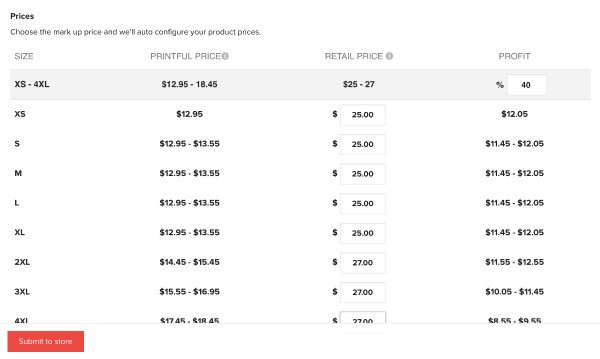
    10. Set your pricing. The first column is how much the shirt will cost you, the second is how much your customer will pay, and the third is your profit. Finally, click the ‘Submit to store’ button. Step-by-Step Tutorial to Use Printful - A great way for Silhouette Cameo and Cricut Explore Businesses to Expand - by cuttingforbusiness.com
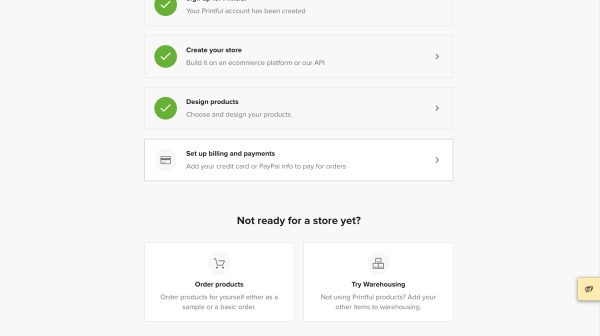
    11. After you’ve designed your first product, set up the billing. You can connect a credit card or Paypal account.Step-by-Step Tutorial to Use Printful - A great way for Silhouette Cameo and Cricut Explore Businesses to Expand - by cuttingforbusiness.com
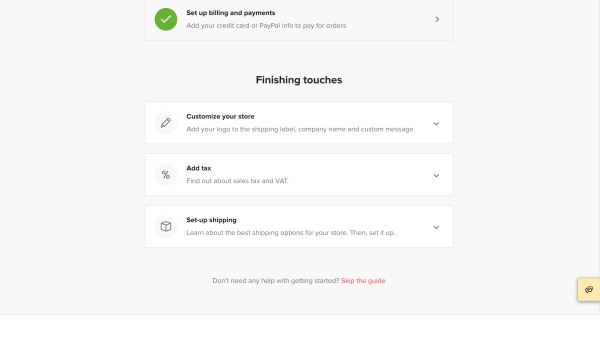
    12. Last, but equally as important, add your logo, tax rates, and shipping. After these three are set up, Printful will automatically sync your listing Etsy’s draft section. You can log into your Etsy account and publish it.Step-by-Step Tutorial to Use Printful - A great way for Silhouette Cameo and Cricut Explore Businesses to Expand - by cuttingforbusiness.comStep-by-Step Tutorial to Use Printful - A great way for Silhouette Cameo and Cricut Explore Businesses to Expand - by cuttingforbusiness.com

    What Happens When a Customer Places An Order?

    While the process differs from platform to platform, here has been my experience using Printful during a test run:

    1. Set up the listing in the Printful dashboard and sync it to Etsy as shown in the tutorial above.
    2. Customer places an order.
    3. Customer’s order is sent directly from my Etsy Shop to Printful.
    4. Printful creates the order and white label (using my branding rather than theirs) ships the order to the customer.
    5. Customer receives it (and loves it)!
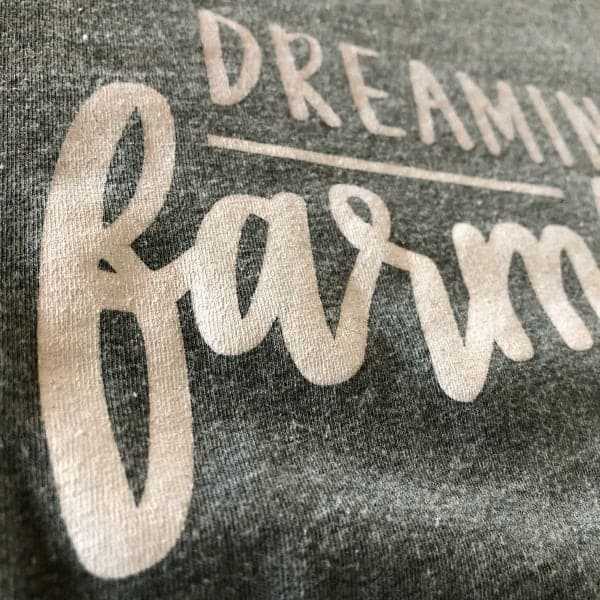
    6. Here’s a close up of the print quality of the shirt from Printful. To write this tutorial, I set up a dummy Etsy shop. So, if you’d like to order one of the shirts in the tutorial click here.Step-by-Step Tutorial to Use Printful - A great way for Silhouette Cameo and Cricut Explore Businesses to Expand - by cuttingforbusiness.com

    That’s it! Using a print on demand service like Printful is a great way to complement your existing products. And remember, Printful is way more than tee shirts – they also carry mugs, leggings, backpacks, hats, phone cases, and more.

    Was this walkthrough helpful? Save the image below to Pinterest.

    Step-by-Step Tutorial to Use Printful - A great way for Silhouette Cameo and Cricut Explore Businesses to Expand - by cuttingforbusiness.com

  • Production Partners on Etsy: An Easy Way to Expand Your Product Lines

    Have you ever heard of production partners on Etsy? If not, they are Etsy’s way of allowing you to outsource work in your craft business – but still sell on Etsy. And, I love them because they are a great way to expand your product line with related products that you cannot/do not make yourself.

    Put simply, production partners are companies/manufacturers that you’ve teamed up with for product creation. Let’s take a look at how you can use production partners to expand your Silhouette or Cricut based Etsy shop.

    Production Partner Examples

    • If you sell planner stickers and goods, find a production partner to create a few planner related coffee mugs or tee shirts with planner related sayings.
    • If you sell tee shirts, find a production partner to make custom printed leggings.
    • If you sell cards, find a production partner to offer high quality prints or canvas.
    • And so on. The key here is to expand your current Etsy shop by finding products that complement your existing ones.

    How to Set Up Production Partners on Etsy

    Setting up production partners is easy:

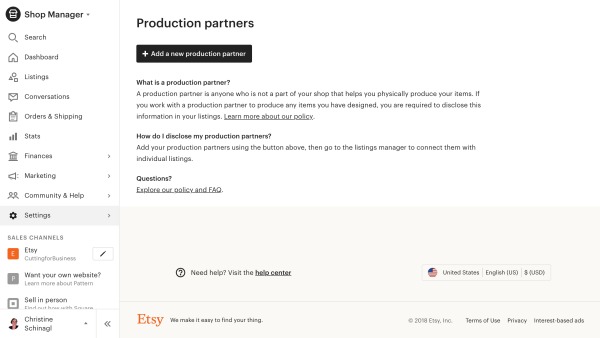
    1. Log into your Etsy account and navigate to ‘Settings’ on the left hand side, then ‘Production partners’.
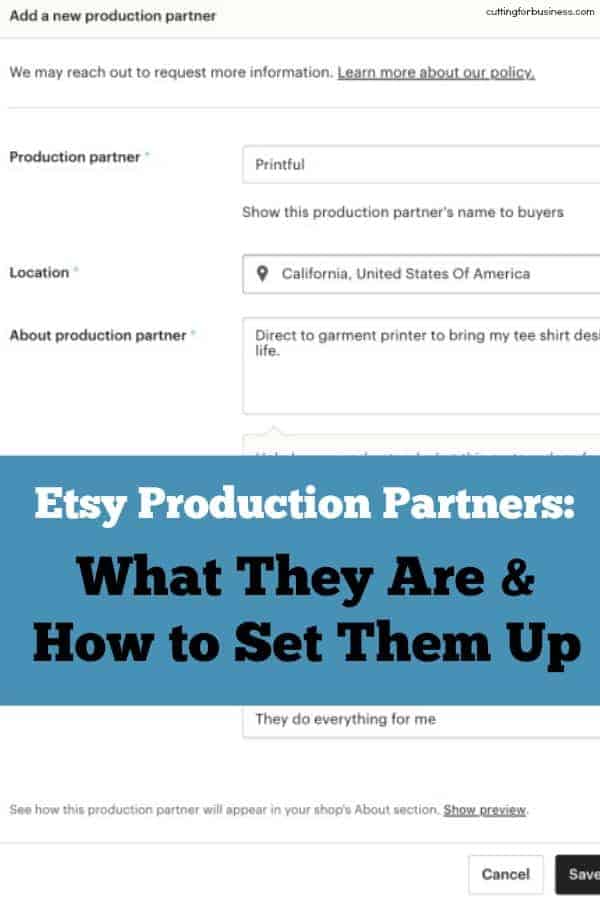
    2. Click the ‘Add a new production partner’ button.Production Partners on Etsy: An Easy Way to Expand Your Product Lines - A good read for Silhouette and Cricut Small Business Owners - by cuttingforbusiness.com
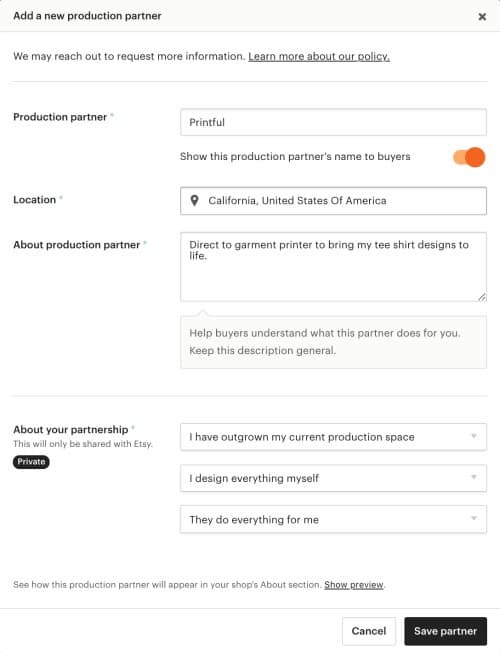
    3. Fill in the information on the pop up screen by adding your production partner name and basic information. In this example, I’m using PrintfulProduction Partners on Etsy: An Easy Way to Expand Your Product Lines - A good read for Silhouette and Cricut Small Business Owners - by cuttingforbusiness.com
    4. That’s it! When creating new Etsy listings, you’ll choose your production partner when creating the listing. Production Partners on Etsy: An Easy Way to Expand Your Product Lines - A good read for Silhouette and Cricut Small Business Owners - by cuttingforbusiness.com

    Who Can Be Your Production Partner?

    You can add anyone who does manufacturing for you as a production partner. After following the steps above, Etsy may reach out to you for additional information about your partner. Most importantly though, Etsy wants to make sure that your production partner follows their Ethical Expectations and that you design the products.

    Off the top of my head, Printful, Art of Where, and Gooten are popular Etsy production partners.

    This post is just an overview of what production partners are and how to set them up in your Etsy shop. On Wednesday, I’ll go through an example showing you how to create your first listing using Printful.

    Was this post helpful? Save the image below to Pinterest.
    Production Partners on Etsy: An Easy Way to Expand Your Product Lines - A perfect read for Silhouette Cameo and Cricut Explore or Maker Small Business Owners - by cuttingforbusiness.com

  • 25+ Creative Email Subject Lines for Christmas in Your Craft Business

    Looking for creative email subject lines for Christmas? I’ve got you covered.

    I’ve said it over – and over – and over again: Email newsletters are a great way to get (and stay!) in front of your customers. If you haven’t read my previous posts on email newsletters, go check them out:

    Why You Need an Email List for Your Craft Business and 3 Ways to Build an Email List without a Website.

    A list of 25+ Creative Email Subject Lines for Christmas in Your Craft Business - Perfect for Silhouette, Cricut, and Glowforge crafters - by cuttingforbusiness.com.

    25+ Creative Email Subject Lines for Christmas

    The most wonderful time of year… Coupon inside!

    Our Ultimate Gift Guide Enclosed

    The best stocking stuffers? Handmade ones!

    Don’t show up empty handed, hurry and grab a hostess gift.

    Open this email for holiday savings!

    GIFT-MAS is here, check out our recommended gifts.

    Looking for a Unique Gift? We’ve got you covered.

    Hurry in for handmade gifts!

    50% (or 40%, 30%, and so on) off everything! Coupon code inside.

    Forget the Fruitcake! Grab our (name of best selling product)!

    Yule love our holiday products!

    Better than Christmas cookies? Our holiday sale!

    Our Sale is so Big, Santa’s Coming!

    Picked the perfect tree? Put the perfect gift under it.

    We wish you a Merry Christmas (with these special deals!)

    Stay in your pajamas and shop our sale.

    It’s too cold to go out! Cozy up with these deals.

    Psst, Santa says he shops at (name of shop)! Get an exclusive offer inside.

    Make a new holiday tradition: Shopping our website!

    Free Shipping, Free Gift Wrap, and a Coupon Code!

    Santa Approved! New Products are Now Available.

    Don’t be a Grinch, shop early and save!

    Our elves are working overtime! Last minute gifts available.

    ‘Tis the Season – To Save! Sale details inside!

    The Best Christmas Gifts? Personalized Ones!

    Announcement: Our Biggest Holiday Sale Starts Now!

    How’d I come up with these sayings? For many of them, I used this ‘formula’: Catchy saying/Pun + Deal. The first half is a cute, creative, or catchy play on words to get the customers attention in their inbox. The second part is a deal/coupon/sale/new product announcement. After you’ve gotten their attention in their inbox, you give them a reason to open the email.

    So, get out there and try it! Need more help getting your shop ready for the holidays? Read this article on how to get your business ready for the holidays.

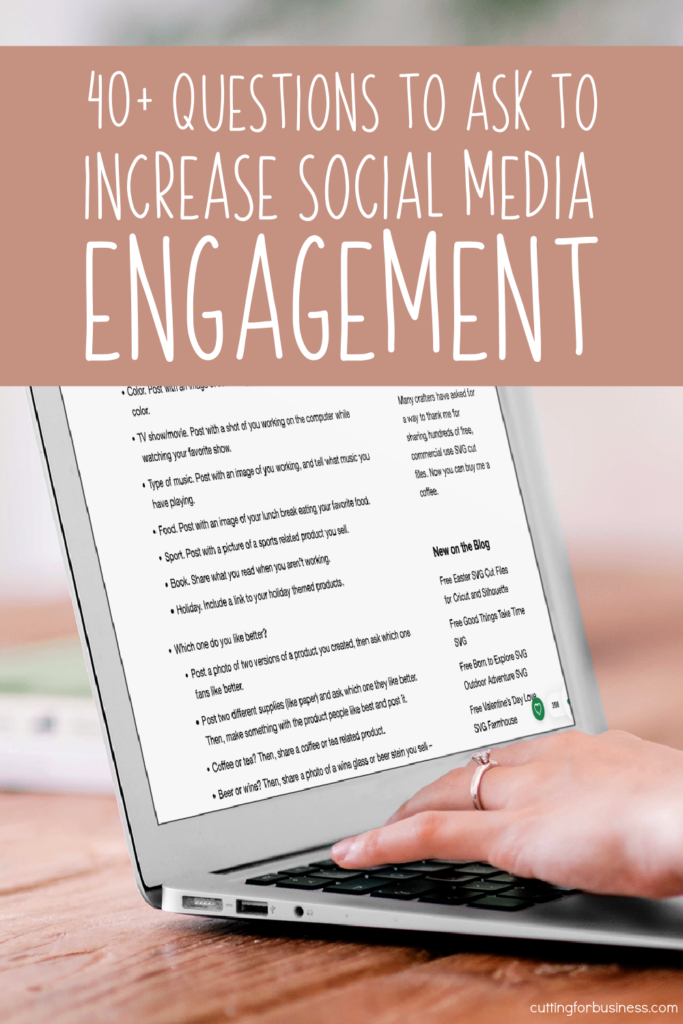
  • 40+ Questions to Ask to Boost Social Media Engagement

    Looking to improve your social media engagement? Not sure how to do it?

    Social media, like Facebook, Instagram, and Twitter, have changed our lives, but it has also changed the way that we get our small businesses out there.

    Years ago, it was much easier to be seen on social media. You created a profile, posted some content to it, and your fans could see it when they logged in.

    Now that social media has grown. It seems like you have to follow ever changing expert advice, keep up with constantly changing social media algorithms, and even pay to advertise to get your small business seen.

    Today, let’s take a look at engagement. In addition to posting regularly, social media engagement is the easiest way to get your craft business noticed on social media.

    40+ Questions to Ask to Increase Social Media Engagement - Small Business - cuttingforbusiness.com.

    Why Does Engagement Work on Social Media?

    Social media is at its core a way to connect with others and have discussions. When your content is getting noticed by likes, shares, and comments; social media networks will show your posts to more of your audience.

    But, how do you get more people to engage with your content? It’s easy: Ask questions.

    I’ve compiled a list below with different questions you can ask to get higher engagement on social media, along with some ways that you can related the questions to your craft business.

    Personally, rather than post random questions that have nothing to do with your business, I prefer to keep them business related.

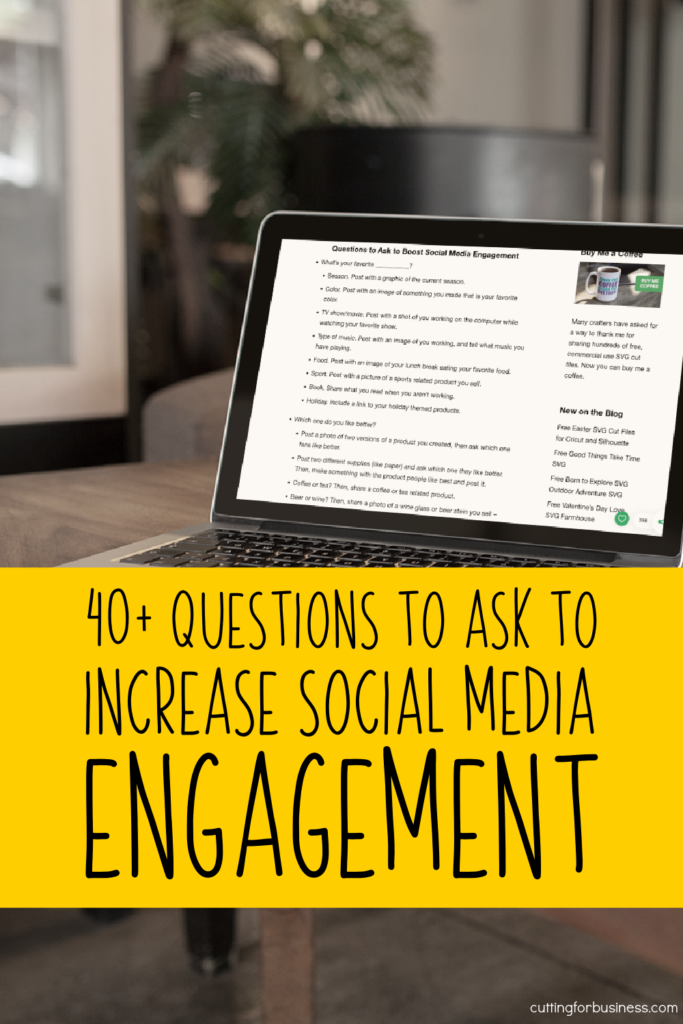
    40+ Questions to Ask to Increase Social Media Engagement - Small Business - by cuttingforbusiness.com.

    Questions to Ask to Boost Social Media Engagement

    • What’s your favorite ___________?
      • Season. Post with a graphic of the current season.
      • Color. Post with an image of something you made that is your favorite color.
      • TV show/movie. Post with a shot of you working on the computer while watching your favorite show.
      • Type of music. Post with an image of you working, and tell what music you have playing.
      • Food. Post with an image of your lunch break eating your favorite food.
      • Sport. Post with a picture of a sports related product you sell.
      • Book. Share what you read when you aren’t working.
      • Holiday. Include a link to your holiday themed products.
    • Which one do you like better?
      • Post a photo of two versions of a product you created, then ask which one fans like better.
      • Post two different supplies (like paper) and ask which one they like better. Then, make something with the product people like best and post it.
      • Coffee or tea? Then, share a coffee or tea related product.
      • Beer or wine? Then, share a photo of a wine glass or beer stein you sell – or both!
    • Would you rather ___________ or ___________?
      • Buy something handmade or make it yourself?
      • Give a gift or get a gift?
      • Plan your days or choose on the fly? Then share your planner related products.
      • Be early or late? Then, share your answer.
    • If you could ___________…
      • Travel back in time, would you? Reminisce about the first days you started your craft business.
      • Meet anyone, who would it be? Share who you’d meet and why. Keep it tied to your business.
      • Retire today, what would you do with your free time? Of course, share that you’d keep running your craft business!
    • What if ___________?
      • You won the lottery… what would you do with the money?
      • You could travel anywhere in the world… where would you go?
      • You had to move to another country? Where will you go?
    • What was your ___________?
      • First car?
      • Last vacation?
      • Job?
      • Pet? Share a pet related product.
      • First Etsy purchase from us?
      • Favorite gift? Tie this into products that make good gifts from your business.
    40+ Questions to Ask to Increase Social Media Engagement - Craft Business - cuttingforbusiness.com.
    • When you were a kid, what ___________ did you want?
      • Career. Share what career you wanted when you were a kid, but share why owning a small business turned out better.
    • Current events.
      • For big games: Which team do you want to win? Then, share a sports related product.
      • For political events: Which side are you on? Then, share a political product you sell.
      • Award shows/TV premieres: Who is your favorite actor and why? Then, share yours. Or, share a general movie/TV themed product.
    • Share a photo of ___________.
      • A product you bought from us.
      • Your family. Then, share one of yours.
      • The day you became a mom or dad. Then, share yours.
    • Ask us anything!
      • Ask social media followers to ask you anything about your business in the comments, then answer their questions. This is a fun way to also show the human side of your business.
    • Fill in the Blank: ___________ inspires me.
      • Choose a product or two that you sell and tell what inspired them.
    • If we ___________ what would you do?
      • If we gave you $1000 to spend in our shop, which products would you stock up on?
      • If we offered craft classes, which product would you like to learn to make?
      • If we offered to make you anything, what would it be?
    • What’s on your bucket list?
      • Share what is one your personal or business bucket list.

    Remember, the answers people give you aren’t that important – the fact that they engaged with your content will help your social media presence.

  • 15 Ways to Get Your Craft Business Ready for the Holidays

    For many small business crafters, December’s holiday season is the busiest time of year. Between all the orders, the craft shows, the holiday parties, shopping for your own family, and so much more – things can get overwhelming.

    But, I think I can help.

    I put together a list of 15 things you can do today, before the rush, to help get your craft business ready for the holidays.

    How to Get Your Craft Business Ready for the Holidays - Great for Silhouette, Cricut, and Glowforge crafters - by cuttingforbusiness.com.

    15 Ways to Get Your Craft Business Ready for the Holidays

    1. Sign up for holidays fairs, shows, and markets. I hear it all the time – ‘I wanted to do some craft fairs, but they are all full!’ Want to know why the shows are full? You waited too late to sign up. So, get to it. Need some help finding shows? Head to this link.
    2. Arrange for extra help. If you think your craft business will be out of control busy this year, get some help lined up. Whether you call on friends and family or hire an employee – get to it – early!
    3. Plan your promotions now. Right now, sit down and determine your best selling products. Choose a handful of them and get marketing banners, ads, and sales ready to focus on the things you know will sell.
    4. Write out your holiday email newsletters. Email newsletters remain a great way to get customers to your shop and get your products bought. Of course, there’s no need to send them now, just save them as a draft or schedule them to be sent later. Need ideas for your emails? Anything related to gifts works great, and there are more ideas in this post.
    5. Plan a holiday giveaway or contest. It’s pretty obvious – but customers like free. Even the opportunity to get something for free. Before you start planning a giveaway or contest though, understand the legalities of it. Read more in this post.
    6. Make stock now. The holiday season is often a chaotic time in our lives – from the kids being out of school, to our personal shopping, and family events – there is so much going on. Take time now to make ready to ship items to sell during the holidays. I shared an easy way to stock up ahead of time in this post.
    7. Get your shipping methods in order and set order by deadlines. Do the research you need to find out the best methods to ship your products to your customers. Price out expedited shipping and decide on your cutoff date for holiday orders to arrive in time for Christmas. In an ‘Amazon fueled world’ free shipping is best if you can swing it – just build the shipping price into your product price.
    8. Figure out gift wrap. If you don’t currently offer gift wrapping services in your craft business, sit down and take the time to figure it out now. Order the supplies you’ll need and add the service to your shop. If you can offer gift wrapping services for free – it’s a great promotion!
    9. Give your shop a holiday theme. Create an overlay for your website to get shoppers in the holiday season or a new banner for your Etsy shop. There’s no need to upload it until later in the season. If you need some stock images to help you, head to this post.
    10. Plan to do good. People like to do good around the holidays and love when businesses also spread joy. Pick a cause to support over the holiday season and, if necessary, get in touch with them. Also, create some marketing materials to show how your business is helping others during the season.
    11. Add a gift category to your website or shop. In this section, you can highlight which of your products are perfect for gifting. Consider categories like ‘For her’, ‘For him’, ‘Under $20’, ‘Under $100’, and so on.
    12. Make sure your website is mobile friendly. The amount of users accessing websites on their mobile devices continues to grow. If you have a standalone website, don’t miss out on eager holiday shoppers because your site isn’t mobile friendly.
    13. Consider offering returns or exchanges. For non personalized or custom orders, get a policy together for returns and exchanges and advertise it to customers. This helps boost customer confidence in your products and small business.
    14. Offer gift cards or certificates. I know I’ve got a lot of ‘hard to buy for’ people on my Christmas list. I usually get them gift cards. Don’t forget to offer them in your craft business.
    15. Start your own holiday shopping. Without the stress of rushing to get your own shopping done, you’ll have more time to work on your business. Bonus: You’ll probably end up spending less when you shop early and plan ahead of time!

    Remember, the time to start planning for a successful Christmas and holiday season is now – not in a few weeks, a month, or when you ‘have time’.

  • 160+ Free Commercial Use SVG Cut Files

    160+ free files is awesome, but since this article was originally written, I’ve added over 300 additional commercial use SVG cut files – for a grand total of nearly 500!

    400+ Free SVG Cut Files for Silhouette, Cricut, Glowforge, Brother Scan 'n Cut, Juliet, Romeo, xTool, and more - cuttingforbusiness.com

    What are Commercial Use SVG Cut Files?

    Commercial use SVG cut files are designs that you can use to make and sell products using your favorite craft machine. While you can sell a product with the design on it, you cannot resell the digital file. Read my license for using free SVG cut files on Cutting for Business.

    Free Commercial Use SVG Cut Files

    New Year

    Valentine’s Day

    Love & Wedding

    St. Patrick’s Day

    What Programs Can You Use SVG Files In?

    The files below were designed in Silhouette Studio Business Edition, but they can be used in any program that accepts SVG files. This includes Adobe, Cricut Design Space, Sure Cuts a Lot, Leonardo Design Studio, and more.

    Easter

    Spring & Gardening

    Patriotic

    Summer & Vacation

    What Can You Do with Commercial Use Cut Files?

    You can use commercial use SVG cut files to make products like mugs, t-shirts, wood signs, cards, decals, and more using machines like a Silhouette Cameo or Silhouette Portrait, Cricut Maker, Siser Juliet, Siser Romeo, Glowforge, xTool, and more.

    Outdoors

    Pets

    Home

    Family

    Taking Too Long to Download Each SVG?

    I know it can be time consuming to visit each page to download the free SVG. If you are short on time and want to download all the free SVG cut files shown on this page quickly, I offer a bundle.

    Birthday

    Coffee

    Wine

    Crafting

    Buy Me a Coffee

    Want to support me? Designing free commercial use SVG cut files takes a lot of time. I not only share them with you for free, but I allow you to use the files to make and sell products. Don’t forget to Buy Me a Coffee.

    Small Business

    Motivational

    School & Graduation

    Sports

    Where to Find More Free SVG Cut Files

    Want more files? Take a look at the list of websites and blogs that offer free commercial use SVG files.

    Cancer Awareness

    Halloween

    Fall

    Thanksgiving

    Want to Learn to Design Your Own SVGs?

    I find designing SVG cut files to be not only fun, but therapeutic as well. Digitally designing has become a way to release my creativity in a non messy way. And let’s face it: Anytime I craft, I make a giant mess. Anyway, I’ve written a short, fun course to help you learn the rules for designing SVG cut files. Get more information at How to Design SVGs.

    Winter

    Christmas

    Miscellaneous