Blog

  • 12 Things I Wish Someone Had Told Me About the Silhouette Alta

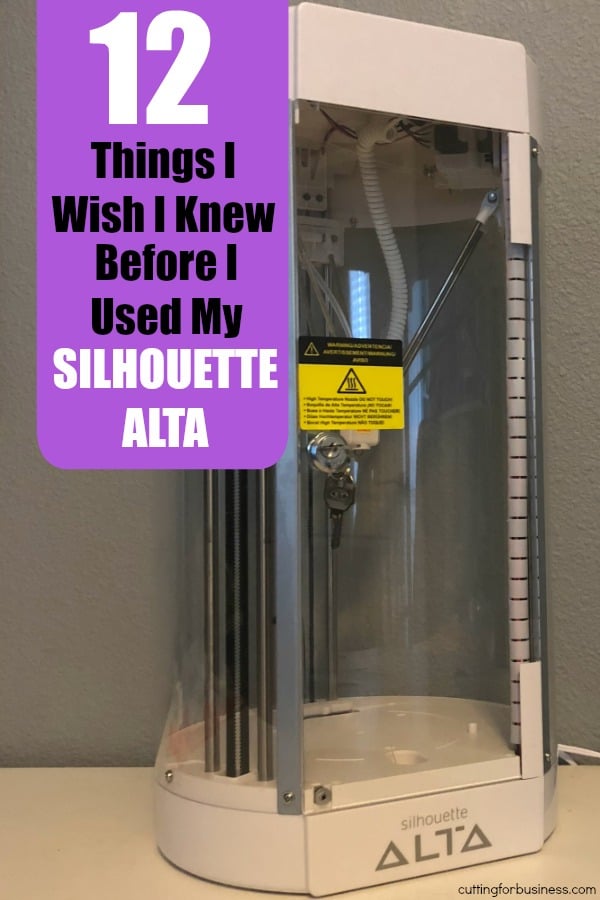
    Yesterday I introduced you to the Silhouette Alta, Silhouette’s newest machine launch and their first 3D printer. (Haven’t read the FAQ yet? See here.) Today, I’m sharing tips and tricks I’ve picked up in my first experiences with the Silhouette Alta.

    (If you are a seasoned 3D printer user, feel free to skip this post entirely. These are simply my findings and things I’ve come across as a brand new 3D printer owner.)

    12 Things I Wish Someone Had Told Me About the Silhouette Alta

    • PLA filament has a shelf life of about a year. In more humid environments, the shelf life is reduced. As someone who likes to buy in bulk, I’ll have to rethink this.
    • PLA filament is made from plants and is food safe.
    • PLA filament absorbs water from the air and should be stored in an air tight container.
    • PLA filament can be drilled, sanded, and/or painted.
    • Acrylic paint, nail polish, and model making paints all work well on PLA. I picked up this set.
    • 3D printing is a slooooooooow process. Detailed designs take hours to print.
    • The platform base on the Silhouette Alta must be covered for the 3D print to stick to it. Painters tape works better than the included Alta tape. (Psst: Other users say glue sticks and hairspray work well, too. They both sound too messy for me though.)
    • Investing in some 3D print removal tools will save your finger nails from having to pry designs off the base. I picked up this set.
    • If you don’t have a 3D print removal tool laying around and your design is stuck, place the base in the freezer for a few minutes. When you take it out, it should pop off.
    • You need a decent amount of free space on your computer (4GB of RAM) to run the Silhouette 3D software. I had to first delete a lot of junk files to even load the program. Silhouette 3D also seems to work best when all other programs are shut down.
    • The Silhouette 3D software shuts down unexpectedly and often. If you are in the middle of printing something, don’t fret. Reopen the software and the 3D print should continue.
    • There are multiple large communities of 3D printer users. Use Google to search them out and read, read, read. The more you can learn about 3D printing – the more of an asset your Silhouette Alta will be.

    Enjoying Alta Week on the blog? Tomorrow I’ve got 25 ideas of things you can print with your Silhouette Alta.

    Did you find the information helpful? Save it to Pinterest and help another crafter.

    12 Things I Wish Someone Had Told Me About the Silhouette Alta - 3d Printer - by cuttingforbusiness.com

  • The GDPR and Your Etsy Shop: How to Make it Compliant

    Remember that super important post about the GDPR that I urged everyone to read recently on Cutting for Business? If you didn’t read it yet, grab some coffee and head here. Today I’ve got great news: Etsy has made it easy to comply with GDPR regulations that take effect May 25, 2018.

    How to Make Your Etsy Shop GDPR Compliant

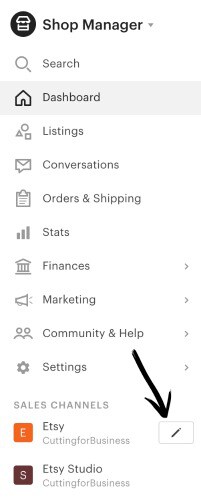
    1. Log into your Etsy shop and navigate to your ‘Shop Manager’. Then, scroll down the left hand menu until and click the pencil icon next to your Etsy shop. The GDPR and Your Etsy Shop: How to Make it Compliant - by cuttingforbusiness.com
    2. Scroll down until you reach the recently added section, Privacy Policy. The GDPR and Your Etsy Shop: How to Make it Compliant - by cuttingforbusiness.com
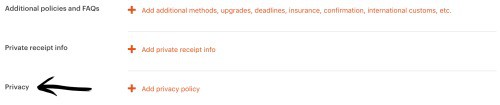
    3. Click the plus sign to add your privacy policy. You can include anything you’d like, but here is what Etsy says you must include, according to the GDPR guidelines (paraphrased by me):
    • the personal information you collect;
    • the legal bases you rely on to collect, use, and share personal information;
    • the third parties with whom you share personal information (for example, Google Analytics);
    • the length of time you keep the personal information;
    • if you are transferring personal information outside of Europe, and how the transfer will be handled;
    • your buyers’ rights regarding the use of their personal information; and
    • how your buyers can contact you with privacy-related requests.
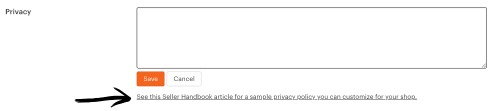
    The GDPR and Your Etsy Shop: How to Make it Compliant - by cuttingforbusiness.com

    After writing your Privacy Policy for Etsy, be sure that you save it. Your new Privacy Policy will appear on your main shop page under Privacy Policy. Here’s a look at mine live on Etsy (scroll down to the ‘Policies’ section).

    Etsy’s Example Privacy Policy

    Etsy has an example of a good Privacy Policy at this link. You could copy and paste it as Etsy suggests, then alter it to fit your needs. For my Etsy shop, I copied and pasted and altered the sample Privacy Policy Etsy provided. Here is the text of my Privacy Policy on Etsy:

    “This Privacy Policy describes how and when I collect, use, and share information when you purchase an item from me, contact me, or otherwise use my services through Etsy.com or its related sites and services.

    This Privacy Policy does not apply to the practices of third parties that I do not own or control, including Etsy or any third party services you access through Etsy. You can reference the Etsy Privacy Policy to learn more about its privacy practices.

    Information I Collect

    To fulfill your order, you must provide me with certain information (which you authorized Etsy to provide to me), such as your name, email address, mailing address, payment information, and the details of the product that you’re ordering. You may also choose to provide me with additional personal information (for a custom order, for example), if you contact me directly.
    Why I Need Your Information and How I Use It

    I rely on a number of legal bases to collect, use, and share your information, including:
    • as needed to provide my services, such as when I use your information to fulfill your order, to settle disputes, or to provide customer support;
    • when you have provided your affirmative consent, which you may revoke at any time, such as by signing up for my mailing list;
    • if necessary to comply with a legal obligation or court order or in connection with a legal claim, such as retaining information about your purchases if required by tax law; and
    • as necessary for the purpose of my legitimate interests, if those legitimate interests are not overridden by your rights or interests, such as 1) Providing and improving my services. I use your information to provide the services you requested and in my legitimate interest to improve my services; and 2) Compliance with the Etsy Seller Policy and Terms of Use. I use your information as necessary to comply with my obligations under the Etsy Seller Policy and Terms of Use.

    Information Sharing and Disclosure

    Information about my customers is important to my business. I share your personal information for very limited reasons and in limited circumstances, as follows:
    • Etsy. I share information with Etsy as necessary to provide you my services and comply with my obligations under both the Etsy Seller Policy and Etsy Terms of Use.
    • Service providers. I engage certain trusted third parties to perform functions and provide services to my shop, such as delivery companies. I will share your personal information with these third parties, but only to the extent necessary to perform these services.
    • Business transfers. If I sell or merge my business, I may disclose your information as part of that transaction, only to the extent permitted by law.
    • Compliance with laws. I may collect, use, retain, and share your information if I have a good faith belief that it is reasonably necessary to: (a) respond to legal process or to government requests; (b) enforce my agreements, terms and policies; (c) prevent, investigate, and address fraud and other illegal activity, security, or technical issues; or (d) protect the rights, property, and safety of my customers, or others.

    How Long I Store Your Information

    I retain your personal information only for as long as necessary to provide you with my services and as described in my Privacy Policy. However, I may also be required to retain this information to comply with my legal and regulatory obligations, to resolve disputes, and to enforce my agreements. I generally keep your data for the following time period: 7 years.
    Transfers of Personal Information Outside the EU

    I may store and process your information through third-party hosting services in the US and other jurisdictions. As a result, I may transfer your personal information to a jurisdiction with different data protection and government surveillance laws than your jurisdiction. If I am deemed to transfer information about you outside of the EU, I rely on Privacy Shield as the legal basis for the transfer, as Google Cloud is Privacy Shield certified.

    Your Rights

    If you reside in certain territories, including the EU, you have a number of rights in relation to your personal information. While some of these rights apply generally, certain rights apply only in certain limited cases. I describe these rights below:
    • Access. You may have the right to access and receive a copy of the personal information I hold about you by contacting me using the contact information below.
    • Change, restrict, delete. You may also have rights to change, restrict my use of, or delete your personal information. Absent exceptional circumstances (like where I am required to store data for legal reasons) I will generally delete your personal information upon request.
    • Object. You can object to (i) my processing of some of your information based on my legitimate interests and (ii) receiving marketing messages from me after providing your express consent to receive them. In such cases, I will delete your personal information unless I have compelling and legitimate grounds to continue using that information or if it is needed for legal reasons.
    • Complain. If you reside in the EU and wish to raise a concern about my use of your information (and without prejudice to any other rights you may have), you have the right to do so with your local data protection authority.

    How to Contact Me

    For purposes of EU data protection law, I, Christine Schinagl, am the data controller of your personal information. If you have any questions or concerns, you may contact me at christine@cuttingforbusiness.com.”

    Quick Things to Remember

    • Filling in your Privacy Policy on Etsy makes your Etsy shop GDPR compliant, as long as all the GDPR required information is included in your Privacy Policy.
    • You’ll still have to make your mailing list and stand alone website GDPR compliant, as well as your presence on other marketplaces.

    Together, we will get through this. Remember, even if you are not located in the EU, the GDPR likely still applies to you. Again, be sure to read my previous post on it at this link.

    Was this article helpful? Share the image below on Pinterest.
    The GDPR and Your Etsy Shop: How to Make it Compliant - A must read for craft business owners who sell on Etsy - by cuttingforbusiness.com

  • How to Run a Mystery Subscription Box Using Your Silhouette or Cricut

    There’s one thing that is certain about small business: uniqueness and originality sell. Today, I wanted to share some ideas I have about running a mystery box subscription service using your Silhouette or Cricut. This is an idea I’ve had in my head for many months, and I’ve finally gotten around to putting it in action.

    Before we get started, my storyline is cheesy. For that, I’m sorry. I am not a fiction writer, but I am an experienced escape room player and I’ve been to several mystery dinner theaters. Oh yeah, we’ve done several of the Mysterious Package Company experiences.

    How to Create a Mystery Box Subscription Service Using Your Silhouette or Cricut

    The way I see this working is that customers sign up one month in advance of receiving their first box so you’ll know how many “boxes” you’ll need to create.

    Customers actually won’t receive a single box, they will receive five boxes/envelopes throughout the month, about one per week. Each shipment to customers will reveal a little bit more about the case. The fifth and last envelope will reveal the solution to the case.

    Here is the sample case I put together and will mail to a friend of mine:

    The Story: Characters, and Plot

    The premise of the story is that a retired local detective has obtained permission to reopen some cold cases from decades ago and is asking for the public’s help in solving the cases. Since the current case took place near your address, you are being asked to help out.

    Envelope 1

    A letter from the detective introducing himself, explaining what he’s doing, and asking for your assistance and cooperation throughout the process. A photo of a male murder victim is enclosed.

    Envelope 2

    Evidence: Diary pages of the victim’s wife, detailing life in the time before her husband was found brutally murdered. A copy of a life insurance policy of the victim. List of belongings in the room when when detectives originall

    (At this point, people will likely think that the victim was killed by his wife so that she could collect on his life insurance policy. Hello!? This is an unsolved case from decades ago! It’s not that simple!)

    Envelope 3

    Receipt from charity donation of entire life insurance settlement.

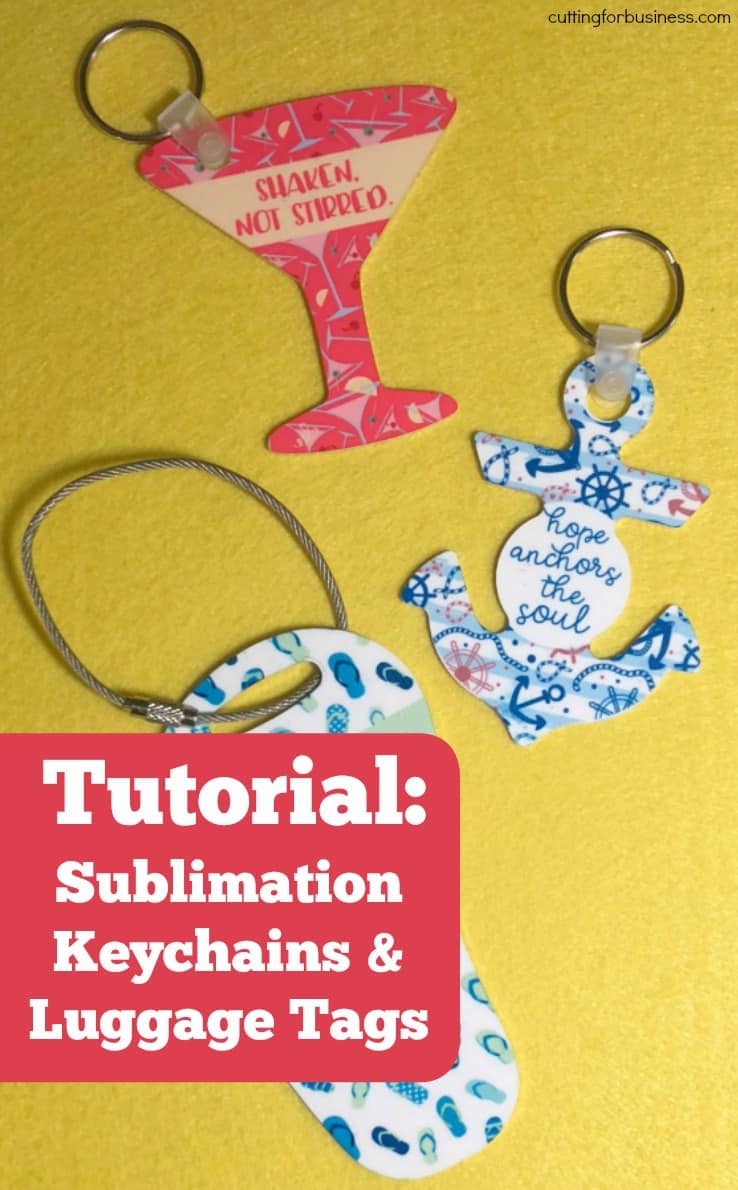
  • Tutorial: Sublimation for Keychains & Luggage Tags

    I love making keychains with adhesive vinyl and my Silhouette or Cricut! What I don’t love is that the vinyl tends to get knicked and dinged up by my keys. When I set out the other day to make some keychains, I remembered that I had some blank sublimation keychains. I thought to myself that they would be a great alternative to vinyl on keychains because the sublimation printing can take getting beat up and thrown into my purse better than adhesive vinyl. Today, I’m sharing the process I used to create keychains (and a luggage tag).

    Tutorial: How to Create Sublimation Keychains and Luggage Tags

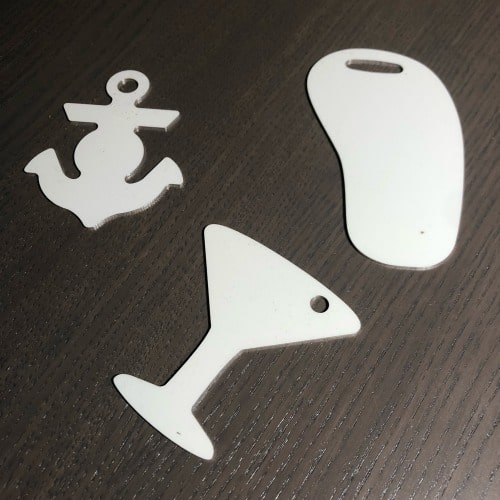
    1. Order some supplies. Pick up some blank Unisub keychains or luggage tags. Unisub is the manufacturer and doesn’t sell direct to the public, however, you can pick up sublimation keychains at this link. If you are looking for luggage tags, head to this linkTutorial: Sublimation for Keychains & Luggage Tags - by cuttingforbusiness.com
    2. Grab the templates. Unisub offers templates for all the products they manufacture. I have a tutorial showing how to use the templates with Silhouette Studio in this blog post.
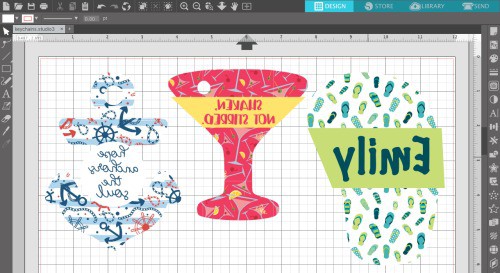
    3. Create your designs. Use your favorite software (Silhouette Studio, Cricut Design Space, Adobe Illustrator, Inkscape, or whatever you like best!) to create some designs. I stuck to simple with my designs and used colorful themed backgrounds with some text. I picked up commercial use backgrounds from stock photo sites. Be sure to mirror your design before printing. Tutorial: Sublimation for Keychains & Luggage Tags - by cuttingforbusiness.com
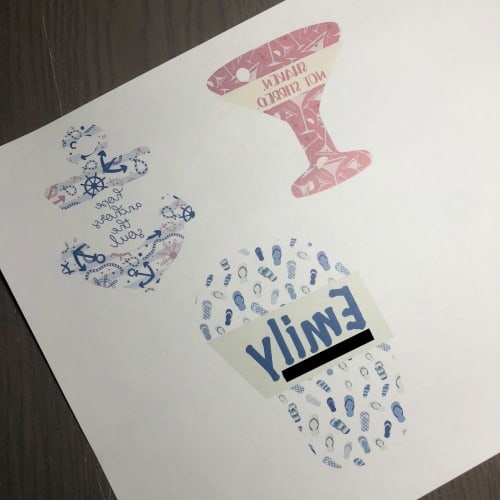
    4. Print your design on heat transfer paper. Here is a link to the paper I’ve been using. (My phone number is blacked out in the photo below so thousands of people don’t call me!)Tutorial: Sublimation for Keychains & Luggage Tags - by cuttingforbusiness.com
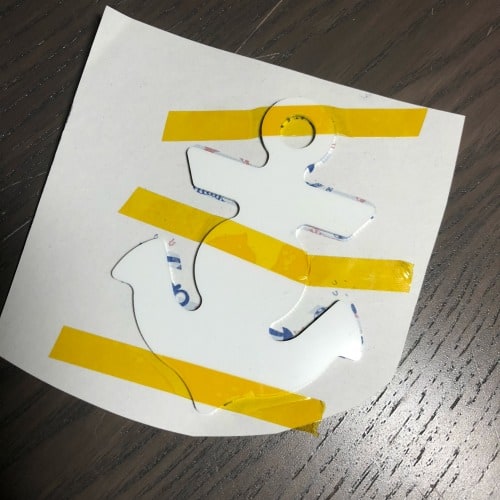
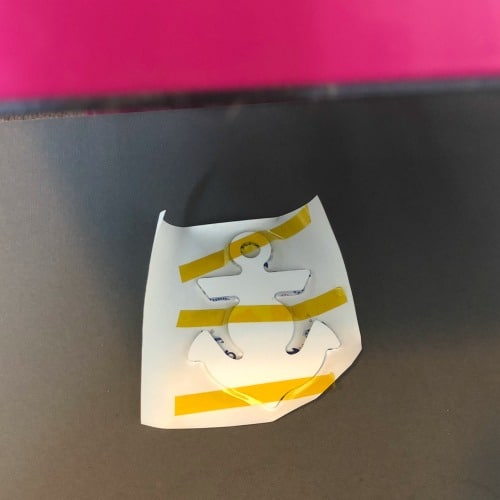
    5. Line up your design with your blank keychain and tape it into place. I use this heat resistant tape. You will see that I made the design slightly larger than the keychain. This is referred to as a ‘bleed’. This ensures that your entire keychain is covered with your design. Be sure that no important details are in the bleed area.Tutorial: Sublimation for Keychains & Luggage Tags - by cuttingforbusiness.com
    6. Press the design. I pressed for 180 seconds at 375 degrees Fahrenheit and got great color. I used my handy little pink heat press that I talked about in this post. As a quick reminder, the keychains are metal and they really heat up in the press! Be cautious taking them out and allow them to cool before touching them.Tutorial: Sublimation for Keychains & Luggage Tags - by cuttingforbusiness.com
    7. Add the hardware. The keychains I have (martini glass, 4666 and anchor, 4731 came with a keychain ring and plastic connector) the luggage tag (flip flop, 4729) did not include hardware.

    That’s it! I think sublimation makes for great keychains and luggage tags! Wondering what else you can do with sublimation? I’ve got a tutorial for jewelry at this link, mugs at this link, and a whole beginners series on what exactly sublimation is that starts at this link.

    Love this project? Save the image below to Pinterest.

    Tutorial: Sublimation for Keychains & Luggage Tags - by cuttingforbusiness.com

  • 8 Ways to Make Money in the Craft Community without Selling Products

    There have been a number of Cutting for Business readers who have started small businesses making and selling products – and then decided that it really wasn’t ‘their thing’. (And that is totally ok!)

    One reader reached out to me on Facebook and asked if I had any ideas of how she could stay involved in the handmade community (and make money) without selling handmade products. Of course I have ideas on how to make money in the craft community without selling products.

    I gave her a whole list of things she could do, and today I’m sharing it with you.

    8 Ways to Make Money in the Craft Community without Selling Products - cuttingforbusiness.com

    8 Ways to Make Money in the Craft Community without Selling Products

    Sell Supplies

    Whether you choose to sell blank products to embellish or craft supplies themselves, selling supplies can be profitable.

    Host a YouTube/Tik Tok Channel

    If you are good at explaining how to create projects, video yourself and put them on YouTube or Tik Tok. Both YouTube and Tik Tok can be lucrative once you hit a certain number of views and start getting paid advertising revenue.

    Social Media and Marketing

    If you are good at social media, allow other crafters to hire you to manage their social media and marketing efforts in their craft businesses.

    Become an SEO Expert

    SEO stands for search engine optimization. If nit picky things like keywords and search functions interest you, become an SEO specialist and help craft businesses get found in search engines.

    Host an Instagram Feature Account

    If you love Instagram, you can start a feature account and have crafters pay you to feature their business on your account. First, of course, you’d need to build up a solid following on Instagram. You can learn more about feature accounts in this post.

    Write a Blog

    If you are particularly knowledgeable about a particular craft, machine, or aspect of working in the handmade community, put your expertise online and start a blog.

    Teach Classes

    Whether you prefer Silhouette or Cricut, Glowforge or xTool consider lending your talents to teach craft classes. There’s always new machine owners looking to learn how to use their machine. You could teach online through webcams or in person.

    Be a Designer

    Working as a designer can mean so many things. Some designers design cut files or patterns; while others work directly with clients on websites and logos. If you’ve got a knack for creating digital goods, consider freelancing as a designer.

    Do you work in the handmade community but don’t sell handmade products to customers? Tell us what you do in the comments.

  • How to Say ‘No’ to Fundraisers in Your Craft Business

    An overwhelmed craft business owner reached out to me recently and told me that she needed help saying ‘no’ to fundraiser organizers who kept asking for donations for various events and charities. This is pretty common in the handmade world, as crafters and designers are often happy to donate items in exchange for the advertisement of their business.

    But, what happens when you are constantly being asked about donation after donation? I mean, you can’t donate to every event and still run a profitable business. However, you don’t want to offend the organizer. And, donations are great for word of mouth advertising and tax deductions.

    Two Ways to Say ‘No’ to Fundraisers in Your Craft Business

    1. Set a budget at the beginning of the year or quarter to go towards donations. When your budget is exhausted, that’s it. When a organizer contacts you about donating to their cause you can either agree to the donation or share that you’ve exhausted your donation fund for the year and invite them to
      1. Example conversation: Fundraiser: “Hello, we are organizing a silent auction to benefit XYZ charity. We are hoping you will donate ABC product to help us raise money.” You: “Hello and thank you for reaching out to me. At this time, we have exhausted our donation budget for this quarter. Feel free to reach out to us at a later time or different event. Best of luck!”
    2. Choose a charity to work with in your business. If you’d prefer to work directly with a charity, choose one (or a small handful) and don’t donate to other causes.
      1. Example conversation: Fundraiser: “Hi, we are collecting product donations for XYZ cause. We are contacting you to gauge your interest in donating a number of ABC product to be given out at our event.” You: “Thanks for contacting me. DEF Business works exclusively with a handpicked number of charities and would not be able to donate to your cause. We wish you the best of luck raising money.”

    That’s it! Don’t ever feel pressured to have to donate to an event or charity. However, if you would like more information about working with fundraisers and charities, see this post and this post.

    Was this information helpful? Save the image below to Pinterest.


    How to Say 'No' to Fundraisers in Your Craft Business - Silhouette Cameo and Portrait or Cricut Explore or Maker - by cuttingforbusiness.com

  • Summer Marketing Themes for Your Craft Business

    Summer is here! Today, let’s tackle marketing themes and ideas for Summer in your craft business.

    Let’s look at marketing your craft business in the months of June, July, and August.

    Summer Marketing Themes for Your Craft Business - cuttingforbusiness.com

    Summer Marketing Themes

    Use these marketing themes throughout the Summer months in your products, social media posts, and promotions.

    • Vacation/Staycation – With school out of session for most across the USA, it’s time to pack up and head out on vacation. Products themed to vacations work well. Don’t forget that not everyone has the time or budget to travel – consider ‘staycation’ themed products, too.
    • Water – Vacations and water go hand in hand. Products geared towards rivers, oceans, beaches, cruises, pools, and lakes sell well all summer long.
    • Hot Weather – Typically, summer has the warmest temperatures of the year. Focus on flowy fabric style shirts, lightweight cottons, tanks, crops, swimsuits, cover ups, wide brimmed hats, and shorts.
    • Bright Colors – Summer is a time for bright and bold colors. Use pinks, reds, greens, oranges, and yellows throughout the summer.
    • Fruit – Various citrus fruits are in season throughout the summer, along with melons like watermelon. Use fun designs geared to incorporate them throughout the warmer months.
    • Family Reunions – During summer, many families take the down time to hold a reunion. Spend time marketing to those holding family reunions, since they tend to be large bulk orders with high cart totals. 
    • Grilling, BBQs, and Backyard Activities – Families often take the time off to grill out. Grill related products, especially around Father’s Day can be a big hit.
    • Patriotic – Summer is full of patriotic holidays. From Memorial Day to July 4th and Labor Day, patriotic themed products sell well all summer long but peak the last weeks of June.
    • Father’s Day – While Spring was geared towards Mother’s Day, summer is the time to focus on Father’s Day. Get products up early, as women are more likely to shop ahead of time.
    • Back to School – The second half of your summer marketing should be focused on Back to School items. From name labels to decor, and first day of school shirts to classroom gear – parents everywhere will start shopping for school supplies in the second half of summer. Check to see if your state has a sales tax holiday and promote it.

    Summer Themed Copywriting

    Copywriting is defined as the text you use to describe or promote your products. This summer, try using the words on below to spice up your summer marketing.

    • Cool down
    • Make a splash
    • Fun in the sun
    • Summer vibes
    • Beach ready
    • Hot deals
    • Sizzling offers
    • Poolside perfection
    • Ready, Set, Beach!
    • Sun soaked adventures
    • Breezy summer days
    • Splash into summer
    • The pool is calling
    • Chill out in style
    • Endless sunshine

    Need more phrases for summer marketing? This is the perfect job for ChatGPT.

    Companies to Partner with This Summer

    If you are looking to partner with another business in your craft business, contact small businesses on this list:

    • Travel agents
    • Pool companies
    • Local attractions
    • Local events
  • 16 Real Life Examples of How to Use Amazon Associates in Your Craft Business

    This week, I’m covering passive income. Yesterday, I went over affiliate programs and I mentioned Amazon Associates. I know that sometimes it can be hard to take information from a blog post online and turn it into action in your craft business. So today, I’m giving you concrete examples of how to use the affiliate program in your existing Silhouette or Cricut business. I focused on giving you examples for Facebook and Instagram only – as that is what most craft businesses use. However, you can use any social media network, or even create your own Pinterest pins with affiliate links.

    16 Examples of How to Use Amazon Associates in Your Craft Business

    If you sell: Custom Tumblers

    1. (On Facebook) Just finished this one (photo of latest tumbler) and it’s mine to keep. Wondering my favorite thing to drink in it? Iced passion: https://amzn.to/2rvQJUV! #affiliate
    2. (On Facebook) Heading to the beach this weekend? Pick up a couple of these to keep your custom tumblers sand free! https://amzn.to/2K3K1fR #aff

    If you sell: Rustic Wood Signs

    1. (On Facebook) Just picked up these rustic stools for my kitchen: https://amzn.to/2jLgP1U #aff
    2. (On Instagram) Love my new gallery wall? (With picture of gallery wall.) My secret weapon is Command Hooks! Grab a pack through the link in my bio! #gallerywall #commandhooks #aff (Put link to https://amzn.to/2IuGjP9 in Instagram bio or use an Instagram story with the link.)

    If you sell: Apparel

    1. (On Facebook with staged picture of a shirt and shorts) Our newest design is now available at xyz.com! Pick up coordinating shorts at https://amzn.to/2FZzRdF (Affiliate)
    2. (On Instagram wearing your shirt with the necklace) The perfect way to complement our custom tees? A chunky statement necklace! Pick up one at the link in my bio. #affiliate #chunkynecklace #customtee #yourhashtag (Add link to https://amzn.to/2wteqlT in Instagram bio.)

    If you sell: Planner goods

    1. (On Facebook) Everyone always asks my favorite pens to use in my planner. I use and love these: https://amzn.to/2rvg28V #affiliate
    2. (On Facebook) Need a way to keep your planner closed? These handmade straps work perfectly: https://amzn.to/2KMbTpK (Aff. link)
    3. (On Instagram) (Photo of pile of new washi tape.) #Washitape for days! #linkinbio #aff (Add link in Instagram bio or story: https://amzn.to/2rvwia0.)

    If you sell: Digital cut files

    1. (On Facebook) Using our cut files to make tee shirts? We recommend this heat transfer vinyl bundle: https://amzn.to/2IsfpHD #affiliate
    2. (On Facebook) Need storage for your vinyl? Check out this rack: https://amzn.to/2rC2Qzh #aff
    3. (On Facebook) Did you know I always test cut all my files before selling them? I just bought a Cricut Maker: https://amzn.to/2I7yVpD (Affiliate link.)

    If you do: Hands on classes

    1. (On Facebook) Class registration is now open on xyz.com for our Introduction to Silhouette Cameo 3! Use our machines, or bring your own: https://amzn.to/2KKU3DI (Affiliate link)
    2. (On Facebook) Held a DIY class today and participants loved learning how to use Cricut’s new knife blade. Order one for yourself: https://amzn.to/2I3Ky4G #aff

    If you sell: Anything

    1. (On Facebook) Taking a break from creating today to wait for delivery of these: https://amzn.to/2I7jXzK #aff
    2. (On Instagram) Want to know my secret to saving money on dryer sheets? I use these (photo of them). Pick up a set from the link in my bio. #ad #linkinbio (Include link to https://amzn.to/2jKgXyT in bio or story.)

    Disclosures and Best Practices

    As I mentioned yesterday, when advertising products using affiliate links, you are required by law to disclose that it is an affiliate link. On social media, it is as easy as stating ‘Affiliate Link’ or #affiliate. If you are posting on your website, you’ll need an affiliate disclosure policy. Learn more about FTC required disclosures at this link.

    When you are posting affiliate links. Make sure you have purchased the product or used it. Your customers and audience will have questions about the products – and they will ask. If you haven’t ever used the product, it will show and you could lose credibility.

    Now, get out there and make some passive income!

    Was this information helpful? Save the image below to Pinterest.

    16 Real Life Examples of How to Use Amazon Associates in Your Silhouette or Cricut Craft Business - by cuttingforbusiness.com

  • How to Make Money on Amazon Without Selling Anything

    Sometimes I write blog posts and I expect that they will be really popular. Unfortunately, this doesn’t always happen. Then, I always look to see what I could have done differently to make the post more impactful.

    One such post that falls into this situation is a short series I did on passive income. I was hopeful that many Cutting for Business readers would use the information I provided and add passive income to their existing businesses. This didn’t happen. I moved on.

    Fast forward several months and we started talking about passive income and affiliate programs in the Cutting for Business Insider’s Club. There was a ton of interest in the group – and a ton of questions. So, today and tomorrow, we are going to take a step back and look at Amazon Associates. Why? It is one of the easiest and most popular affiliate programs on the internet. Today, I’m going to show you how to join and share links. Tomorrow, I’m going to give you concrete examples of how to implement the program into your existing Silhouette or Cricut craft business.

    What is Amazon Associates?

    Amazon Associates is an affiliate program that allows users to make money by referring their favorite products on Amazon. Members share special links with a tracking code in them. When someone clicks on the link and purchases anything, the referrer gets a percentage of the sale. It is important to note that the purchase doesn’t have to be the product you recommended – you’ll get a percentage of any purchase made until the tracking cookie runs out.

    How Do I Join Amazon Associates?

    Click here to fill out an application for Amazon Associates. It is free to join.

    How Do I Share My Referral Links?

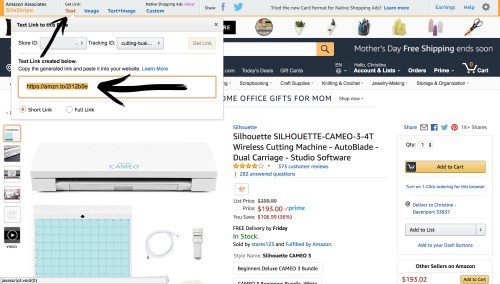
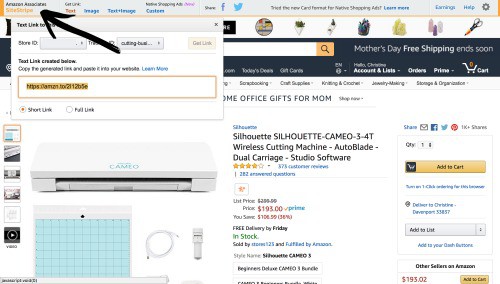
    After joining the Amazon Associates program and being approved, simply visit Amazon and search for the product you want to share. Across the top of the screen, you’ll see the Amazon Associate SiteStripe. Next to it, you’ll see three links: Text, Image, and Text + Image.

    How to Make Money on Amazon Without Selling Anything - An Introduction to Amazon Associates Affiliate Program for Craft Business Owners - by cuttingforbusiness.com

    These are the links that you’ll copy and paste into your website, social media, or more. You can choose your favorite format. Obviously, text is a text only link. Image is a photo only. And, text and image will give you both. You’ll need to experiment and see which links convert best for your audience.

    How Can I See Information About My Account?

    You can see information about your account in your Amazon Associates Dashboard. Simply click the Amazon Associates SiteStripe to be taken to your account. (Mine is not shown for privacy purposes.) How to Make Money on Amazon Without Selling Anything - An Introduction to Amazon Associates Affiliate Program for Craft Business Owners - by cuttingforbusiness.com

    How Much Will I Make and How Will I Get Paid?

    The percentages vary for each product on Amazon by category and range from 0% to 10%. Payments are sent monthly (near the end of the month but the day often varies) via ACH transfer to your bank.

    That’s it! While I covered the absolute basics today to get you signed up and started, tomorrow I’m going to share concrete examples of how to use the program in your existing Silhouette or Cricut business.

    Love this information? Save the image below to Pinterest!

    How to Make Money on Amazon Without Selling Anything - An Introduction to Amazon Associates Affiliate Program for Craft Business Owners - by cuttingforbusiness.com

  • 11 Questions Your Handmade Product Description Should Answer

    Yesterday I detailed the importance of the words we as handmade sellers use to get our message to buyers. This is called copywriting. Today, let’s look at all the information that should be included in your product description. Most importantly when selling online: It is your job as the seller to virtually put your product into the hands of the buyer.

    11 Questions Your Handmade Product Description Should Answer

    1. What is it? You should be clear in your product description what item is for sale.
    2. Who is the product for? Is your product best suited for kids, teens, adults, or everyone?
    3. What does the customer do with it? Give examples of how your customer can use your product. This can either be in the text, in the accompanying photos, or both.
    4. What size is it? In addition to listing the physical size in your product description, take a photo of your product in use or next to something that buyers know the size of. It’ll help them visualize.
    5. What colors are available? If you offer your product in multiple colors, be sure the options are clear.
    6. What is it made from? Buyers need to know what material the product is. If it is vinyl, state that. If it is paper, let them know that.
    7. How long will it last? If your product has a limited lifespan, be sure that your customer understands this.
    8. How much does it cost? While it doesn’t have to be written out in your descriptions, the price has to be on the page. If you aren’t selling through a marketplace or website, you’ll need to put it in the description.
    9. How many does the buyer get? Whether the customer gets one item or ten, be sure it’s clear.
    10. How long will it take before it will ship? Customers want their products and they want them fast. Let them know how long to expect before they receive their product.
    11. What makes it special/better/different? Last but not least, let the customer know what makes your product special. Is it the way you made it? Is it your customer service? Whatever it is, let them know.

    Struggling with product descriptions? My best advice is to have a few non-crafters read your product descriptions. If after reading the product description they have a good idea of what the product is and can tell another person about it, you’ve done a good job.

    If you haven’t read the post on copywriting, head here.

    Was this post helpful? Save the image below to Pinterest.

    11 Questions Your Handmade Product Description Should Answer in Your Silhouette Cameo or Portrait and Cricut Explore or Maker Small Business - by cuttingforbusiness.com