Author: christine

  • How to Find Banned Hashtags on Instagram

    It’s no secret, the internet is full of spam. Unfortunately, social media is no exception. In an effort to combat spam and spammers, Instagram has bots that ban certain hashtags. If you’ve had an Instagram post that doesn’t perform well, chances are that you might have used a banned hashtag. Today, let’s take a look at how you can find out what hashtags are banned.

    How to Find Banned Hashtags on Instagram

    Banned hashtags change daily, so there’s no single site that can keep an accurate list of all banned hashtags. However, it only takes a minute to check a hashtag. Here’s how:

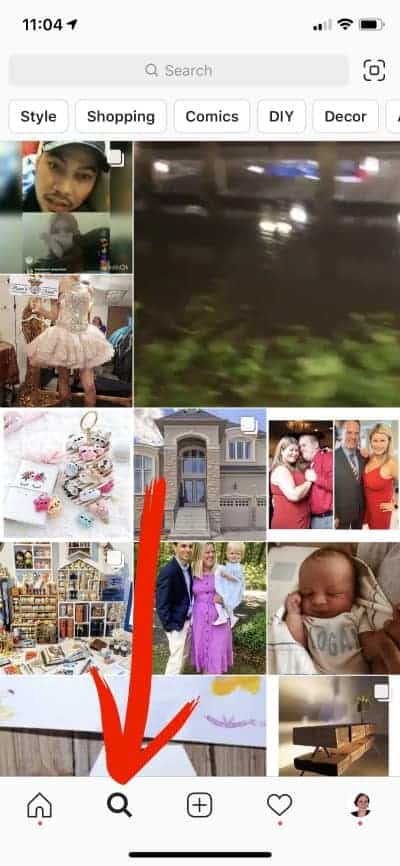
    1. Go to Instagram, and click the magnifying glass at the bottom of the screen. How to Find Banned Hashtags on Instagram - by cuttingforbusiness.com
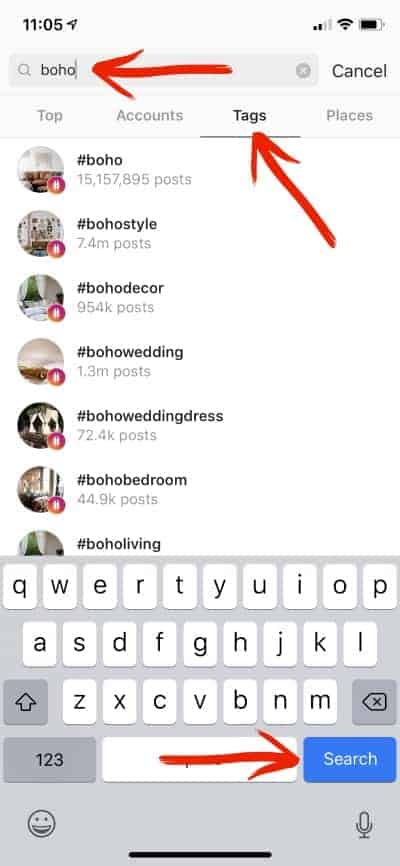
    2. Enter a hashtag in the search bar, tap ‘Tags’, and click the ‘Search’ button.How to Find Banned Hashtags on Instagram - by cuttingforbusiness.com
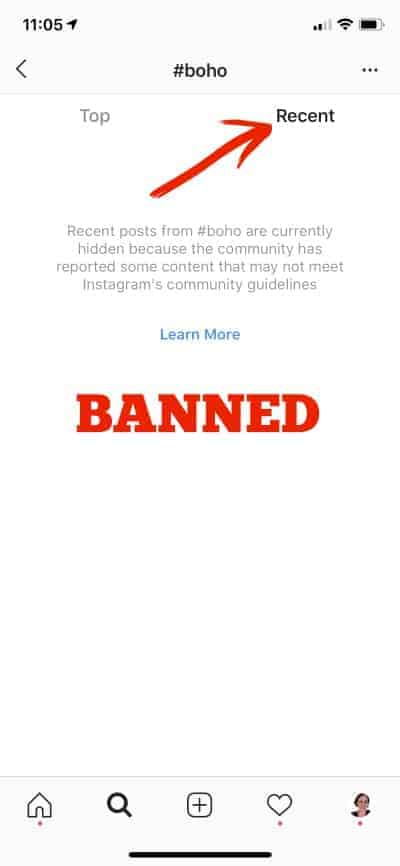
    3. Click on the hashtag you are looking up, then tap on ‘Recent’. If you see a message that posts are hidden instead of seeing recent posts, you’ve located a banned hashtag. How to Find Banned Hashtags on Instagram - by cuttingforbusiness.com
    A Few Surprising Banned Hashtags

    In doing research for this post, I found a handful of surprising banned hashtags. (Remember, these are currently banned but may not be banned forever.)

    • #adulting
    • #boho
    • #dm
    • #direct
    • #hotweather
    • #humpday
    • #parties
    • #snapchat

    Putting This to Use in Everyday Marketing

    It’s pretty obvious that if you want to do well on Instagram; you should avoid using banned hashtags. Using them could get your account flagged as spam and it could seriously limit your reach and engagement. But, it’s is pretty time intensive to search every hashtag before you use it. I’d suggest listing out the most common hashtags that you use and searching each of those every month or so.

    Was this post helpful? Save it to Pinterest.
    How to Find Banned Hashtags on Instagram - A good read for Silhouette Portrait or Cameo and Cricut Explore, Maker, or Joy small business owners. By cuttingforbusiness.com
  • 10 Characters in the Public Domain for Crafters to Use Freely

    Earlier in the week, I touched on using famous quotes in products you sell. If you remember, I talked about being able to use things that are in the public domain. Today, I’m giving you a list of things that are in the public domain.

    Sometimes with all this copyright and trademark information I share, it makes me feel like a ‘Debbie Downer’. So often, I highlight things that you can’t make or use without I often share information

    What Does Public Domain Mean?

    Before we get any further, let’s talk about the public domain. Things that are in the public domain are texts, photos, designs, and more where the copyright has expired or forfeited. This means that anyone in the public (you included!) can use the

  • 100 Products to Make and Sell with Your Silhouette, Cricut, xTool, Romeo, or Juliet

    I’ve been away at a crafting conference all weekend and I am always in awe of the uniqueness of the products you can make with a crafting machine. It seems that every conference, my crafty eyes are opened to more and more things you can make with the machines – especially when you push the proverbial ‘envelope’.

    So, I got to work writing down some of the amazing craft products and items I’ve seen the last few days. Whether you have a Silhouette, Cricut, xTool, Romeo, or Juliet – take a read and get inspired with 100 products to make and sell with your craft machine.

    100+ Products to Make and Sell with Your Silhouette, Cricut, xTool, Romeo, and Juliet - cuttingforbusiness.com

    100 Products to Make and Sell with Your Silhouette, Cricut, xTool, Romeo, or Juliet

    Wood signs
    T-shirts
    Sports jerseys
    Spirit gear for teams
    Scarves
    Hoodies
    Socks
    Hats
    Leggings
    Sweatpants
    Infant bodysuits
    Leather jewelry and goods
    Embellished shoes
    Costumes
    Swimsuits
    Decorated cell phone cases
    Tumblers
    Mugs
    Wine glasses
    Beer steins
    Water bottles
    Puzzles
    Lanterns
    Cardstock banners
    Felt busy books
    Gift tags
    Embellished balloons
    Party favors
    Pencil pouches
    Cupcake & cake toppers
    Cupcake holders
    Birthday stat boards
    Clipboards
    First/last day of school/work signs
    Labels
    Growth charts
    Return address labels
    Coffee cup holders
    Greeting cards
    Advent calendars
    Drink koozies
    Popsicle koozies
    Pet tags
    Invitations
    Keepsake boxes
    Handkerchiefs
    Oven mitts
    Potholders
    Halloween treat bags
    Dish towels
    Wine bags
    Stove covers
    Light switch covers
    Aprons
    Tote bags
    Backpack hangers
    Cutting boards
    Spice jar labels
    Serving trays
    Herb garden markers
    Decorative plates
    Magnets
    Wooden hangers
    Keychains
    Plush toys
    Decorative glass blocks
    Pillows
    Pillowcases
    Car decals
    Decorated mason jars
    Lunch boxes
    Mousepads
    Business signage
    Backpacks
    Makeup clutches/bags
    Wall, window, and door decals
    Furniture stencils
    Earrings
    Bracelets
    Screen printing stencils
    Coasters
    Embellished candles
    Candle holders
    Embellished journals
    Scrapbooks
    Door mats
    Nail decals
    Paper flowers and plants
    Flower pots/cans
    3D paper sculptures
    Customized phone chargers
    Personalized earbud cases
    Custom tablet sleeves
    VR headset decals
    Passport holders
    Etched glassware & casserole dishes
    Stickers/planner stickers
    Wine and beer bottle labels
    Wine charms
    Cup koozies
    Beach towels
    Christmas ornaments
    Packaging for other small businesses
    Photo booth props
    Napkin holders/rings
    Shadow boxes
    Fabric appliques
    Embellished Santa/laundry bags
    Hair bows
    Bow ties
    Headbands
    Wedding and event seating charts
    Bandanas
    Themed center pieces
    Umbrellas
    Temporary tattoos
    Rhinestone projects
    Decorated toilet paper
    Pop sockets
    Party confetti
    Embellished bill organizers/budgets
    Garden flags
    Yard signs
    Home decor
    Holiday decor
    Decorated storage containers
    Wreaths
    String art
    Paper boxes
    School & classroom goodies
    Paper miniatures
    Photo frames
    Gravesite & memorial products

    What can you add to the list? Drop it in the comments and I’ll add it.

  • What is Social Media Engagement?

    I’ve talked a lot about social media practices on the blog. However, the other day I got an email from a reader asking what ‘social media engagement’ means. Today, let’s take a lot at what social media engagement is. More importantly, we have to talk about why it’s important.

    What is Social Media Engagement?

    Social media engagement is simply the number of likes, reactions, comments, shares, and follows that your social media post or account receives.

    Why is Social Media Engagement Important?

    All the social media networks run on formulas called algorithms. The algorithms are programmed to show content that people find useful. Usefulness can be equated to likes, reactions, comments, shares, and follows. So, if you post something and no one interacts with the content – it’s reach (the amount of people that see it) will be low. Similarly, if you post something and people leave comments and reactions – the reach will be higher.

    A Challenge for You

    Now that we’ve talked about social media engagement, I have one challenge for you. Before you publish any content on social media, ask yourself: ‘Will my customers engage with this?’ If so, post away. If not, edit it, then post it.

    When you ask yourself, ‘Will my customers engage with this?’ You may find yourself posting less content. That’s ok. You’ll find yourself doing better on social media if you post more meaningful content. Quality over quantity – but still try to post once per day.

    Looking for help with what to post? Head to this post.

    Was this post helpful? Save it to Pinterest.
    What is Social Media Engagement? A good read for Silhouette Cameo and Cricut Explore or Maker small business owners - by cuttingforbusiness.com

  • Facebook Pages vs Groups: Which One is Best for Your Craft Business?

    Social media marketing is an important part of all small businesses.

    If you are just starting your business, you may wonder if you should choose Facebook Pages vs Groups.

    Should You Have a Facebook Page or a Facebook Group for Your Craft Business? - cuttingforbusiness.com.

    What is a Facebook Page?

    A Facebook page is a public page on Facebook where anyone can see updates your business posts.

    Additionally, anyone can like or follow the page to have your updates shown on their Facebook feed. However, Facebook’s algorithm determines how much your posts show on user’s feeds. This is called organic reach. In recent years, organic reach has been more difficult to get – especially if your posts have links in them.

    Unique Features of Facebook Pages

    • Ability for customers to leave reviews
    • Paid advertising is available
    • Direct messaging

    What is a Facebook Group?

    A Facebook Group is a community of people interested in the same thing on Facebook.

    Groups can be public – anyone on Facebook can see the content of the group; or private – only members can see what is posted in the group.

    Unique Features of Facebook Groups

    • Group chats
    • Buy and sell posts
    • Q & A sessions
    • Guides
    • Fundraisers

    Facebook Pages vs Groups

    Your craft business should have a Facebook Page.

    Your craft business could have both a Facebook Page and a Facebook Group.

    Your craft business should not have only a Facebook Group.

    Keys to a Successful Facebook Group

    • Call it a club, VIP Program, or something catchy. You want your customers to feel special when joining. Do not refer to it simply as a Facebook Group.
    • Post regularly to your Facebook Group.
    • Post different content to your Facebook Group than your Facebook Page.
    • Do not neglect your Facebook Page. You will still need to post regularly to your Facebook Business Page, even if engagement is low.
    • Your page should be an admin of your group.
    • Have a backup admin (or two) in your Facebook Group. If for some reason your account gets limited, someone will need to be able to manage the group.

    Struggling to get engagement on social media? Read 40+ Questions to Ask to Boost Social Media Engagement.

  • Facebook Groups:

    Facebook is dynamic and ever changing. Lately, it seems they are putting effort into making Facebook Groups more meaningful places to interact with others.

    This is important: Starting last week, Facebook is removing inactive members from Facebook Groups. Why is this important to Silhouette and Cricut small business owners? If you’ve got a Facebook Group for your Silhouette or Cricut small business, it’s

    Personally, if you don’t have a Facebook Group for your Silhouette or Cricut small business, now is a good time to start one.

  • 10 Ways to Overcome Crafter’s Block & Find Your Creativity

    Imagine this: You’ve had your Silhouette, Cricut, Glowforge, or xTool machine for a while now.

    You’ve made it all: t-shirts, cups, cards, wood signs, doormats, ornaments, decals, and so on.

    Perhaps you run a business and are getting burned out making the same set of products over and over again?

    If you’ve been feeling in a rut with your crafting lately, let’s change your mindset and get rid of your crafter’s block!

    Today, I’m sharing 10 ways that I use to get my creative juices flowing and my mind back in the game.

    10 Ways to Overcome Crafter's Block & Find Your Creativity - cuttingforbusiness.com

    10 Ways to Overcome Crafter’s Block

    Window Shop at Home Decor and Craft Stores

    No need to buy anything, I usually use my phone camera to take pictures of things that inspire me. My personal favorites are: Homegoods, At Home, Michaels, and Joanns.

    Flip through the Latest Magazines and Catalogs

    They don’t have to be craft related. In fact, I wrote a whole post on how I use magazines and catalogs for inspiration. If you don’t subscribe to any, head to your library or local bookstore.

    Browse Pinterest

    It’s a no brainer for inspiration! Use caution though – Pinterest can become a rabbit hole and suck away your whole day!

    Head to a Craft Show, Co-op, or Market

    If there’s one going on in your area – head there. When I’m looking for inspiration for my own crafting, I usually skip the small talk with crafters and just browse. Be sure to ask before taking any photos, as it hurts some crafter’s feelings.

    Redo a Previous Project or Finish a Project You Started

    You know the ones I’m talking about: That crooked sign you made when you first got your machine or that glass etching that didn’t turn out the way you had hoped it would. Redo it and use your experience to make it better.

    Or, maybe you’ve got a nagging project you started ages ago – now’s the time to finish it.

    Clean your Craft Room

    I’m just as guilty as the next crafter – I buy things at craft stores and then stash them away. When I clean my space I rediscover the things I’ve previously bought. (Oh, buying supplies without a purpose is a big money waster for small businesses.)

    Take a Craft Class

    Whether you choose online or in person, doing one crafty thing usually leads me to more and more ideas.

    Create with Your Kids

    There’s that old saying about nothing is the same when seeing it through the eyes of a child. When I’m lacking creativity, I turn my kids loose in my craft space for a while. Sometimes by watching and helping them, it sparks my own ideas. But, be prepared for the mess!

    Get Together with Crafty Friends

    Plan an afternoon or night together to share crafty ideas over dinner out. No actual crafting needed, just bounce ideas off of each other.

    It helps to come prepared with inspiration on your phone. This way, you’ll be talking crafts the whole time and not searching your phone.

    Pack It Up for a While

    As much as I hate to say it, sometimes the best thing for me to do is to lock my craft room doors for a few days and stay away. In my time away, I do anything but think about crafts.

    Tell me in the comments: How do you get over crafter’s block?

  • 5 Ways to Use Fiverr in Your Craft Business

    I hear from Silhouette and Cricut small business owners that they are often overwhelmed with some of the day to day operational tasks of running a business. While a lot of tasks can’t be outsourced in a craft business, there are plenty of small, one off things you can outsource.

    Let’s look at Fiverr.com today. If you aren’t familiar with Fiverr, it’s a marketplace where users sell services. You can hire individuals to remotely complete odds and ends tasks – and it is great for small business – since the pricing starts at just $5. Let’s look at some examples of how to use Fiverr in your Silhouette or Cricut small business.

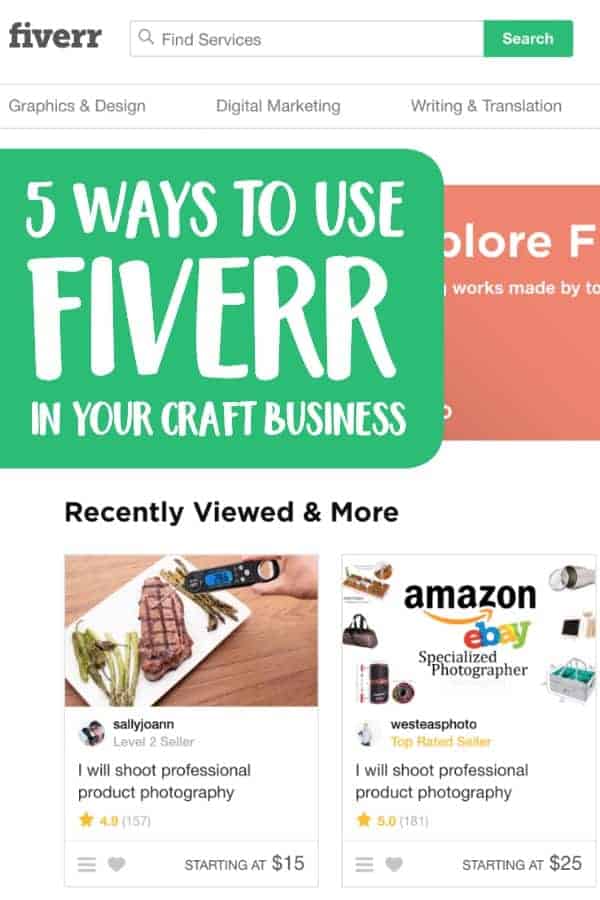
    5 Ways to Use Fiverr in Your Craft Business

    1. Graphic design. Whether you need a new logo, promotional graphics for an upcoming sale, custom illustrations that you can turn into cut files, or ads to promote your business, Fiverr is a great alternative to hiring a full time graphic designer.
    2. Video and slideshow creation. I’ve told you before that videos are a great way to ramp up your social media efforts (see here). But, if you don’t want to be in the spotlight, you can always create a video or slideshow that shows off your products. Don’t have the time or technical ability? Hire it out!
    3. Product descriptions. I laid out everything a good product description should have in it a while back (read it here). I recognize though that not everyone is a good writer. If writing isn’t your strength, hire out copywriting on Fiverr.
    4. Social media. I know that as a small business owner, you know that social media is a great way to build your brand’s presence. But, if you struggle with creating social media posts or can’t keep up, there’s plenty of ways to outsource it on Fiverr.
    5. Product photography. If you’ve never listened to any advice I’ve offered on this blog before, listen to this: good product photos sell your products. Unfortunately, I know that not everyone has the ability to take great photos or even the equipment to attempt it. One of the newer categories offered on Fiverr is product photography. In these cases, you send your products to the photographer. They then photograph and mail your products and photos back to you. For the non-photographers – it’s a win win!

    With any marketplace where sellers buy from individuals, it’s always best to read the descriptions of the services completely, ask questions before buying, and look up the reviews from previous users.

    Was this post helpful? Save the image below to Pinterest so another craft business owner can read it.

    5 Ways to Use Fiverr in Your Silhouette Cameo or Cricut Explore or Maker Craft Business - by cuttingforbusiness.com

  • 200+ Free SVG Cut Files with Commercial Use

    Wow! Years ago, when I started sharing free SVG cut files on Cutting for Business, I never expected they would be so popular. I also didn’t expect that I would share hundreds of them.

    Want a fun little story? I originally started sharing free SVG cut files on the blog, because I didn’t want readers to think I was boring and only wanted to talk business. I wanted to be able to connect with readers and also say, “Hey, while I like to talk about running craft businesses, I’m also a crafter like you!”

    Now, there are nearly 500 free SVG cut files on Cutting for Business. Grab a few of your favorites from the list below.

    If you make something using my file – I’d love to see! Send me an email, or tag me in your social media post.

    Good to Know Before You Download the Free SVG Cut Files

    What Does SVG Stand For?

    SVG stands for Scalable Vector Graphic. What is special about this file format is that SVG files can be resized in any graphics program without losing quality.

    What Can I Do With These SVG Files?

    You can use the SVG files on this page to create an sell products using your Silhouette, Cricut, or any other craft machine. Personally, I use the files that I’ve created on wood signs, cards, shirts, bags, and more. You can (and should!) read my full SVG license.

    How Do I Download the SVG Files Below?

    Click on the file you’d like to download to navigate to that freebie’s page. Scroll down to the green box near the end of the page, put it in your cart, and checkout. After checkout, files will immediately be available.

    If you don’t have the time to visit each page individually, I sell a zip file that contains all the free SVG cut files on the blog.

    Buy Me a Coffee

    If you have a few minutes, I’d love for you to Buy Me a Coffee. I offer these files for free, but many crafters were asking for a way to show a little support. For just $5, you can make my day!

    Want to Learn to Design Your Own SVG Cut Files?

    Did you know? I offer a class on creating your own SVG designs. Find more information about the How to Design SVGs course.

    Get More Free Commercial Use SVG Cut Files

    Want even more free SVG cut files? I’ve compiled a long list of other websites to download free SVG cut files.

    Free Commercial Use SVG Cut Files

    New Year

    Valentine’s Day

    Love & Wedding

    St. Patrick’s Day

    Easter

    Spring & Gardening

    Patriotic

    Summer & Vacation

    Outdoors

    Pets

    Home

    Family

    Birthday

    Coffee

    Wine

    Crafting

    Small Business

    Motivational

    School & Graduation

    Sports

    Cancer Awareness

    Halloween

    Fall

    Thanksgiving

    Winter

    Christmas

    Miscellaneous

    200+ Free Commercial Use Cut Files for Silhouette, Cricut, Glowforge, xTool, Juliet, and more - cuttingforbusiness.com.
  • Tax Resources for Craft Business Owners

    With the beginning of a new year, there’s one thing that starts looming: Filing taxes. Don’t worry Silhouette and Cricut craft business owners – I’ve got you covered with a lot of tax information on the Cutting for Business blog. Today, I’m rounding it up in one place. Let’s start at the beginning.

    I get asked a lot: “Do I have to report the income in my Silhouette or Cricut business?” Most likely, the answer is yes. I see misinformation about this all over: There’s no “magic” number for what amount of income you should report – and the IRS is pretty clear on when you are an official business. Read more in this post:

    Do You Have a Silhouette Cameo or Cricut Explore or Maker Craft Hobby or Business? - by cuttingforbusiness.com

    Next, if you work for yourself in the US, but prepared for self employment tax:

    Income Tax and Self Employment Tax in Your Silhouette or Cricut Small Business - by cuttingforbusiness.com

    Maybe the only good thing about filing taxes? Tax deductions! Read on: 

    Tax Deductions in Your Silhouette or Cricut Business Craft Business - by cuttingforbusiness.com
    Still not sure where to start? Head here and grab my printable tax prep checklist in this post:

    Printable Tax Prep Checklist for Silhouette or Cricut Small Craft Businesses - by cuttingforbusiness.com

    Wondering about a 1099 from Etsy (or other marketplaces)? Find out if you’ll get one:

    Why Didn't I Receive a 1099 from Etsy, Ebay, Amazon, Stripe? By cuttingforbusiness.com.

    While I’ve been highlighting posts about Federal taxes, don’t forget you’ll also be responsible for sales tax in many states. But, what is sales tax? Find out in the next post:

    Should You be Charging Sales Tax to Your Customers in Your Silhouette Cameo or Portrait and Cricut Explore or Maker Business? By cuttingforbusiness.com.
    With recent legislation last year, you may be responsible for taxes in states that you don’t live in, too. Get more information in this post:

    Internet Sales Tax Legislation - What Craft Business Owners Need to Know for Silhouette Portrait or Cameo and Cricut Explore or Maker Crafters - by cuttingforbusiness.com

    Too busy to be bogged down with filing sales tax? I use a service to file automatically. Here’s my review:

    Review: TaxJar Sales Tax Preparation and Filing Service for Small Businesses - by cuttingforbusiness.com

    Was this good information? Share the image below on Pinterest.

    Tax Resources for Craft Business Owners - Silhouette Portrait or Cameo and Cricut Explore or Maker - by cuttingforbusiness.com