Author: christine

  • 3 Ways to Profit from Handmade Yard Games in Your Craft Business

    From oversized Jenga style games to handmade Scrabble lawn games, and wooden tic tac toe boards to lawn Yardzee games, there’s plenty of outdoor games that you can create and sell with your Silhouette or Cricut. And, the best time to promote them? Right now: The beginning of summer! Today, let’s take a look at three different ways you can make money selling handmade yard games.

    3 Ways to Profit from Handmade Yard Games

    1. Sell directly to customers. Just a second to state the obvious here: Make and sell to customers through local buy and sell groups, Etsy, your own website, or word of mouth.
    2. Rent them out. Renting out giant yard games is another way to profit from them this summer. Many people won’t have a use for them outside of a special event like a wedding or a family reunion. Also, they might not have the space to store them. Head to this post for the ins and outs of renting products. (And trust me, it’s something I could consider myself an expert in!)
    3. Sell to event rental businesses. Wholesaling is a great way to make money off of handmade yard games this summer. And who better to sell them to than your local event rental businesses? In this case, you’d sell your yard games directly to the event rental business. Unless they are extremely busy, they’d probably only need 3 to 5 units total. They’d then rent out the units to their customers throughout the year. Need more information on wholesaling? Head to this post.

    Yard Game DIY Tutorials

    Looking for a few tutorials to get started making your own yard games with your Silhouette or Cricut? There’s no need for me to write any, since there are plenty of good ones already online.

    If you decide that making and selling the games isn’t for you, you could also make and sell the digital plans to other crafters.

    Tell me in the comments, what is your favorite tutorial for making giant outdoor games with your Silhouette or Cricut?

    Love this post? Save the image below to Pinterest.

    3 Ways to Profit from Handmade Yard Games in Your Silhouette or Cricut Craft Business - by cuttingforbusiness.com

  • 3 Reasons to Outsource Can Koozie Orders

    Making and selling customized and personalized products in your craft business is a great way to make money.

    However, there are just some products that it makes more sense to outsource. For example, if a customer came to you with an order for 5,000 tee shirts, you’d likely find a way to outsource it. For the amount of time that it would take a single person to do the order wouldn’t make it worth it for the maker or for the customer.

    Similarly, can koozie orders usually aren’t worth making them yourself. Let’s look at reasons to outsource can koozie orders.

    3 Reasons to Outsource Can Koozie Orders  - cuttingforbusiness.com

    3 Reasons to Outsource Can Koozie Orders

    1. Can koozies often include tiny text, which means a lot of weeding of tiny letters. This leads to a high time commitment and a high labor rate to pass onto the customer.
    2. Can koozie orders are usually placed for events, which means there is usually a large quantity needed.
    3. They are usually designed as one time use, which means the customers won’t have a large budget per piece.

    Where to Outsource Can Koozie Orders

    24hourwristbands.com

    • Several styles of can holders available.
    • Most popular style is SKU K_30.
    • 45 can holder colors available. 2 different camo colored prints.
    • Can be ordered printed single or double sided.
    • Ability to do full color.
    • $0.64 each for 100.
    • As low as $0.29 for orders of 25,000.
    • Rush ordering available.

    totallyweddingkoozies.com

    • Several styles of can holders available.
    • Most popular style is Collapsible Foam Wedding Can Cooler – 70000.
    • 44 can holder colors available. 2 different camo colored prints.
    • Can be ordered printed single or double sided.
    • Ability to do full color.
    • $0.72 each for 100.
    • As low as $0.35 for orders of 1,000.
    • Rush ordering available.

    *Both sites above have different price breaks based on quantities ordered. Be sure to price out both before ordering.

    Example Pricing for Outsourced Can Koozie Orders

    Let’s look at a sample order.

    Your customer needs:

    • 100 collapsible black can holders for an upcoming wedding.
    • Custom designed with both their names in a floral wreath.
    • Needs them in approximately one month.

    To outsource this order, it is cheapest for me to use totallyweddingkoozies.com. If I quote the customer a price of $2 each, I’d pay $0.72 for each. Therefore, the totals would be: $200 and $72. Without accounting for shipping costs, I’d profit $128 for creating the design, uploading it, and outsourcing it. There’s no way I could make 100 can holders for less than $0.72 each in supplies and labor time.

    Remember, sometimes you have to work smarter and not harder.

    Trademark Issues: Koozie

    Don’t forget: The word ‘koozie’ is trademarked and you cannot use it to promote your can holder. Consider using can holder, neoprene can holder, can sleeve, or similar.

  • Time Blocking: How I Use it to Be More Productive

    I often get asked how I manage to get so much done each day. Not just by Cutting for Business blog readers, but by my friends and family. On the surface, I have a lot on my plate: I have a husband, four kids who have extra curricular activities 5 days a week, I sell on Etsy, Amazon, and a few stand alone websites, I write the Cutting for Business blog, and 98% of the time my house is as clean as a model home. Oh, I should mention that I am an absolute bear if I don’t get at least 8 hours straight of sleep.

    Today, I’m taking you into my time blocking schedule to show you how everything gets done.

    What is Time Blocking?

    Time Blocking is a time management strategy where you divide the hours in your day into ‘chunks’. Within each chunk of time, you schedule tasks to be done during that time. While working through your schedule each day, you only focus on the tasks assigned to that time block. When the time block is over, you move on to the next task.

    How I Use Time Blocking to Be More Productive

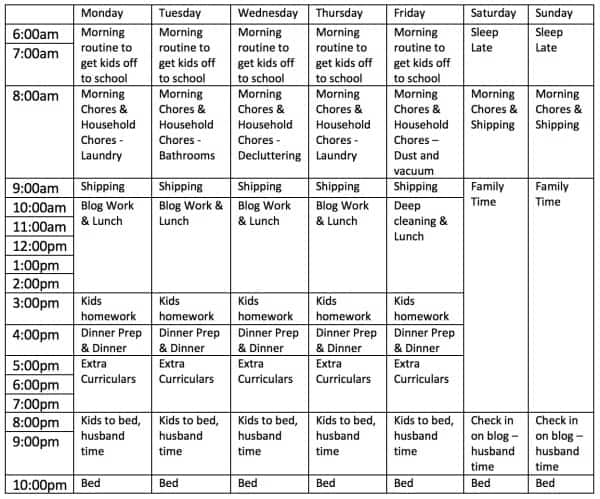
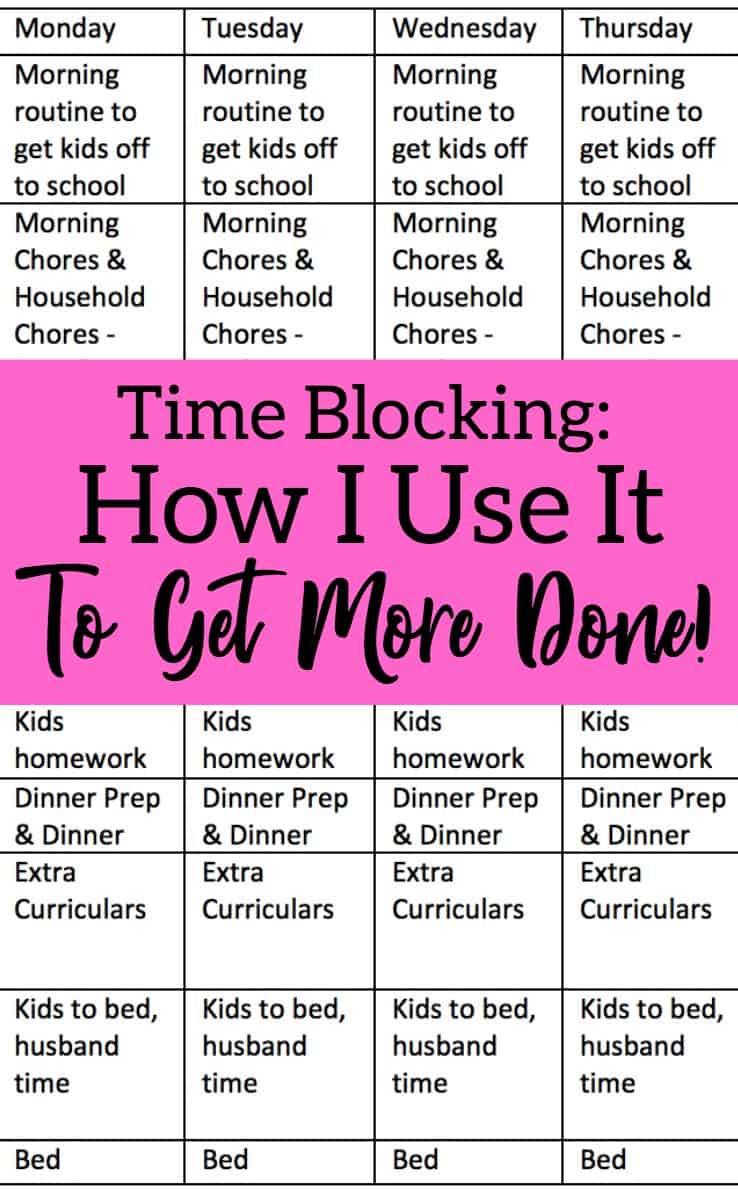
    Here’s a look at my real life schedule. Obviously, my schedule won’t work for anyone but me. However, you can create your own blocked schedule. Simply write down the time you wake up until the time you go to sleep. Then, begin putting your daily tasks into blocks. Your blocks can be as short as 30 minutes to as long as the whole day. It truly just depends on your needs. If you work a 9am to 5pm job, you may only need to time block your evenings and weekends.

    Time Blocking: How I Use it to Be More Productive - Great for small and craft business owners - by cuttingforbusiness.com

    What Happens If I Don’t Finish Something in the Allotted Time?

    If you are working on something that isn’t finished and your schedule switches to the next time block, you stop what you are doing and move on. When I first started with time blocking several years ago I scheduled one hour daily as catch up time. As I got used to time blocking and worked on my schedule, I was able to remove it.

    Looking for more information on time management? Head to my Pinterest board at this link.

    Was this post helpful? Save the image below to Pinterest.
    Time Blocking: How I Use it to Be More Productive - Great for small and craft business owners - by cuttingforbusiness.com

  • Spending Audits: Why You Need to Do Them Regularly

    Yesterday I talked about separate bank accounts in your craft business. Today, let’s look at expenses. Do you ever ask yourself: Where does all my money go? Or, why don’t I have as much money as I thought I did in my business bank account? I know I do! A spending audit is an easy way to see where your money is going.

    How to Conduct a Spending Audit in Your Craft Business

    I do spending audits every single month. If that’s too much for you, feel free to do them quarterly.

    1. Log into your online accounting program and print out an expense statement. How you do this will vary depending on what system you use.
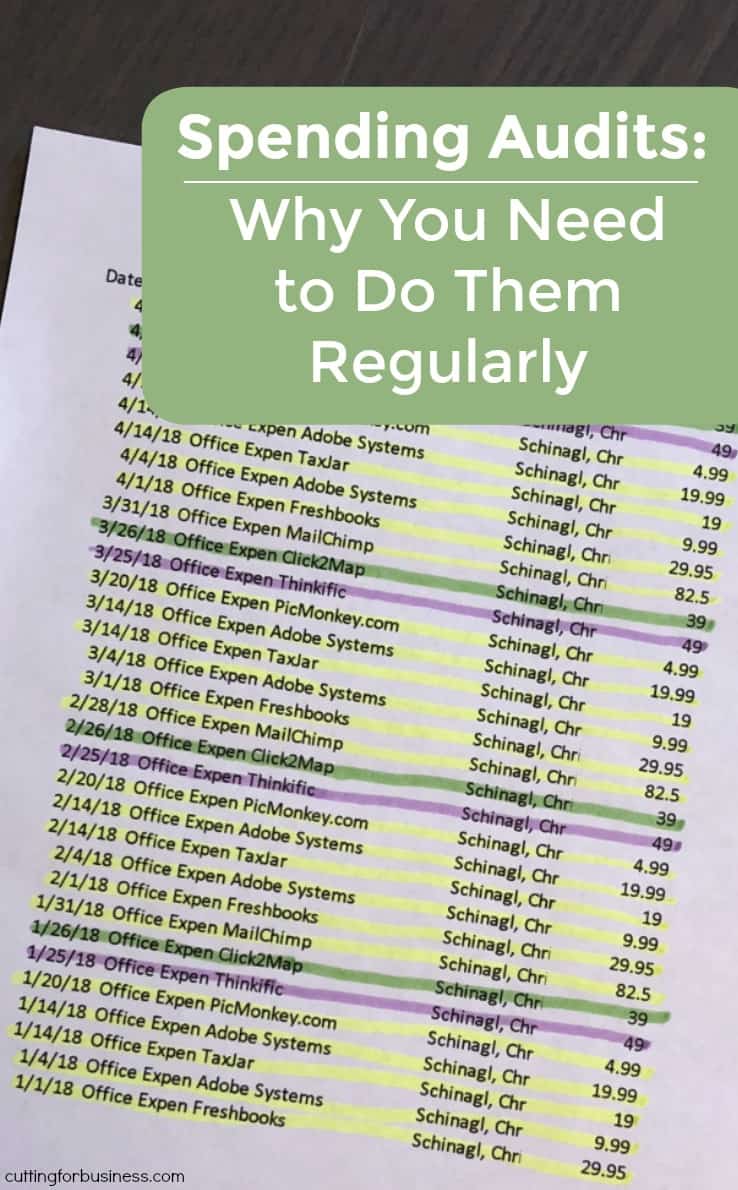
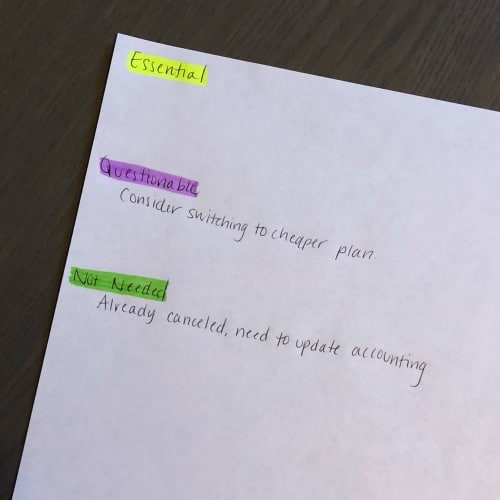
    2. Get out a blank piece of paper and three different highlighters or markers. On the piece of paper, write Essential, Questionable, and Not Needed. Highlight each of them using a different color. This will serve as your ‘key’ while you are going through your expenses. Also, it serves as a place to write any notes as you go. Spending Audits: Why You Need to Do Them Regularly - A good read for small home craft businesses - by cuttingforbusiness.com
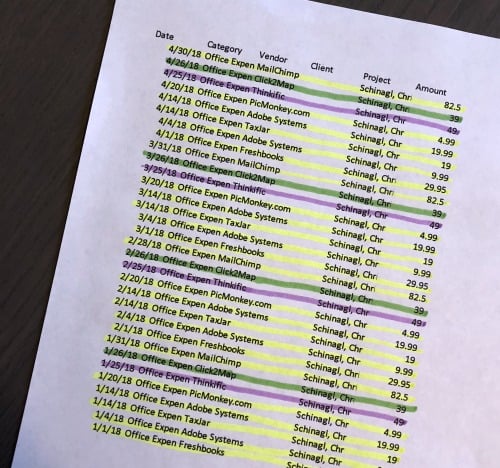
    3. Grab that log of expenses and one by one start going through each line item. Highlight each expense with the appropriate color for Essential, Questionable, and Not Needed. Spending Audits: Why You Need to Do Them Regularly - A good read for small home craft businesses - by cuttingforbusiness.com

    Taking Action on Your Spending Audit

    1. After you’ve finished your spending audit, take action:
      1. For things you’ve highlighted as Essential: Leave them alone. These are the things that you need to run your business.
      2. For things you’ve highlighted as Questionable: Decide whether or not you need to purchase these items again. Or, you could find a new supplier for the item that is cheaper.
      3. For things you’ve highlighted as Not Needed: Immediately remedy the problem. For example, if you’ve found that you are on autopay for a service that you no longer use. Cancel it right then and there! Or, if you’ve recently purchased something you are never going to use, return it or resell it to recoup the money in your business.

    It simply isn’t enough to record your expenses as you go. You need to monitor them. You may just find that regular spending audits will kelp you stay laser focused in your spending.

    Tip: The more often that you do spending audits, the easier it will get. If you need help with accounting, head to this post.

    Was this post helpful? Save the image below to Pinterest.
    Spending Audits: Why You Need to Do Them Regularly - A good read for small home craft businesses - by cuttingforbusiness.com

  • In Their Words: How Real Craft Business Owners Deal with “I Can Make That!” Comments

    As a craft business owner, one of the last things you want to hear from customers is, “I can make that!” Whether they write it on your social media posts or tell you (or a friend) while they are browsing your craft booth at a show; dealing with it gracefully can be tough.

    What worked for me when I did craft shows was to engage the customer offender person in conversation like, “That’s awesome that you love making XYZ product, too! Then you know how time consuming they are!” And then, I move on. Here’s what other craft business owners do:

    How Real Craft Business Owners Deal with ‘I Can Make That!’ Comments

    Loved this post? Save it to Pinterest.

    In Their Words: How Real Craft Business Owners Deal with "I Can Make That!" Comments - A great read for craft show sellers, Etsy sellers, and Silhouette or Cricut crafters - by cuttingforbusiness.com

  • 10 Steps to Start Your Own Blanks Buy In/Co-Op Group

    If there’s one thing that crafters love… it is discounted prices. I have had a number of Cutting for Business readers ask how to set up their own blanks buy in groups – so today I’m tackling the topic.

    First, what is a blanks buy in (also called a co-op) group? It’s a group of crafters that bands together to purchase large quantities of blank goods or craft supplies directly from a manufacturer. By placing an order together, buyers can negotiate lower prices. Essentially, the owner of the group becomes the ‘middle man’.

    How to Start Your Own Craft Blanks Buy In Group

    1. First, figure out how you will make money. There’s two different ways to make money: 1) Upcharging members for the blanks they purchase. For example, if you are purchasing tote bags from a manufacturer for $3 each, you could charge members $5 per bag. 2) Charging members a buy in fee. This fee is on each order placed and is generally $1 to $3. Beware: If you upcharge too much, members will know and will likely not use or recommend your group. Similarly, if your buy in fees are too much, members will shop elsewhere.
    2. Decide whether or not you have the time and space to host a buy ins. You’ll need space to store the bulk order while you divide it up and space to store packaging materials. You’ll need the time to create and send out invoices and package each buyer’s order then ship it to them.
    3. Locate products that you feel would be good sellers. Do some research and make a list.
    4. Register your business. If you want to buy directly from manufacturers, you’ll need to have a registered business. Manufacturers generally won’t sell direct to the public. If you are looking for manufacturers overseas, Alibaba is a good place to start. Learn more about Alibaba in this blog post.
    5. Form relationships with manufacturers. This is usually as easy as sending a message through a marketplace, an email, or calling them. After you locate manufacturers that you’d like to work with, ask for them to send a sample product for you to review. The manufacturer may send it free of charge or they may ask you to pay for it.
    6. If you plan to order products from overseas (like China), get familiar with the customs duties involved with importing goods to the United States.
    7. Now, it’s time to start your group. Most buy in groups use Facebook Groups to communicate with members, but you could also use a website. When creating your group, be sure to include information about the group, group rules, and how members can reach out for help.

    Hosting Your First Buy In

    1. After you’ve received samples and negotiated a price with the manufacturer, you will want to photograph the products in the buy in or get permission from the manufacturer to use their photos.
    2. Then, create a spreadsheet that members can edit to place their order. Once you’ve got it ready, upload it to your group. Be sure to tell members about any minimum order quantity, colors available, and the buy in closing date.
    3. Once the buy in has closed, send members an invoice for their order. Your invoice can either cover their product order and shipping from you to them, or you can invoice shipping costs once the products arrive.
    4. After all members have paid, place the order with the manufacturer.
    5. Be sure to keep members up to date with the expected arrival date of the products and the expected shipping date from you to them. Always share delays with all members.
    6. Once the products arrive, divide them and ship them to each member.

    Buy in groups can be profitable, but they aren’t a ‘get rich quick’ scheme. If you are truly interested in starting your own buy in group, I’d recommend you first join some existing groups to see what works and what doesn’t work.

    Also, there are a number of  ‘Beware of buy in groups’ and ‘Bad buy in groups’ Facebook Groups. If you create a buy in group, I would become a member of these groups as well to monitor your group’s reputation.

    Was this post informational? If so, save the image below to Pinterest.

    10 Steps to Start Your Own Blanks Buy In/Co-Op Group - Great for Silhouette Portrait or Cameo and Cricut Explore or Maker looking to getting into selling products - by cuttingforbusiness.com

  • 4 Reasons Your Craft Business Needs a Separate Bank Account

    Let’s talk bank accounts and your Silhouette or Cricut craft business for a few minutes. Earlier in the year, I had a craft business owner email me for advice about the easiest way to separate her business expenses from her household expenses when she was preparing to file her federal taxes. She told me that she had already spent hours trying to go through account statements to see how much she had spent for business purposes. After giving her a few tips, I also advised her to open a business account for her business so that she wouldn’t have the same issues next year.

    Let’s take a look at some of the reasons why you want to have a separate bank account solely for your business.

    4 Reasons Your Craft Business Needs a Separate Bank Account

    1. It’s timesaving. As I mentioned above, having a separate bank account allows you to easily see how much you are spending and making in your craft business. Come tax time, it’s pretty easy to locate all your expenses and income.
    2. It’s easier to control your business cash flow. When your business and personal transactions are all mixed together, how can you tell how profitable or not profitable your business is? I mean, you can’t log in and check your business bank account balance if you don’t have one!
    3. It’s required for most registered businesses. For most business structures (like LLC, Corporation, or Partnership), you are required to keep separate business accounts and not comingle business and personal transactions. (Note: For sole proprietorships in most states, you are not legally bound to have a separate bank account since the sole proprietorship is an extension of yourself.) Additionally, if you ever have an IRS audit, they may argue that expenses you’ve deducted as business related are personal related. For example, what about monthly bank charges? In a comingled account, do they fall under personal expense or business expense? If you had a business account, they’d definitely fall under business expenses.
    4. It’s against the bank policies. If you read to ‘fine print’ terms and conditions for your personal bank account, you are likely to find out that it’s against the bank’s policies for you to use a personal account for business purposes.

    Now, where to find an inexpensive business account? Start with the bank that you use for your personal accounts. Since you are an existing customer, they may be able to give you a good deal or free business account.

    Was this post helpful? Save the image below to Pinterest.
    4 Reasons Your Craft Business Needs a Separate Bank Account - A good read for Silhouette Portrait or Cameo and Cricut Explore or Maker crafters - by cuttingforbusiness.com

  • Internet Sales Tax Legislation – What Craft Business Owners Need to Know

    Internet sales tax laws are changing the way that both large and small businesses collect sales tax. There has been various federal legislation trying to make its way into law over the last several years – but as of 2020 – it hasn’t happened yet.

    As a small business owner, the best thing you can do is stay up-to-date with the Internet Sales Tax Laws. 

    Current Sales Tax Laws

    Under current federal laws in the United States, sellers are required to collect and remit sales tax to states where they have nexus. Nexus is a fancy term that means that the business is registered in that state.

    For example: As a business based in Florida, I am required to collect sales tax from buyers in Florida and remit it to the state of Florida. If my business also had a warehouse in Texas, I would be required to collect and remit sales tax in Florida and Texas. Similarly, if I were based in North Carolina, I would be required to collect and submit sales tax in North Carolina.

    The Problem with the Current Laws

    Under the current federal laws, states feel they are missing out on sales tax collection when internet purchases are made from out of state.

    Current State Legislation

    Since the federal government hasn’t passed a law, states have been busy creating their own laws regarding sales tax on internet purchases. It’s nearly impossible for me to keep up with all the changes in all 50 states. Instead, I scoured the internet and found this awesome chart to help you. Read it, understand it, and bookmark it. 

    Selling Through Etsy

    Wait! Before you go, did you know that if you are selling through Etsy they are likely already collecting and remitting sales tax on your behalf? Read more at this link. A word of caution though: Some state requirements are based on the number of transactions you’ve done in the state. If you sell 20 things on Etsy in a particular state, but 200 to the same state off Etsy – Etsy might not correctly be collecting and remitting sales tax on your behalf because they have no idea about the off Etsy sales you’ve made.

    Was this information helpful? Save it to Pinterest.

    Internet Sales Tax Legislation - What Craft Business Owners Need to Know for Silhouette Portrait or Cameo and Cricut Explore or Maker Crafters - by cuttingforbusiness.com

  • 5 Ways to Slow Down Orders in Your Craft Business

    Need to slow down orders in your craft business? Whether you are thinking towards summer or you stumble across this article later during the Christmas rush; there’s times in your craft business when it may be too busy to keep up. And that’s ok. If you are a one person shop owner, it is likely that you’ve got a lot on your plate.

    No matter whether you just need a break or you’ve had something come up, let’s take a look at five ways to slow down orders in your craft business.

    5 Ways to Slow Down Orders in Your Craft Business - cuttingforbusiness.com.

    5 Ways to Slow Down Orders in Your Craft Business

    1. Raise your prices. This is pretty much a nod to Economics 101 – it’s simple supply and demand. When the demand is high, you raise the prices. When the demand is low, you lower the prices. Put simply, if you are too busy with orders, raise your prices. This will cause some customers to wait until the price is lower before they order. And, you’ll be making more for doing the same amount of work. If you raise your prices and the orders don’t slow down, raise them again. (Psst! The pricing in your craft business should be changing regularly anyway.)
    2. Lengthen your turnaround time. If you are having a hard time keeping up with the orders flowing in, lengthen the amount of time before the orders will ship. This not only gives you more time to work on the orders, but it will deter some customers from placing an order (especially those last minute types).
    3. Stop doing custom work. While this won’t work in all situations, if you sell a mix of ready to ship and custom designed products, stop accepting new custom work. It’s no secret that custom work takes longer to complete than ready to ship products. If you are behind, stop taking on custom requests. And, custom work might not even be the best for your shop.
    4. Remove your products from some marketplaces. If you sell products in multiple places (some on Facebook, some on Etsy, others through your website, and so on), sell out products in the smaller venues and only take orders from your most profitable marketplace. This ultimately gives your products less visibility and will slow down the amount of orders you have.
    5. Place your shop on vacation mode/sell out your products. Debates fly on the internet about the adverse effects of placing your shop on vacation mode – whether it is on Etsy, Amazon, or somewhere else. Putting your shop on vacation mode is quick and easy to do and will definitely stop orders. Let me offer you a quick alternative: If you are able to keep up with the messages in your shop and you don’t have thousands of products, consider selling out your products instead of placing your shop on vacation mode. This will also stop orders from coming in.

    These are all temporary solutions to slow down your orders. Don’t forget that once you’re able to handle the flow of orders again, reverse whatever steps you took to slow down orders.

    And remember, if you are researching on how to slow down orders in your craft business – you must be doing something right!

  • 100+ Hashtags for Craft Businesses to Use on Instagram

    Oh Instagram! It seems to be the social media network that Cutting for Business readers struggle with the most. One thing I keep seeing is craft businesses trying out Instagram but not using hashtags in their captions! Today, I’ve compiled a list of 100+ hashtags for your craft business to use.

    Stop! Before you read any farther: If you don’t know how to effectively use hashtags on Instagram read this post first.

    100+ Hashtags for Craft Businesses to Use on Instagram

    #silhouette
    #silhouetteportrait
    #silhouettecameo
    #silhouettecameo3
    #cameo
    #silhouetteamerica
    #cricut
    #cricutexplore
    #cricutexploreair
    #cricutexploreair2
    #cricutmaker
    #craft
    #crafts
    #crafter
    #maker
    #makersgonnamake
    #silhouettebusiness
    #cricutbusiness
    #craftbusiness
    #wahm (stands for work-at-home mom)
    #smallbusiness
    #entrepreneur
    #handmade
    #homemade
    #oneofakind
    #etsy
    #etsyshopowner
    #shopify