Category: Starting Your Business

  • Selling on Creative Fabrica: FAQ

    I recently set up a shop on Creative Fabrica. I’ve found it different from other marketplaces I’ve sold on, so I wanted to share my experience setting up my shop – and answer some FAQ along the way.
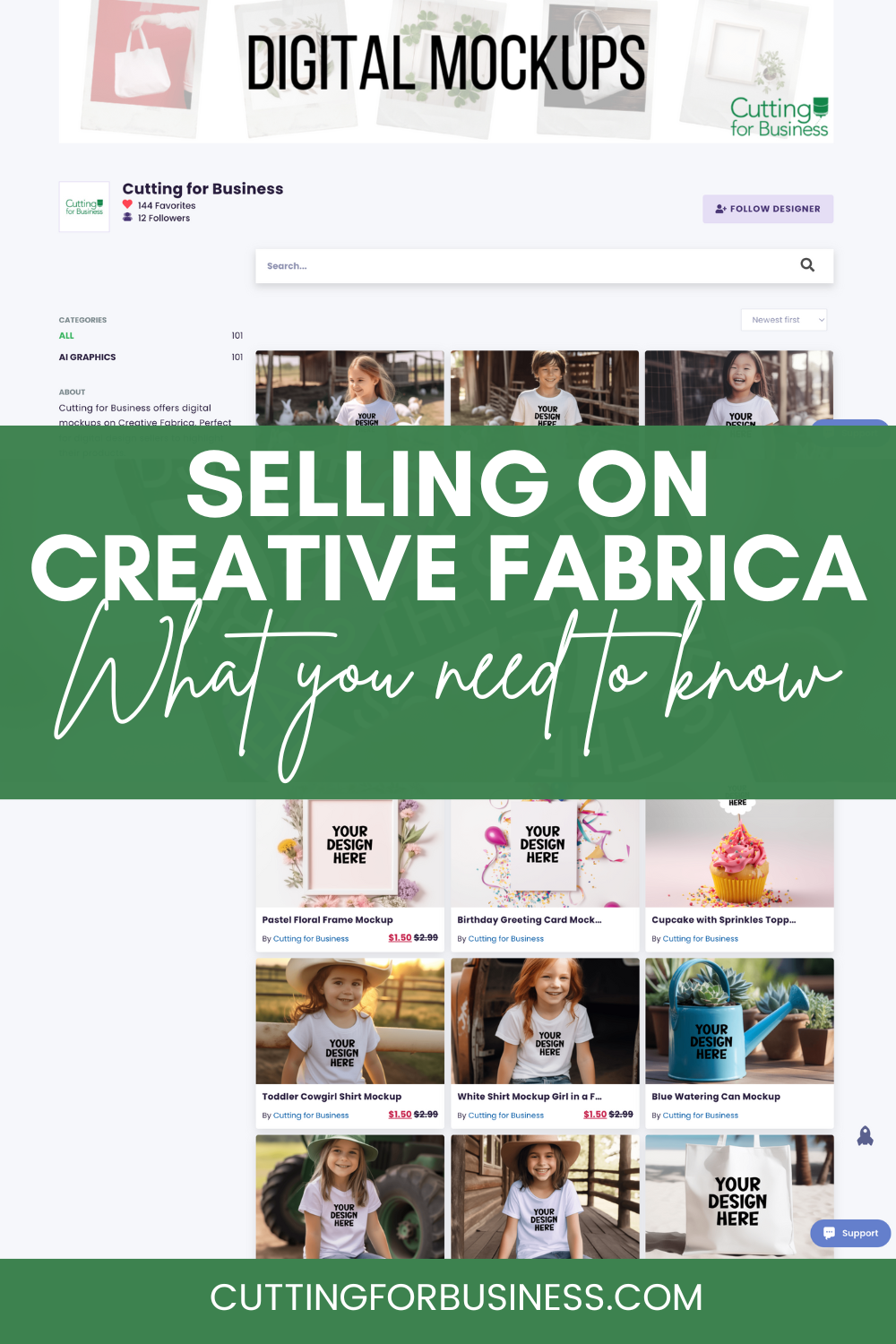
    Selling on Creative Fabrica - cuttingforbusiness.com

    What is Creative Fabrica?

    Creative Fabrica is an online marketplace for digital goods. At the time of writing this article, Creative Fabrica has more than 8 million digital products for sale and 50,000+ designers.

    Launched in 2016, Creative Fabrica and Cutting for Business have a long history together. I’ve been an affiliate since they launched their affiliate program, have written blog posts and taught a class on their AI called CF Spark, and have purchased more products than I can count over the years.

    Before you read this article, transparency is so important to me: I was not contacted by Creative Fabrica to write this post. I did it only to share my experience with the marketplace.

    What Can You Sell on Creative Fabrica?

    Basically, you can sell any digital asset. These include:

    • Design files for Silhouette, xTool, Cricut, Glowforge, and more.
    • Product mockups.
    • Digital backgrounds.
    • Fonts.
    • Stock photos.
    • Knitting and crochet patterns.
    • Online courses.
    • …and so much more.

    How Much Does it Cost to Sell on Creative Fabrica?

    Listing a product on Creative Fabrica is free. Additionally, there is no cost to open a store.

    How to Set Up a Shop on Creative Fabrica

    To sell on Creative Fabrica, you first apply for a shop using this link: Apply for a Creative Fabrica Shop.

    After filling out a short application with digital product samples, you’ll need to be approved. My shop was approved in a day or so.

    How to Create a Listing on Creative Fabrica?

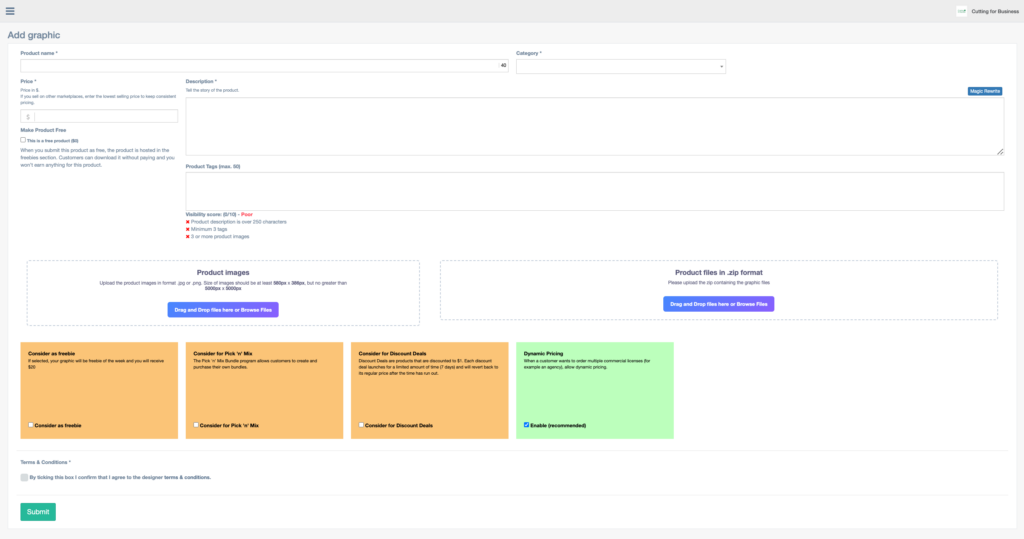
    Creating a listing on Creative Fabrica is straightforward and easy. Here is a screenshot from my dashboard of what the listing creation looks like:
    Screenshot of listing a product on Creative Fabrica - cuttingforbusiness.com

    To create a listing on Creative Fabrica, you’ll add a product name, choose one category, set a price, add a description, add product tags, upload product images, and add your product files in a zip file.

    Then, you’ll choose if you want Creative Fabrica to consider your product for three different promotions on their site: 1) Consider as a freebie. If your product is chosen as a freebie, you’ll receive a flat rate of $20. 2) Consider for Pick ‘n Mix. This option allows Creative Fabrica users to create their own bundles. 3) Consider for Discount Deals. This option allows Creative Fabrica to change your price to $1 for a limited amount of time and promote your product in their Discount Deals promotion. Finally, you’ll be able to opt in to Creative Fabrica’s dynamic pricing for discounts on agency licenses for your product.

    Lastly, you’ll agree to the designer terms and conditions.

    Your product will then go to the review team and (hopefully) be listed in your Creative Fabrica shop.

    How Much Money Do You Make on Creative Fabrica?

    There are two different ways to make money on Creative Fabrica: Selling your digital products and using your affiliate links.

    Selling your digital products: You can set the price for your digital products. Creative Fabrica takes 50% of your sale price. In the world of online marketplaces, I think this is hefty. However, Creative Fabrica only takes 25% of your sale price when you refer the sale through your affiliate link. For products of yours that are included in Creative Fabrica’s promotional bundles or sold to Creative Fabrica’s customers with subscriptions, sales are split through a point system. (Note: There is extensive documentation available to designers regarding the point system. Unfortunately, Creative Fabrica requests that it not be uploaded publicly. If you become a designer, you’ll be able to access it.)

    I think it’s important to remember that while the commission split is high, you have to remember that one product may sell over and over again. It becomes passive income when you upload a product once and it can sell for years to come.

    Selling through affiliate links: When you become a designer on Creative Fabrica, you are automatically given an affiliate account. You can use your link to promote your products or other products on their site. You’ll earn a varying percentage on affiliate purchases: 25% of whatever a customer pay for a product and 20% of subscriptions.

    How Do You Get Paid on Creative Fabrica?

    All money you earn is collected in a digital wallet. You can then request a payout to your Paypal account, a bank transfer, or Payoneer.

    Payments are then sent in about a week. Minimum payout amounts and transaction fees vary depending on how you choose to get paid.

    What About Licensing on Creative Fabrica?

    All products you list on Creative Fabrica are subject to their blanket commercial use license. Read their license.

    Unfortunately, you cannot add your own license to your listings on Creative Fabrica. So, if you wanted to list a digital product for personal use only – you wouldn’t want to list it on Creative Fabrica.

    Some Quirks About Selling on Creative Fabrica

    Up until this point in this article, everything has been pretty standard: Apply for a shop, get approved for a shop, enter your shop settings, and list your products.

    Now, let’s talk about what I call… quirks about selling on Creative Fabrica:

    1. Creative Fabrica is a juried marketplace that requires approval before listing. This means that every listing you create needs to be approved before it’ll be live in the marketplace. To me, this is not a big deal. It keeps inappropriate products out of the marketplace. And, product listing approval has always been a day for my products. Since I’m in the US and Creative Fabrica is in the Netherlands, I submit products throughout the day and they are approved in the middle of the night and in my shop by the time I wake up.
    2. Once your product is listed, you can only make limited edits. This goes along with Creative Fabrica being a juried marketplace. Once your product is listed, you can only edit the product title, the product settings, the product tags, the price, and the featured images. You cannot edit the file you uploaded, the product description, or the product category. This means you need to check and double check your product listing for typos and errors before submitting it. (Note: You can submit an email to Creative Fabrica to have your product updated – but I have not done this – and honestly, it seems like a hassle.)
    3. Deleting a product from Creative Fabrica takes up to 3 months. This is included in the Designer Terms & Conditions you agreed to when opening your shop. I find it odd that I cannot delete a product right away. But, is it a deal breaker for me? No.
    4. You cannot offer coupons or single product sales. Within your Creative Fabrica shop, you cannot create coupon codes for products, or put a single product (or a group of products) on sale. Any promotion that you run in your shop will apply to all products in your shop. Additionally, you can only list shop promotions for 50% off, 60% off, 70% off, 80% off, or 90% off.

    How My Shop is Doing on Creative Fabrica & Will I Continue to List There?

    My shop has been open for only about a week at the time of writing this article – with around 100 products. While I haven’t had any sales, I have had several downloads of my free products (no income for those), several users have followed me, and I’ve amassed some favorites from other users.

    I will continue listing on Creative Fabrica, a few listings every week to keep my shop fresh. I’m hopeful to get some of my products chosen for upcoming Creative Fabrica promotions.

    Do you think you’ll sell on Creative Fabrica?
  • 16 Digital Craft Businesses You Can Run From Home

    Now that we are a few years out of the pandemic, when we look back we realize that not everything that came out of the pandemic was bad. When people stayed home, they relied more on online purchases and businesses. I truly believe this kickstarted our era of ‘work from home’ jobs and careers as we know it.

    Did you know there are a number of digital craft businesses that you can do 100% online? This means: No making products, no physical inventory, and no shipping products. Not only can these businesses be 100% run online, you can also start and grow them from anywhere in the world. (And, who doesn’t dream of waves splashing your feet as you work on a remote beach?)

    If you are thinking of reinventing your business, adding a digital component, or starting a new business; I’ve compiled some ideas for you of digital craft businesses. 

    16 Digital Craft Businesses You Can Run from Home - cuttingforbusiness.com.

    16 Digital Craft Businesses You Can Run from Home

    1. Selling SVG Cut Files, Patterns, Fonts

    If you have already been designing files for yourself, this should be an easy transition. To get the most exposure to your files, I’d suggest opening and maintaining multiple shops on several marketplaces. I have more advice on selling SVG cut files.

    2. Selling Mock Up and Stock Images

    Online sellers and influencers need mock up and stock images to sell their cut files and products. For this business, you’ll take photographs at home, edit the images, and sell them online.

    3. Take Online Drawing Requests

    Do you hand letter or can you draw? Start taking paid commissions. In fact, Fiverr might be a good place to start.

    4. Online Teaching

    Love instructing others? You can teach small or large groups online, or even private one-on-one classes using videos or livestreams. You can offer classes to create specific projects (example: a t-shirt or a wreath) or you can teach software skills (example: tracing in Silhouette Studio or designing a card in Cricut Design Space).

    5. Photo Editing

    It’s no secret that great photography helps sell products. If you’ve got editing skills and experience, start offering photo editing services to craft business owners of product photos that they have taken.

    6. File Digitizing

    Crafters need files in different formats than they may have. If you can offer digitizing services, start a business from it.

    7. Print on Demand Designer

    If you love creating and designing products, you can transition your existing business to be 100% digital by using print on demand drop shippers like Amazon Merch or Printful among others. 

    8. Graphic Designer

    Small business owners need business logos, shop banners, sale graphics, product packaging, and more. If you’ve got experience in graphic design, start promoting yourself to crafters. You can sell the digital files to customers, or place orders through printers and have physical products delivered to your customer through dropshipping.

    9. Web Design

    Trust me when I say there are a lot of small business owners out there who would like a website of their own but don’t have the ability to create one. If you can, start offering either premade templates or websites or custom web design work. If those are too advanced for you, consider installing and setting up existing templates for customers.

    10. Search Engine Optimization Services

    SEO stands for “Search Engine Optimization Services”. Basically, it helps small business owners optimize their content to be seen in search engines – like Google. Guiding and specializing in working with craft business owners will give you a niche that is already established, but underserved. Need more education? Check out Grow with Google.

    11. Proofreading

    Have a knack for grammar correction and finding typos? Start a proofreading business that assists online craft sellers.

    12. Social Media Creation & Management

    There’s a need online for both creation of social media graphics and content and the management/scheduling of it. If these are your strengths, consider starting a business around it – and crafters are a great customer base to focus on.

    13. Business Naming Services

    I get asked all the time about suggestions to name a business. And, I see requests of this type all the time. If this is a strength of yours – start offering your services to crafters.

    14. Virtual Assistant

    Have a wide variety of online skills? Offer yourself as a virtual assistant to craft business owners. If you have experience running your own craft business, you’ll be even more valuable!

    15. Craft Blogger/Magazine Editor

    This is obviously near and dear to my heart, but pick a craft related topic and start a blog focusing on it. My best piece of advice: there are a lot of ‘lifestyle’ blogs that cover recipes, parenting, and DIY. Instead of putting yourself into a huge pool of competition, pick a specialized niche and start writing. If a blog isn’t your thing, what about an online magazine that covers the craft industry or an aspect of it?

    I realize that you may not have the skills to start or run many of these types of businesses right now. However, with the extra time you’ve got on your hands right now, now is the perfect time to learn.

    16. Social Media Influencer

    Love using social media? Turn your love into an income stream. If I were you, I’d focus on one platform to start: Instagram, TikTok, Pinterest, or Facebook.

  • Do You Need Suffocation Warnings on Packaging in Your Craft Business?

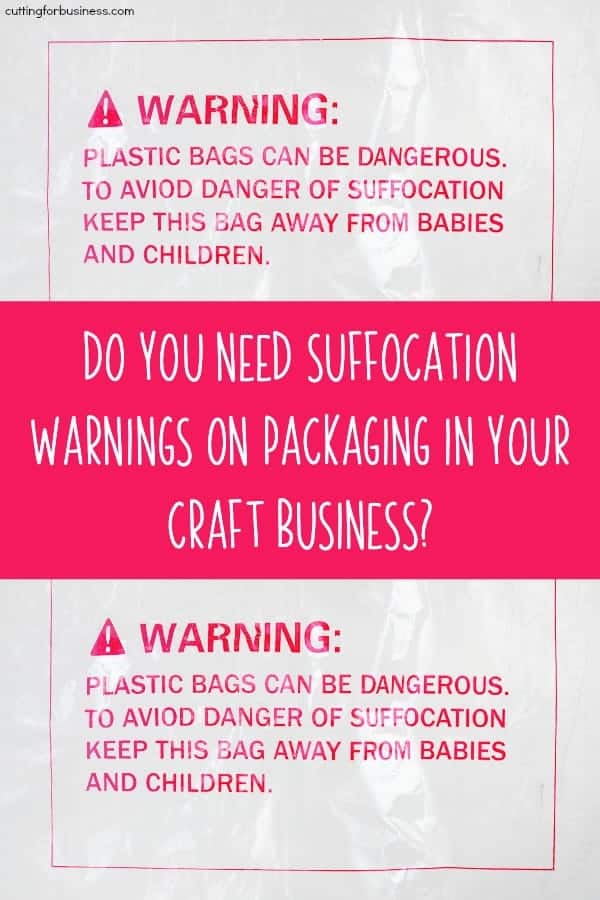
    Serious stuff today, craft business friends. Every year, babies and toddlers die from suffocating on plastic packaging. Today, let’s take a look at the laws surrounding what warnings you need on your plastic packaging. This is especially important for at home craft businesses, because most of us create our own packaging.

    Laws Related to Suffocation Warnings on Packaging

    • There are no Federal laws that govern suffocation warnings on bags in the USA.
    • There are State laws that govern suffocation warnings on bags in the USA.
      • States currently with laws in place: California, Massachusetts, New York, Rhode Island, and Virginia.
    • Several cities across the USA have also adopted laws for suffocation warnings on bags.
      • The major cities include Chicago, Illinois and New York, New York. There are a handful or so of additional cities in the USA that have their own laws.
    • Canada has similar laws related to suffocation warnings.
    • Some marketplaces (namely Amazon) has its own requirements for FBA products. Currently, Etsy has no such policy in place.

    Legal Requirements for Suffocation Warnings

    • Unfortunately, the requirements in each of the cities and states vary. I’m posting this information to make you aware. Now that you are aware that there are laws in place, I want you to take a few minutes today and look up information related to where you live and sell. A search on Google for ‘suffocation warning bags YOUR STATE or YOUR CITY’ works well.
    • In general, suffocation warnings are required on bags that are 1 mil or less in thickness and have an opening of 5 inches or more.
    • Suffocation warnings can be preprinted on the bag or attached with a label.
    • Warnings are generally not required on outer packaging (like a poly mailer) because it is usually thicker than 1 mil.
    • Ziploc bags generally do not require suffocation warnings because they are thicker than 1 mil.

    Sample Warning

    • ‘To avoid danger of suffocation, keep this plastic bag away from babies and children. Do not use this bag in cribs, beds, carriage, or playpens. This bag is not a toy.’

    My Thoughts

    Many bag retailers offer bags that are preprinted with suffocation warnings. For example, this Amazon search brings up hundreds of preprinted bags you can use in your craft business. This is a quick and easy step you can take to take the liability off of your business in case an injury occurs related to your packaging.

    As the world is beginning to get away from plastic packaging (like bags and straws), consider skipping the plastic altogether and offering no inner packaging or paper based inner packaging. You could even use 100% recycled papers for packaging and advertise that your company is eco-friendly!

    Was this information helpful? Save the image below to Pinterest to let others crafters know.

    Do You Need Suffocation Warnings on Packaging in Your Craft Business? A good read for Silhouette Portrait or Cameo and Cricut Explore or Maker crafters - by cuttingforbusiness.com

  • CPSIA Exemptions, Labeling, and CPCs for Crafters

    Let’s continue on our talks about CPSIA exemptions, labeling, and Children’s Product Certificates (CPCs) from yesterday. If you haven’t read this post yet, you’ll need to read it or nothing in today’s post will make sense.

    Again, my legal team would like me to remind everyone that I’m not an attorney and not giving out legal advice. The purpose of this post is to make you aware of the CPSC and the CPSIA. This post should serve as awareness and offer a place and reason for you to start or continue your own research.

    CPSIA Exemptions

    I detailed the CPSIA Small Batch Manufacturing exemptions in yesterday’s post. If you are exempt from lab testing under the exemptions, you’ll need to register for the exemption at this link on the CPSC website.

    Creating Children’s Product Certificates (CPCs) for CPSIA

    Children’s Product Certificates (or CPCs) are documents that you create for each of your children’s products. They basically state that your product complies with children’s product safety rules.

    CPCs must:

    • Be written.
    • Be in English.
    • Describe your product so that it can be identified.
    • Cite each Children’s Product Safety Rule the pertains to your product.
    • Contact information for the manufacturer (that’s you).
    • Date and place you manufactured the product.
    • Date and place that applicable testing occurred.
    • Identify any third party labs used in testing the product in the CPC. For small batch manufacturers, include your registration number instead.

    See sample CPCs from the CPSC at this link.

    Children’s Product Tracking Label Requirements Under CPSIA

    Children’s products must be permanently labeled with the following information:

    • Manufacturer name (that’s you).
    • Where and when the product was manufactured.
    • A batch number, run number, or other identifying information for determining the source of manufacturing. Now, for an at home crafter – the CPSC notes that you don’t need a new system with batch or run numbers. You just need enough information on your product that a customer would know who made it and how to reach you – even years down the road.

    Get more help from the CPSC at this link.

    Where to Get More Help

    The CPSC Regulatory Robot

    The CPSC has a great tool for small business owners called the Regulatory Robot. It asks you a series of questions about your product and gives you a guide to walk through to get compliant. Access it at this link.

    The CPSC Official Links

    Was this information helpful? Save the image below to Pinterest.

    CPSIA Exemptions, Labeling, and CPCs for Crafters - by cuttingforbusiness.com

  • 6 Tips for Running a Craft Business with a Chronic Illness

    People start craft businesses for all types of reasons, including not be able to work in a traditional job setting or role due to a chronic illness. Unfortunately, chronic illnesses are more common than not – but often aren’t talked about due to stigmas. Today, let’s talk about them. 

    There are many laws in place that protect those with chronic illnesses and disabilities when you work for someone else. Unfortunately, those laws don’t matter when you are your own boss. I recently had a chance to talk to a nurse whom I am good friends with and she helped me put together the tips below. For each tip she shared with me, I added real life examples related to craft businesses.

    6 Tips for Running a Craft Business with a Chronic Illness

    • Put yourself first. Your business should come second to your health. Always. While it may be tough, especially if you need the money – take time to recharge. In fact, schedule time in your daily routine to recharge yourself. This could be a nap, some yoga, some tv time, reading – whatever recharges your personal ‘batteries’.
    • Be honest and realistic with yourself. Running a craft business by yourself can be tough without a chronic illness. With a chronic illness, it is even more important to be realistic with your goals and time.
      • Create a flexible schedule. Keep in mind when creating your schedule that it isn’t set in stone. Your schedule can change due to doctor’s appointments or days when you cannot work. Accept this, it’s okay. 
      • Make your goals realistic and attainable. Saying that you’ll make and sell 500 widgets by the end of the month isn’t practical – even without a chronic illness. Making a goal of working on your business for 5 hours this week or month is an attainable goal. Due to the unpredictable nature of chronic illnesses, setting long term goals is often more productive than setting short term goals.
    • Think outside the box.
      • For example: If you can’t stand over a heat press pressing shirts, consider using a print on demand service or screen printer. In this case, you’d create the designs and outsource the printing. 
      • For example: Consider running a business that isn’t tied to fulfilling orders on your customer’s schedule. If you opened an Etsy shop selling SVG cut files, you upload them and customers purchase and download them.
      • For example: Stock premade, ready to ship products. It’s no secret that ready to ship products take less time and effort than custom orders. I’ve talked about this here.
      • I’ve got a great list of ways to be involved with a craft business that doesn’t involve selling directly to customers. Read it here.
    • Be open about it to customers, but don’t overshare. Customers are understanding. If you are comfortable talking a little bit about your chronic illness, go for it. If not, then don’t. 
      • For example: Your About Me page could provide insight on why you started a business and the challenges you face. Learn more about creating awesome About Me pages in this post.
      • Be cautious to not let your chronic illness overshadow your business. People don’t need to know every detail of every doctor’s appointment, struggle you encounter, or challenge you face.
    • Ask for help. Have a trusted friend that can commit some time to help you each week in your business? Maybe someone that isn’t took crafty, but would like to learn? Teach them your ‘tricks of the trade’ as you go. 
      • Realize that someone’s time is valuable. Consider splitting some of the income or paying them for their help.
    • Join communities for your specific chronic illness. Lean on them and learn from them.
      • The internet has helped us get more connected than ever. This means that there is likely a support group or foundation or organization for your specific illness or diagnosis. Join it and ask questions and get involved. Accept advice from people who are facing the same challenges.

    Whatever your chronic physical or mental illness may be – know that it doesn’t define you. While some days may be more challenging than others, keep at it.

    Was this information helpful? Save the image below to Pinterest.

    6 Tips for Running a Craft Business with a Chronic Illness - Silhouette Portrait or Cameo and Cricut Explore or Maker - by cuttingforbusiness.com

  • 100 Products to Make and Sell with Your Silhouette, Cricut, xTool, Romeo, or Juliet

    I’ve been away at a crafting conference all weekend and I am always in awe of the uniqueness of the products you can make with a crafting machine. It seems that every conference, my crafty eyes are opened to more and more things you can make with the machines – especially when you push the proverbial ‘envelope’.

    So, I got to work writing down some of the amazing craft products and items I’ve seen the last few days. Whether you have a Silhouette, Cricut, xTool, Romeo, or Juliet – take a read and get inspired with 100 products to make and sell with your craft machine.

    100+ Products to Make and Sell with Your Silhouette, Cricut, xTool, Romeo, and Juliet - cuttingforbusiness.com

    100 Products to Make and Sell with Your Silhouette, Cricut, xTool, Romeo, or Juliet

    Wood signs
    T-shirts
    Sports jerseys
    Spirit gear for teams
    Scarves
    Hoodies
    Socks
    Hats
    Leggings
    Sweatpants
    Infant bodysuits
    Leather jewelry and goods
    Embellished shoes
    Costumes
    Swimsuits
    Decorated cell phone cases
    Tumblers
    Mugs
    Wine glasses
    Beer steins
    Water bottles
    Puzzles
    Lanterns
    Cardstock banners
    Felt busy books
    Gift tags
    Embellished balloons
    Party favors
    Pencil pouches
    Cupcake & cake toppers
    Cupcake holders
    Birthday stat boards
    Clipboards
    First/last day of school/work signs
    Labels
    Growth charts
    Return address labels
    Coffee cup holders
    Greeting cards
    Advent calendars
    Drink koozies
    Popsicle koozies
    Pet tags
    Invitations
    Keepsake boxes
    Handkerchiefs
    Oven mitts
    Potholders
    Halloween treat bags
    Dish towels
    Wine bags
    Stove covers
    Light switch covers
    Aprons
    Tote bags
    Backpack hangers
    Cutting boards
    Spice jar labels
    Serving trays
    Herb garden markers
    Decorative plates
    Magnets
    Wooden hangers
    Keychains
    Plush toys
    Decorative glass blocks
    Pillows
    Pillowcases
    Car decals
    Decorated mason jars
    Lunch boxes
    Mousepads
    Business signage
    Backpacks
    Makeup clutches/bags
    Wall, window, and door decals
    Furniture stencils
    Earrings
    Bracelets
    Screen printing stencils
    Coasters
    Embellished candles
    Candle holders
    Embellished journals
    Scrapbooks
    Door mats
    Nail decals
    Paper flowers and plants
    Flower pots/cans
    3D paper sculptures
    Customized phone chargers
    Personalized earbud cases
    Custom tablet sleeves
    VR headset decals
    Passport holders
    Etched glassware & casserole dishes
    Stickers/planner stickers
    Wine and beer bottle labels
    Wine charms
    Cup koozies
    Beach towels
    Christmas ornaments
    Packaging for other small businesses
    Photo booth props
    Napkin holders/rings
    Shadow boxes
    Fabric appliques
    Embellished Santa/laundry bags
    Hair bows
    Bow ties
    Headbands
    Wedding and event seating charts
    Bandanas
    Themed center pieces
    Umbrellas
    Temporary tattoos
    Rhinestone projects
    Decorated toilet paper
    Pop sockets
    Party confetti
    Embellished bill organizers/budgets
    Garden flags
    Yard signs
    Home decor
    Holiday decor
    Decorated storage containers
    Wreaths
    String art
    Paper boxes
    School & classroom goodies
    Paper miniatures
    Photo frames
    Gravesite & memorial products

    What can you add to the list? Drop it in the comments and I’ll add it.

  • 6 Reasons to Wait to Start a Craft Business

    Did you have to read the title of this post twice? I know… I’m normally everyone’s cheerleader for starting their craft business, but today, let’s have a quick chat about reasons to wait to start a craft business.

    Why am I writing this post? I see it every year: You received a Silhouette or Cricut for Christmas, along with a few supplies. By early January, you are in business and starting your own online shop.

    While I commend your eagerness – it’s likely that you just aren’t ready. Here’s why:

    6 Reasons to Wait to Start Your Craft Business - cuttingforbusiness.com

    6 Reasons to Wait to Start a Craft Business

    You Don’t Know the Machine

    It doesn’t matter whether you received a Silhouette, Cricut, Glowforge, xTool, Brother, or any other machine. If you’ve only been using it for a few weeks, you don’t know enough about it to sell products.

    Sadly, most crafters find this out when their machine jams, refuses to cut, cuts too deep, and so on. If you give yourself time to experiment and explore your machine, you’ll naturally learn how to fix it when it isn’t working quite right.

    You Don’t Have a Niche

    Maybe you got the machine to make tee shirts, maybe you are interested in making cups. What I’ve found in working with thousands of craft business owners over the years is that most of them found their niche in something that isn’t what they thought it would be.

    You Don’t Know Enough About Design Copyrights, Trademarks, or Commercial Use Licenses

    Just like anything else, there are rules you have to follow if you plan on selling. Before you start your business, take time to learn the rules. Of course, the Cutting for Business blog is a great place to start. Learn about copyrights and trademarks or licenses.

    You wouldn’t give a person a stethoscope and call them a doctor. You don’t give a person a Silhouette or Cricut and call them a craft business owner.

    Christine Schinagl, cuttingforbusiness.com

    Your Family Isn’t Ready for Your Commitment

    Have a lot of free time? Love spending it with your family? It’ll be gone. When I ask craft business owners the number one thing that they didn’t expect when they started their craft business; over and over I hear it’s more time consuming than they expected. I truly recommend sitting down with your immediate family and discussing your choice to start a business.

    There’s a Lot of Competition

    I am not going to lie: There are certain areas in the craft marketplace that are saturated. I’m talking thousands of crafters offering not only the same products, but the same exact designs.

    It can be difficult and frustrating to try to break into one of these areas as a newbie. Always remember, uniqueness sells – and it sells well.

    Your First Projects Will Suck

    I hate to be bold, but it’s true. While the first projects you make will certainly hold a special place in your heart, they will be nothing compared to what you will make in a year from now.

    So, how long should you wait? While it differs for every crafter, I recommend at least 6 months of daily use of the machine. I feel that in that time, you’ll have time to learn the ins and outs of your machine, perfect your products, and do research about starting your business.

  • 6 Steps to Start a Craft Business

    Yesterday, I shared my thoughts about starting a business immediately after getting a Silhouette, Cricut, Glowforge, xTool, or other crafting machine. If you didn’t get a chance to read that yet, read 6 Reasons to Wait to Start a Craft Business, but know that I recommend you wait at least 6 months.

    Wondering what path I do recommend you taking as a new seller?

    6 Steps to Start a Craft Business - cuttingforbusiness.com

    6 Steps to Start a Craft Business

    Get to Know Your Machine

    Get your machine out everyday and experiment with it. Create as many different projects as you can. Find out what you enjoy making as you discover your niche. During this discovery time, you’ll also learn what to do when your machine isn’t quite working correctly.

    Start Gifting your Craft Projects to Your Friends and Family

    After you’ve redecorated your house twice with your creations, made your kids 32 shirts each, and hosted five parties with handmade decor – it’s time to start giving your crafts as gifts. Gift to your most honest, brutal family members who will give you their unbiased opinions about your work. Now is a good time to learn how to take constructive criticism, too. Trust me on this: Not all customer feedback will be positive.

    Sell to Your Friends and Family

    Start getting to word out to your family and friends that you will take orders and make products for them. And, it won’t be free. Find out why you should charge your family and friends full price.

    Sell to Strangers

    If you are still enjoying making and selling products, get yourself out there and start selling to strangers. I recommend using apps like Craigslist, Nextdoor, Mercari, Instagram, and Facebook groups to start. It’s also a good time to focus in on your niche and pick a good business name.

    Start an Etsy Shop

    I think Etsy is a great place to start your handmade business because there’s plenty of customers. You’ll be able to get the hang of regular orders and dealing with customers. You’ll be tied to deadlines and you’ll have an opportunity to work on your photography skills and branding. Want free listings on Etsy?

    Move to Your Own Website

    As you master your craft and become an expert in your niche, it’s time to save yourself some fees and move to your own website. I really recommend you keep both your own website and your Etsy shop; since Etsy can help push traffic to your own site. I prefer a WordPress based setup, but services like Wix work well, too.

    I’ve put together this plan based on years in the handmade world as a seller, then as a blogger who works with craft business owners on a daily basis. Think you’re ready to get started? Ask yourself these questions.

  • Free Printable Accounting Checklist for Craft Businesses

    Accounting always seems to be a sore spot when I bring up the topic in the Cutting for Business Insider’s Club. Actually, a few weeks ago I asked group members if their accounting was up to date in the Silhouette or Cricut small business. I wasn’t that surprised when a number of small business owners admitted that they were behind.

    There’s a funny thing about accounting: It can take hours, days, and weeks if you fall behind and have to play catch up. However, if you do tiny chunks of accounting every week, it doesn’t seem like much of a chore.

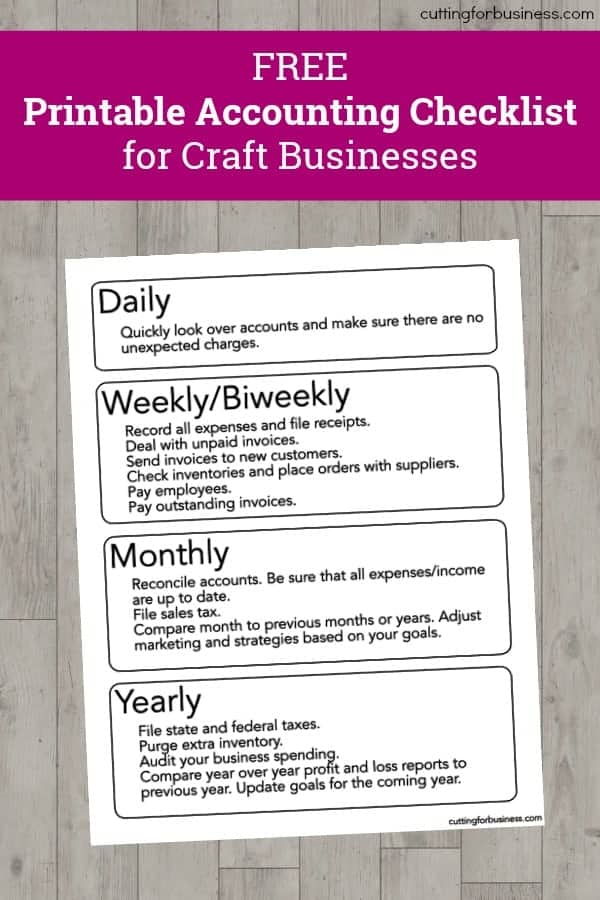
    Today, I’m sharing a checklist I created for Silhouette and Cricut small business owners to do small accounting tasks throughout the month so that it doesn’t snowball into a huge, overwhelming project.

    I realize that the checklist might not work for everyone, since accounting is not a ‘one size fits all’ situation. However, I urge you to take 30 minutes and create a similar checklist that works for your business.

    Ready to download? First, save the image below to Pinterest. Then download the free printable in the green box below. Need an accounting program? I’ve been a fan of Craftybase for years. Read more about it in this post.

    Free Printable Accounting Checklist for Craft Businesses - Great for Etsy shops - by cuttingforbusiness.com
  • What You Need to Know About Etsy’s New Billing Policy

    Last week Etsy announced changes to their method of billing shops for their Etsy fees. This change has been announced several times in the last few months and it has finally rolled out.

    What is Changes Did Etsy Make?

    Let’s refresh quickly:

    Old system: Shop owners sold products in their shop. On the first of each month, Etsy billed an outside credit card for the fees that shop owners accrued during the previous month.

    New system: Etsy fees are deducted in real time from your shop payment account. This includes listing and transaction fees, marketing fees, and shipping labels purchased through Etsy. If your fees are more than you’ve made in your Etsy shop, you’ll be billed the first of the month.

    What Do I Think of the New Billing Method?

    Personally, I think it’s great. Here’s why:

    • No more surprise charges at the beginning of each month. I know that a lot of Etsy owners don’t keep a close watch on their fees every month and their bill can be a surprise. No more!
    • This change will make it more obvious if your shop is making money. Sadly, I see a lot of shops that don’t make any money – and the shop owner doesn’t work out the numbers to actually realize this!
    • This should reduce the amount of scam shops. I’m talking about those shops that set up for a few months, have a bunch of sales, receive their funds, don’t ship the products they’ve sold, and close down the bank account before they can be billed. (Unfortunately, many of these are overseas.)
    • It’s a smart business move for Etsy. By taking their fees out immediately, they won’t have to chase down shops that don’t pay. This should free up time to spend elsewhere on improving their marketplace. As sellers, we want a healthy marketplace.

    Etsy’s New Payment Account Page

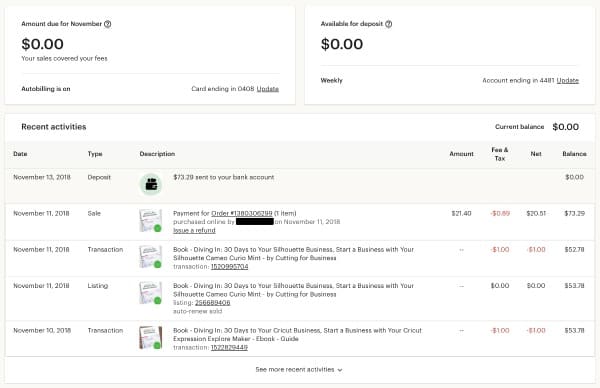
    In addition to new billing methods, Etsy has redesigned the payment account page. It’s pretty self explanatory, but it now shows the amount due to Etsy (in most cases, this will be $0), the amount available for deposit, and it breaks down the fees related to each listing. Here’s a peek:

    What You Need to Know About Etsy's New Billing Policy - A Must Read for Shop Owners - by cuttingforbusiness.com

    Read more about the changes at this link. What do you think of Etsy’s new billing method? Love it? Hate it? Let me know in the comments.

    Was this post helpful? Save the image below to Pinterest so another crafter can read it.

    What You Need to Know About Etsy's New Billing Policy - A Must Read for Shop Owners - by cuttingforbusiness.com