I’ve told you before: Videos are the “thing” on social media right now. Today, I’m sharing a quick (and fun!) way to add a sparkle effect to your videos. But first, Let’s look at the posts related to videos on Cutting for Business:
- 5 Tips for Better Live Videos
- Easy Video Mockups in Your Craft Business
- Tutorial: How to Create Animated Social Media Graphics
- Tutorial: How to Create a Video Thank You in Your Craft Business
- Advertising with Stop Motion Videos in Your Silhouette or Cricut Business
- How to Create Slideshows for Advertising Your Craft Business
- How to Use Flipagram in Your Silhouette or Cricut Business
Now, bring on the sparkle! Don’t you hate it when you photograph a specialty material and it looks dull in the photo but shines in real life? There’s an app for Apple devices called Kirakira+ that allows you to take video and it automatically adds a sparkle to anything reflective. (For the Android users, I couldn’t find anything that works similarly. I’m sorry. Although there are a few apps that look similar in your store.)
Tutorial to Use Kirakira+
It’s really simple: After downloading it in the Apple App Store, open it and choose the “kirakira” effect. Once open, you’ll simply record a video within the app. Here’s what the app interface looks like, along with a few notes:
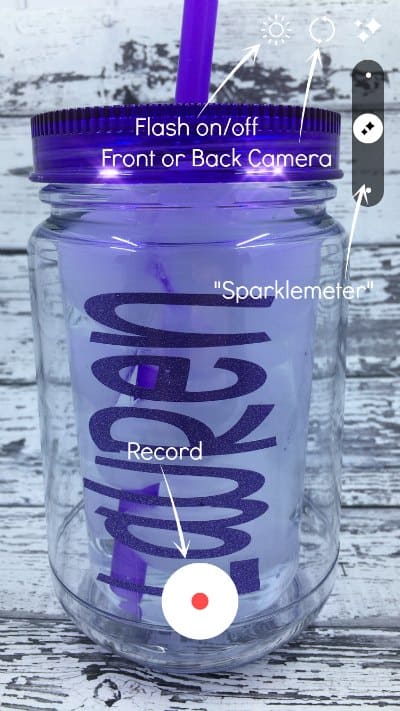
After recording your video, it will be saved to your camera roll and you can use it.
Here’s my sample video:
A few tips for using Kirakira+
- Use this sparingly! Everyone loves a little sparkle, but too much of a good thing is bad!
- Try this app with glitter materials, holographic materials, and reflective materials.
- The sparkle placement is automatic, however, you can manipulate it somewhat using the “Sparklemeter”. Also, for more sparkle, use a bright light and move the product or camera a lot. For less sparkle, use a darker room and keep the camera still (or move it only slightly).
- Unfortunately, you have to record your video using the app. At this time, it does not support importing existing videos.
- There’s other settings in the Kirakira+ App, go explore!
Wondering about the video? I shot the video in my Shotbox (read more here), the mason jar tumbler is this one (straw included) from Save A Cup, and the adhesive glitter vinyl is from this pack. The font I used can be picked up here.
Love this post? Save it to Pinterest:
Leave a Reply