Category: Growing Your Business

  • Sweepstakes, Contests, and Lotteries – Why You Need to Know the Differences

    I see a lot of Silhouette Cameo and Cricut small business owners using social media giveaways to promote their businesses. Overall, this is usually an effective way to grow your small business. However, I’ve seen a few lately that worry me. These are ones that state: “Get entered to win with a purchase” or “Purchase xyz product for a chance to win”. As small business owners, we can’t have giveaways that require purchases. Unfortunately, these types of giveaways are classified as lotteries – which are illegal. Let’s look more at this:

    3 Types of Giveaways

    Sweepstakes – These are random chance giveaways. All participants have an equal chance of winning the prize.

    • Examples: Pick the name of the winner from a hat or a random number generator.

    Contests – In these types of giveaways, a participant submits something and it is judged – then a winner is picked.

    • Examples: Cutest customer photo wearing a shirt you made, or best caption on a photo for your upcoming product line.

    Lotteries – In these types of giveaways, a participant buys their way in to get a chance to win. Lotteries in the USA are government run – and cannot be run by small business owners.

    • Example: Raffle tickets are sold for a chance to win a prize. (It’s important to note that in most states, raffles are allowed for non-profit companies – which most small businesses are not.)

    Who Regulates Giveaways?

    Sweepstakes, contests, and lotteries are regulated by the state or country in which the participant lives in. Additionally, Federal agencies such as the FTC and FCC oversee them.

    How to Be Sure You Don’t Have a Lottery

    1. Be sure that your giveaways fall into the definitions above of sweepstakes or contests. Steer clear of lottery style giveaways.
    2. Be sure that your giveaway has clear terms including: 1) The prize to be won, 2) Define who can enter 3) Have a clear start and end date 4) Detail how to enter 5) Explain how to enter 6) Tell how the winner will be announced 7) Address what will happen in the event of technical difficulties.
    3. Research the laws that govern giveaways and contests.
    4. Reach out to an attorney for assistance for giveaways with high value prizes.

    A Few Miscellaneous Facts

    • It is good to know that Canada prohibits random chance giveaways. Instead, giveaways must have some element of skill.
    • Prizes worth more than $600 in the USA need to be reported to the IRS.

    Tell me, do you use giveaways to build your business?

    Save this post to Pinterest:

    Sweepstakes, Contests, and Lotteries - Why Silhouette Cameo and Cricut Business Owners Need to Know the Differences - cuttingforbusiness.com

  • Free Monogram Madness Decal Sale Graphics

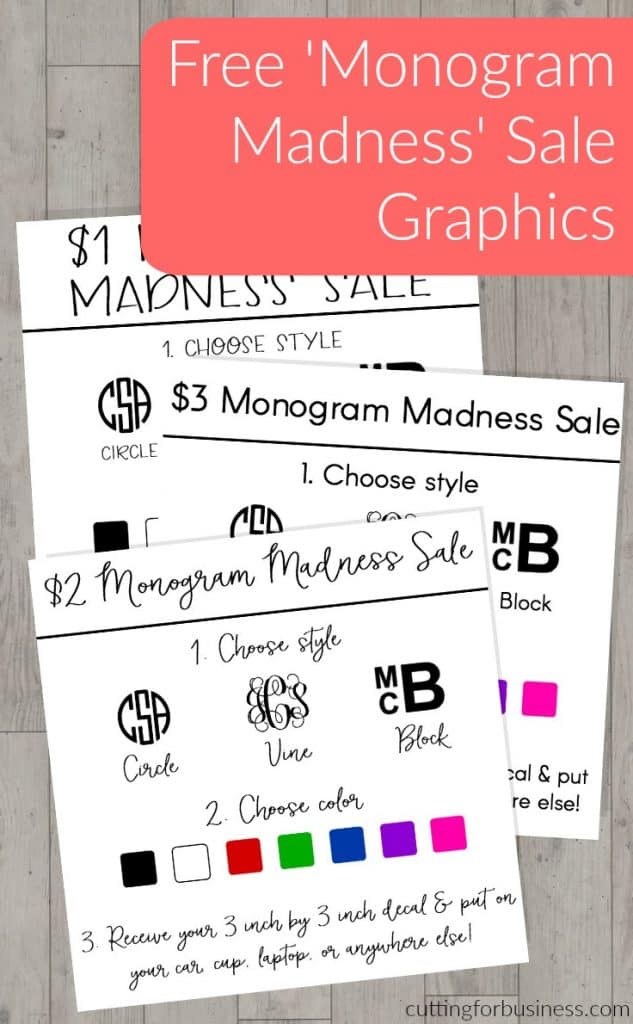
    Need some quick cash this holiday season? Why not run a Monogram Madness Sale using your Silhouette Cameo or Cricut? Today, I’m giving you ready to use graphics to host your own sale on social media.

    How to Run a Monogram Madness Sale

    1. Choose your favorite Monogram Madness sale graphic.
    2. Post it on social media along with instructions for ordering, payment, and shipping (if needed). In most cases, you can just put the monogram decal in a plain envelope with a stamp.
    3. Create the order and mail it out.
    4. Enjoy some extra money this holiday season.

    Fonts I Used

    Sample Facebook Post

    • Monogram Madness Vinyl Decal Sale – all orders ship in 3 days. Comment with style, monogram, color, and Paypal email address for invoice. (Post with image.)

    Sample Instagram Post

    • #Monogram Madness Sale! 3 inch by 3 inch #vinyl #decal. Perfect for #laptop, #car, #notebook, and more! DM or comment with style, monogram, color, and Paypal email address – ships free! #monograms #monogrameverything #monogramlove #monogramitall #monogramlife #monogramobsessed (Post with image.)

    How to Edit the Graphics

    • Need to make a change to the graphics provided? No problem!
      • Download your favorite graphic and open it in PicMonkey.com.
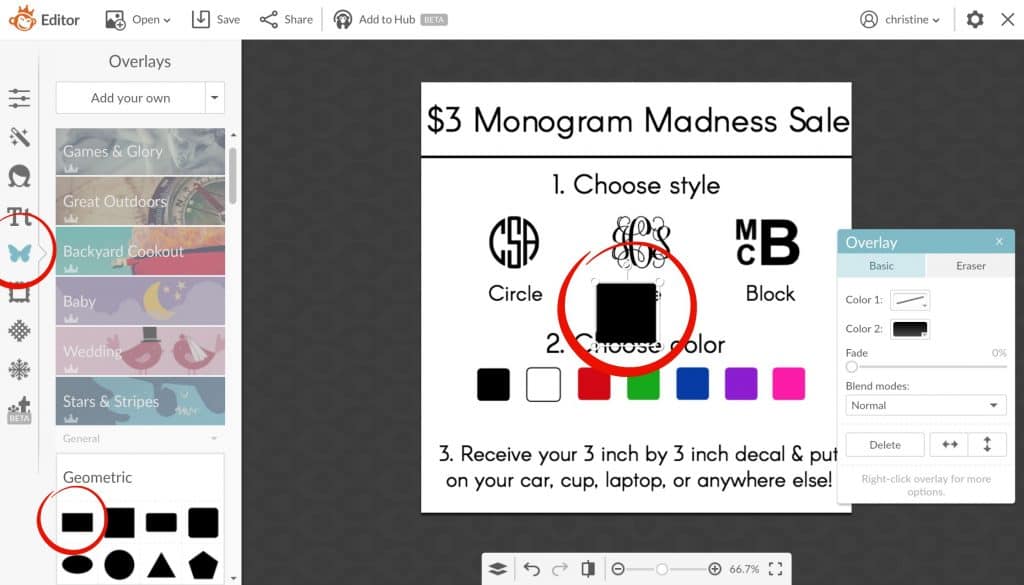
      • On the left hand side, choose the butterfly icon, then choose the rectangle overlay. Free Monogram Madness Sale Graphics for Silhouette Cameo or Cricut Explore Small Business Owners - by cuttingforbusiness.com.
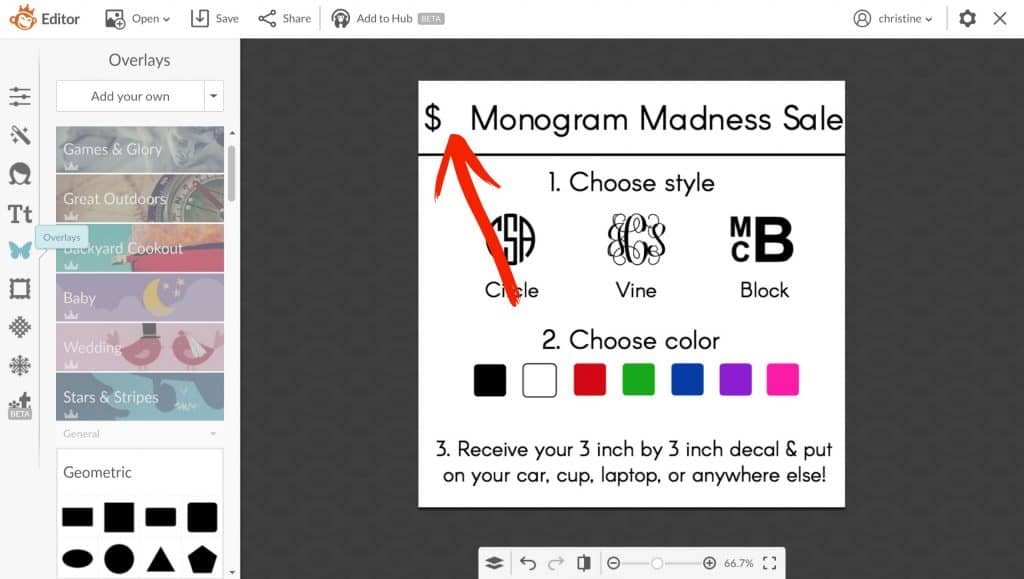
      • Change the overlay color to white and cover anything you want to change with the white box. (I removed the price in the example below.)Free Monogram Madness Sale Graphics for Silhouette Cameo or Cricut Explore Small Business Owners - by cuttingforbusiness.com.
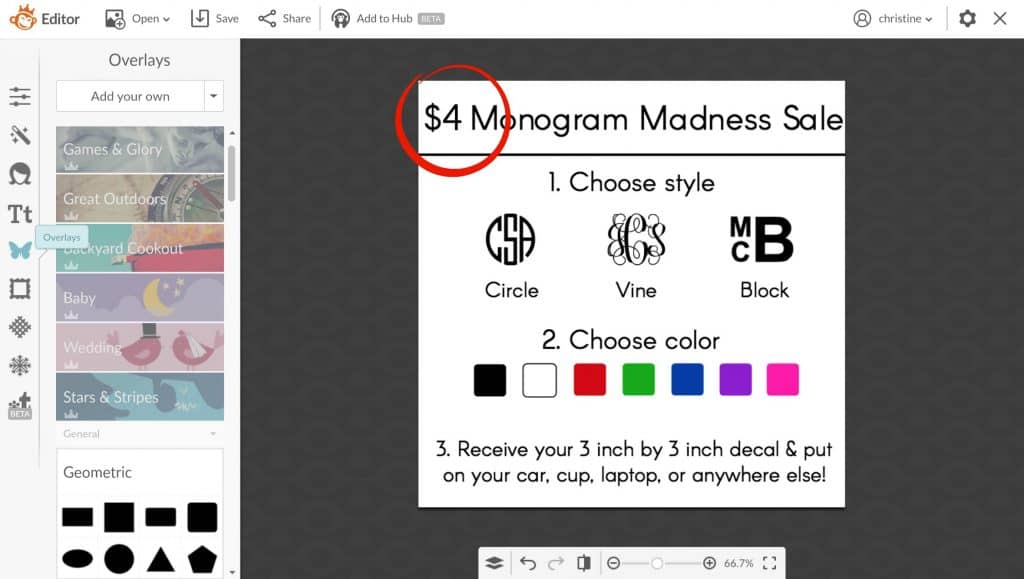
      • Add your edited text over the white box. Free Monogram Madness Sale Graphics for Silhouette Cameo or Cricut Explore Small Business Owners - by cuttingforbusiness.com.

    Ready to download? First, save the image below to Pinterest. Then, download the graphics below.

    Free Monogram Madness Sale Graphics for Silhouette Cameo or Cricut Explore Small Business Owners - by cuttingforbusiness.com.

    [WPSM_INFOBOX id=9291]

  • How to Connect Google Analytics to Your Etsy Shop

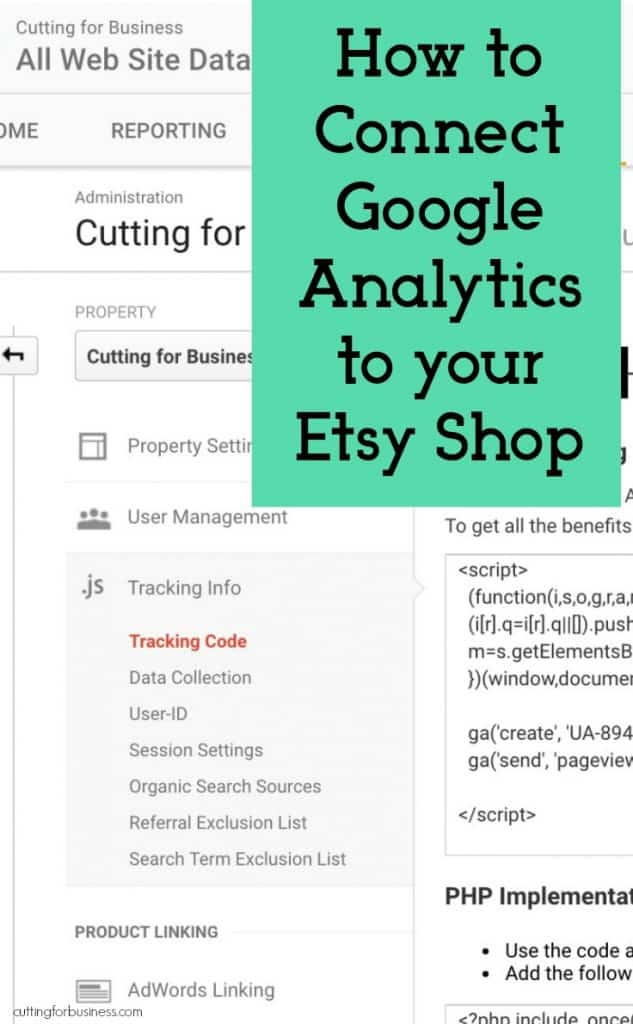
    Ever wonder where customers are finding your Etsy shop, or what they are looking at? While Etsy has limited data available – Google analytics can give you more information. Below you’ll find a step by step tutorial to connect Google Analytics to your Etsy shop.

    How to Connect Google Analytics to your Etsy Shop

    1. Sign up for a Google Analytics account or sign into your existing account.
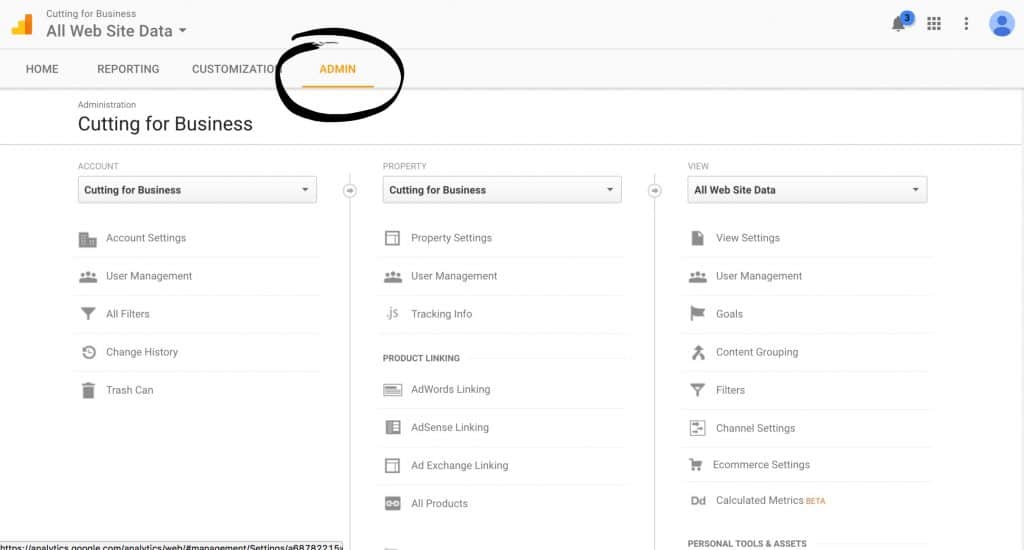
    2. Click the “Admin” tab at the top of the page. How to Connect Google Analytics to Your Etsy Shop - Perfect for Silhouette Cameo or Cricut small business owners - by cuttingforbusiness.com
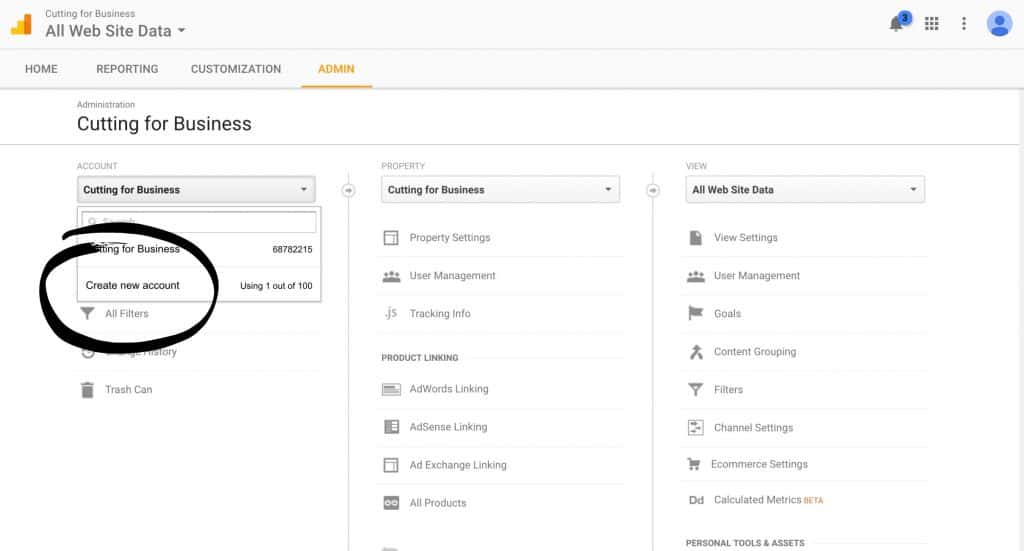
    3. From the account dropdown, select “Add new account”. How to Connect Google Analytics to Your Etsy Shop - Perfect for Silhouette Cameo or Cricut small business owners - by cuttingforbusiness.com
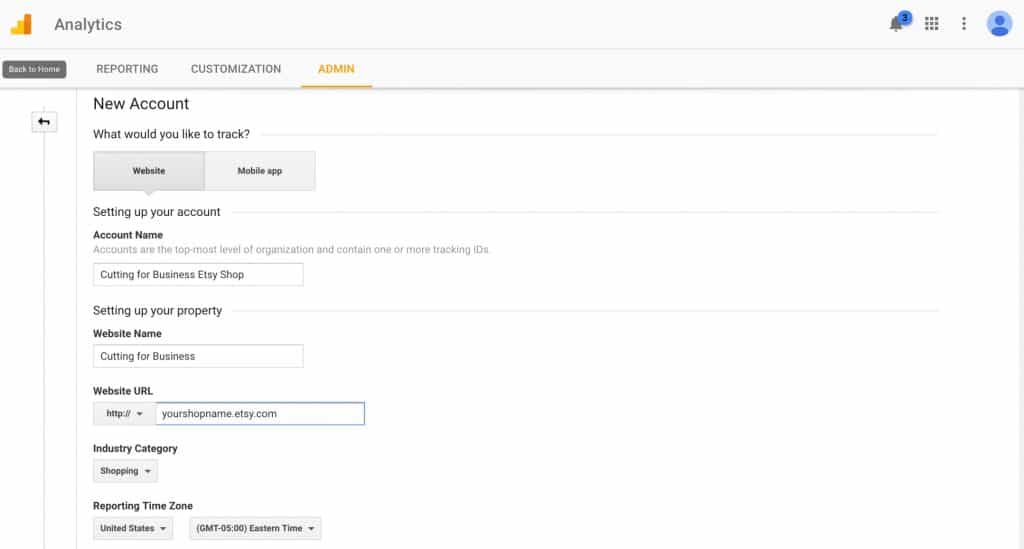
    4. Fill in the basic information. Your shop URL is yourshopname.etsy.com. Be sure to put your actual shop name where I put “yourshopname”. How to Connect Google Analytics to Your Etsy Shop - Perfect for Silhouette Cameo or Cricut small business owners - by cuttingforbusiness.com
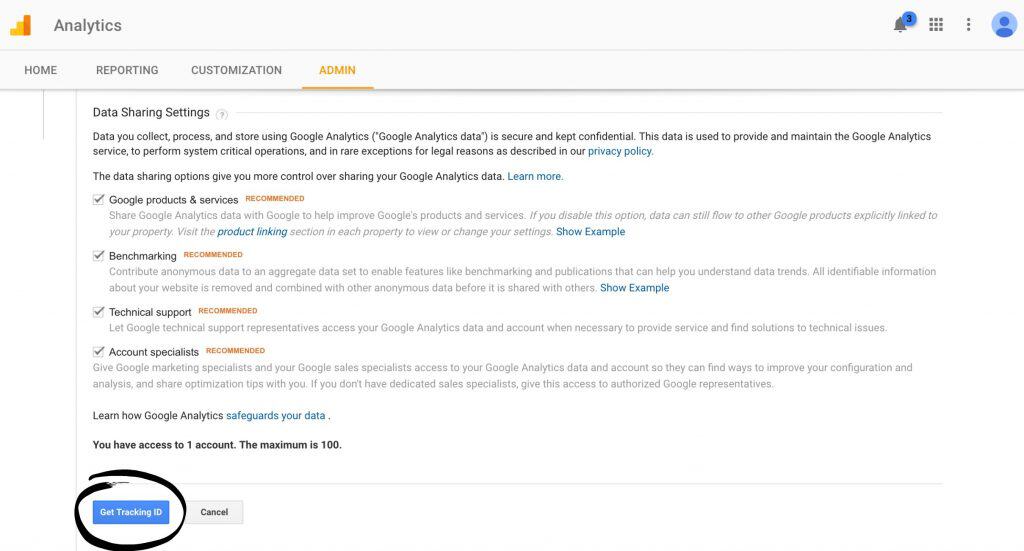
    5. Next, choose the permissions to give Google. I leave everything checked, but it is your personal preference. Click the “Get Tracking ID” button.How to Connect Google Analytics to Your Etsy Shop - Perfect for Silhouette Cameo or Cricut small business owners - by cuttingforbusiness.com
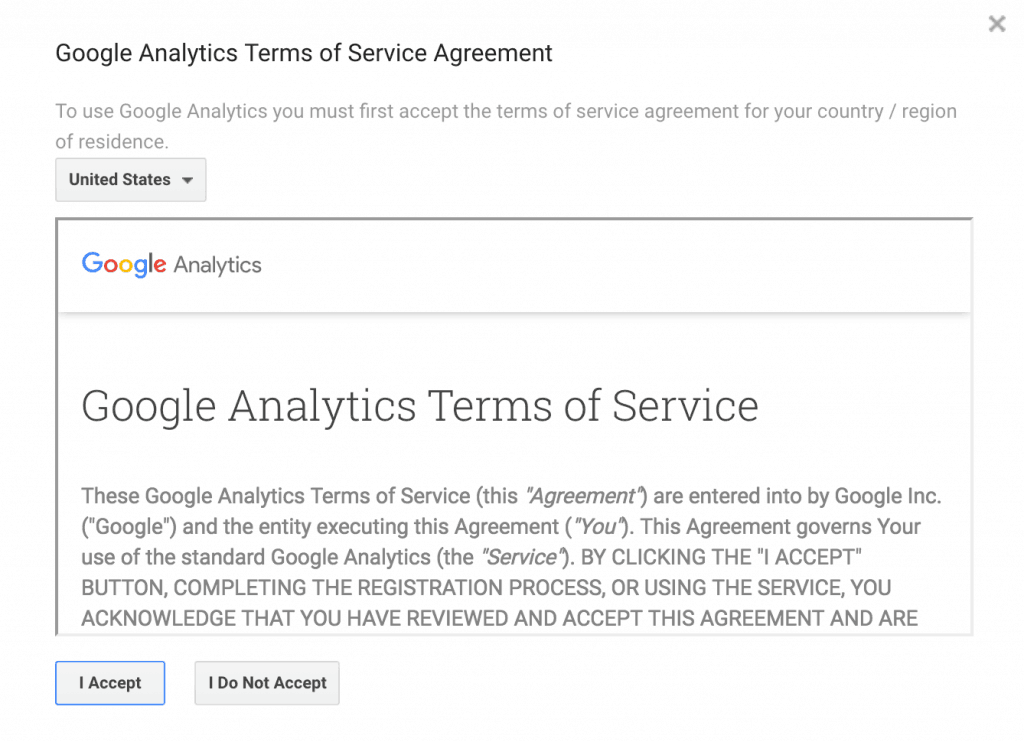
    6. Read and accept Google’s Terms of Service. How to Connect Google Analytics to Your Etsy Shop - Perfect for Silhouette Cameo or Cricut small business owners - by cuttingforbusiness.com
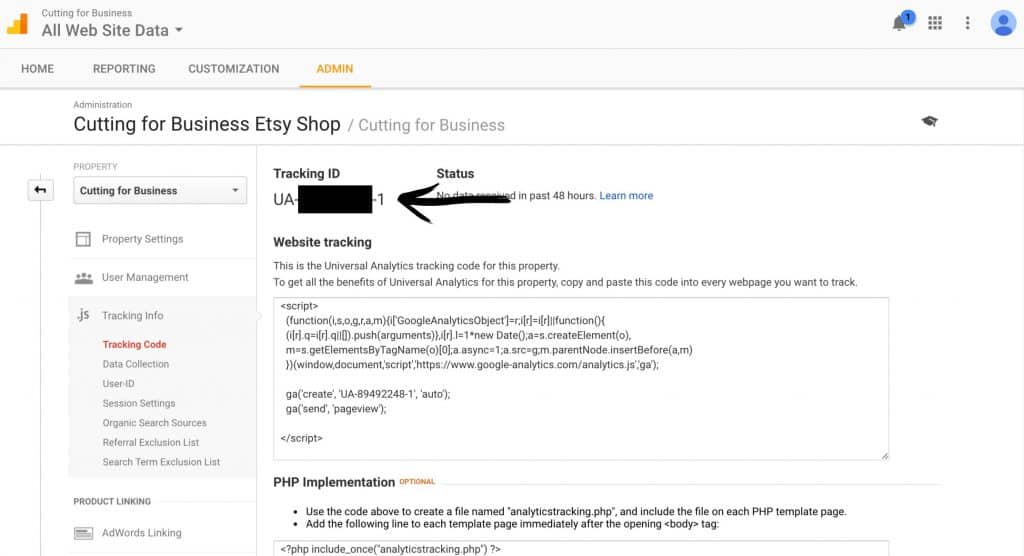
    7. Copy and paste the Tracking ID which starts with UA, then dashes and numbers. (Mine has been blacked out in the screenshot below.) How to Connect Google Analytics to Your Etsy Shop - Perfect for Silhouette Cameo or Cricut small business owners - by cuttingforbusiness.com
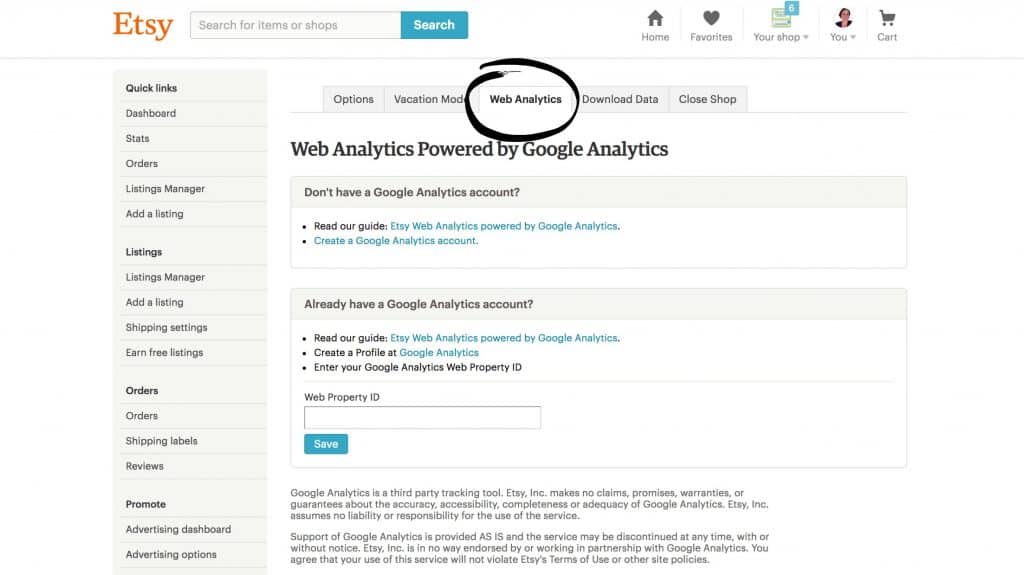
    8. Now, you’ll head to your Etsy shop. Click “Your Shop”, then “Shop Settings”, then “Options”, then the “Web Analytics” tab. How to Connect Google Analytics to Your Etsy Shop - Perfect for Silhouette Cameo or Cricut small business owners - by cuttingforbusiness.com
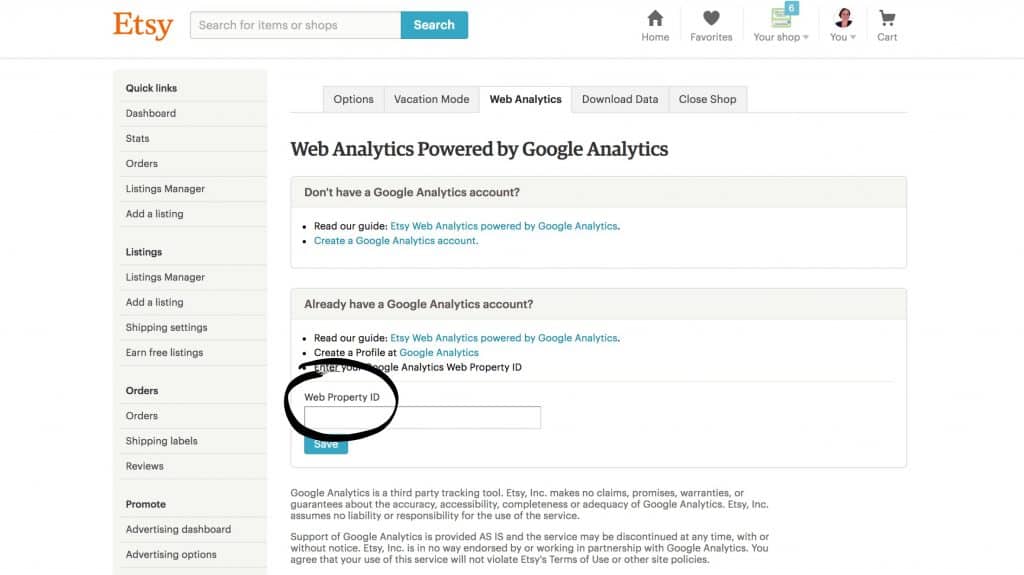
    9. Last, copy and paste the Tracking ID from Google to the box labeled “Web Property ID” and click the “Save” button. How to Connect Google Analytics to Your Etsy Shop - Perfect for Silhouette Cameo or Cricut small business owners - by cuttingforbusiness.com

    Now What?

    Great! You’ve got Google Analytics connected to your Etsy shop. It’ll take about 24 hours to start seeing statistics. To check your statistics, you’ll visit your Google Analytics account. Here’s a quick guide to what you are seeing when you click on the Google Analytics “Reporting” tab:

    • Users: This is the number of unique visitors to your Etsy shop. For example, if I visit your shop 10 times, I will be counted 1 time as a user.
    • Sessions: These are basically page views. This is the number of page views in your Etsy shop. If I click 5 products in your Etsy shop, I’ll be counted as 5 in the sessions.
    • Average Visit Duration: The amount of time I spend in your Etsy shop.
    • Direct traffic: These are people that typed in your Etsy shop address to land in your shop.
    • Referral Traffic: These are visitors that were referred from a link on another site.
    • Search Traffic: This is visitors that landed on your site from search engines.

    More

    • The “All Traffic”, then “Channels” tells you where customers are finding your site. You can click on “Social”, “Organic Search”, “Direct”, and “Referral”. From the “Social” report, you can see which social media networks are most effective. From “Organic Search” you can see what search terms led customers to your shop, from “Direct” you’ll see the number of people that typed in your address directly, and the “Referral” link tells you what other sites have a link to your site where customers have clicked through and landed in your shop.

    I urge you to click around and explore your new Google Analytics account. There is lots of available data for you to sift through.

    Was this tutorial helpful? I’d love if you pinned it on Pinterest:

    How to Connect Google Analytics to Your Etsy Shop - Perfect for Silhouette Cameo or Cricut small business owners - by cuttingforbusiness.com

  • How to Survey Customers Using SurveyMonkey

    Surveying your customers is a great way to get feedback about your products, customer service, or future product lineup. In fact, it is one of the easiest ways to find out if what you are doing in your Silhouette or Cricut business is “working”. There are many ways to survey customers, but today and tomorrow I am going to show you two easy ways. Today, let’s look at using SurveyMonkey to survey your customers. The best thing about SurveyMonkey – it is easy to use, they have a free plan, and a handy mobile app.

    How to Survey Your Customers through SurveyMonkey

    1. Visit surveymonkey.com and create an account. How to Survey Customers Using SurveyMonkey - Great for Silhouette Cameo or Cricut small business owners - by cuttingforbusiness.com
    2. After logging in, click the “Create Survey” button in the top right corner. How to Survey Customers Using SurveyMonkey - Great for Silhouette Cameo or Cricut small business owners - by cuttingforbusiness.com
    3. Next, you’ll create your survey questions. You can either start from scratch or modify a free template. For this tutorial, we are starting from scratch. Click the “Start from Scratch” button. How to Survey Customers Using SurveyMonkey - Great for Silhouette Cameo or Cricut small business owners - by cuttingforbusiness.com
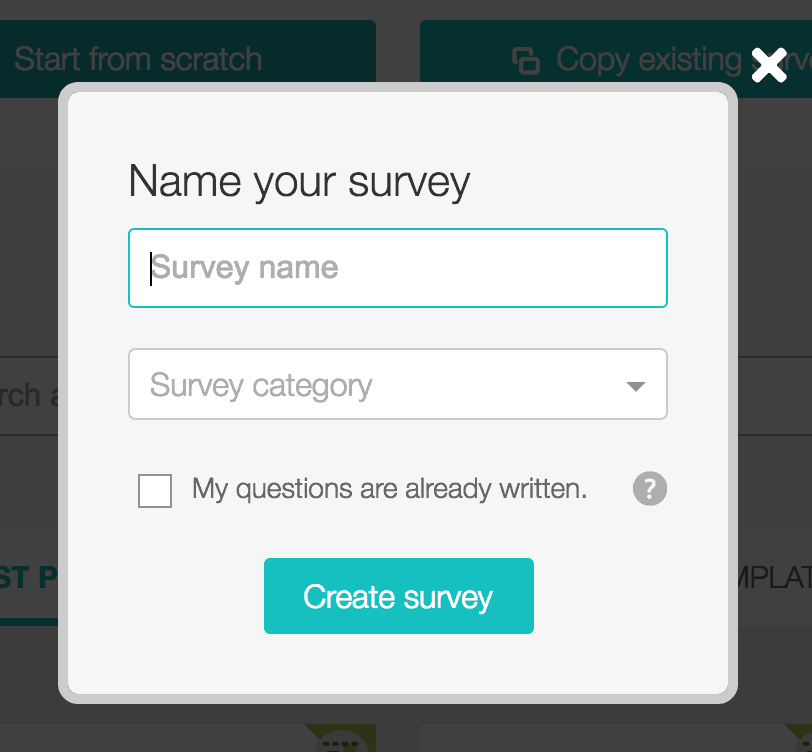
    4. Enter a name and choose a category. Then, click “Create survey”.How to Survey Customers Using SurveyMonkey - Great for Silhouette Cameo or Cricut small business owners - by cuttingforbusiness.com
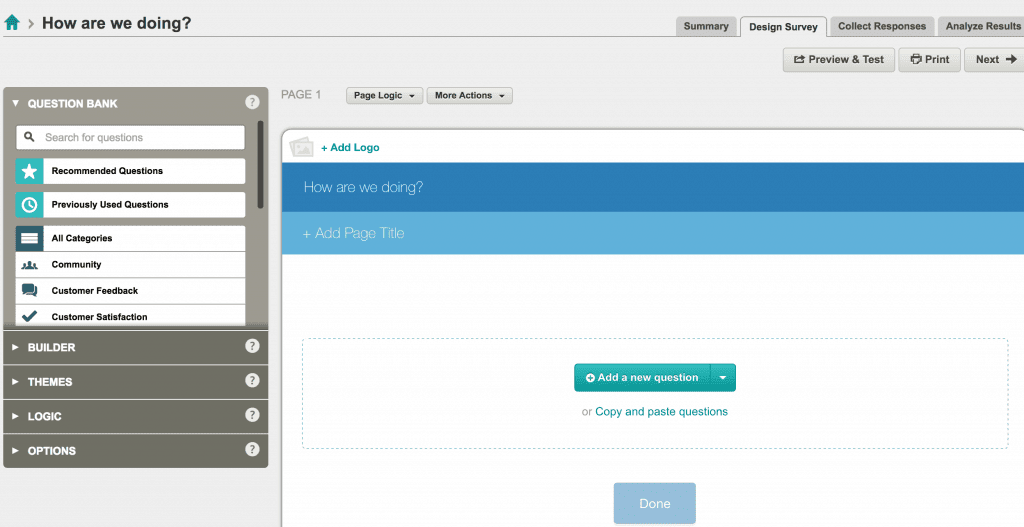
    5. Now, you’ll click the “Add a new question” button. How to Survey Customers Using SurveyMonkey - Great for Silhouette Cameo or Cricut small business owners - by cuttingforbusiness.com
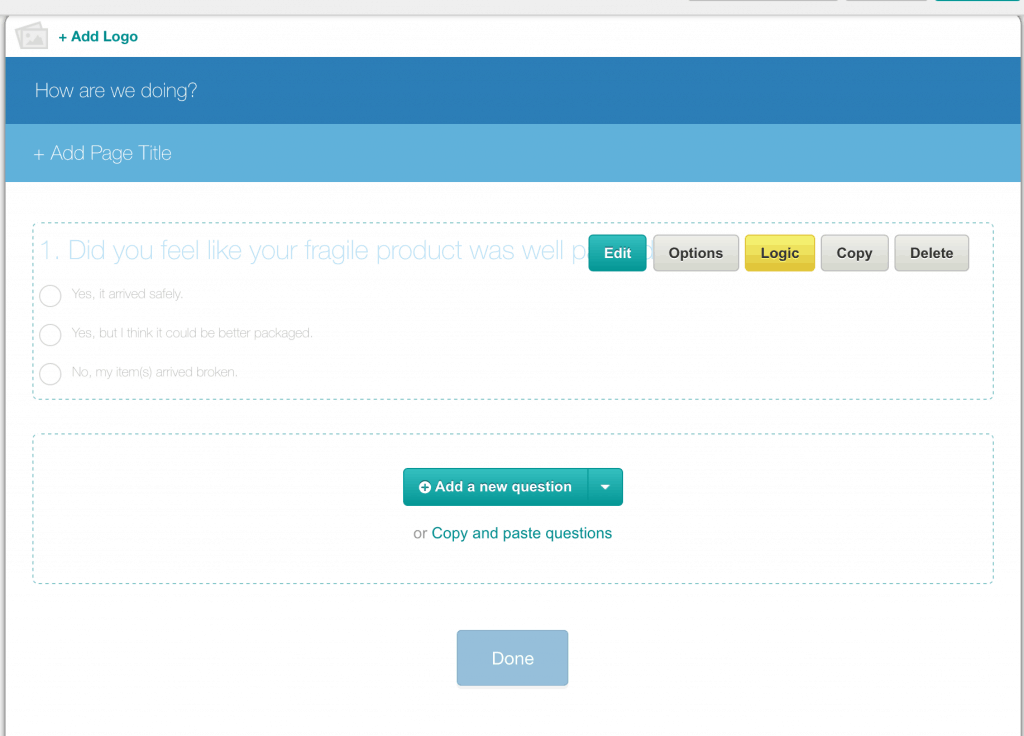
    6. Next, you’ll be able to write your questions. From the dropdown in the center of the page, you’ll be able to select a question format such as multiple choice, short answer, star rating, etc. Add all your questions and select the “Next” button when finished. (You can also choose to add your custom logo!) How to Survey Customers Using SurveyMonkey - Great for Silhouette Cameo or Cricut small business owners - by cuttingforbusiness.com
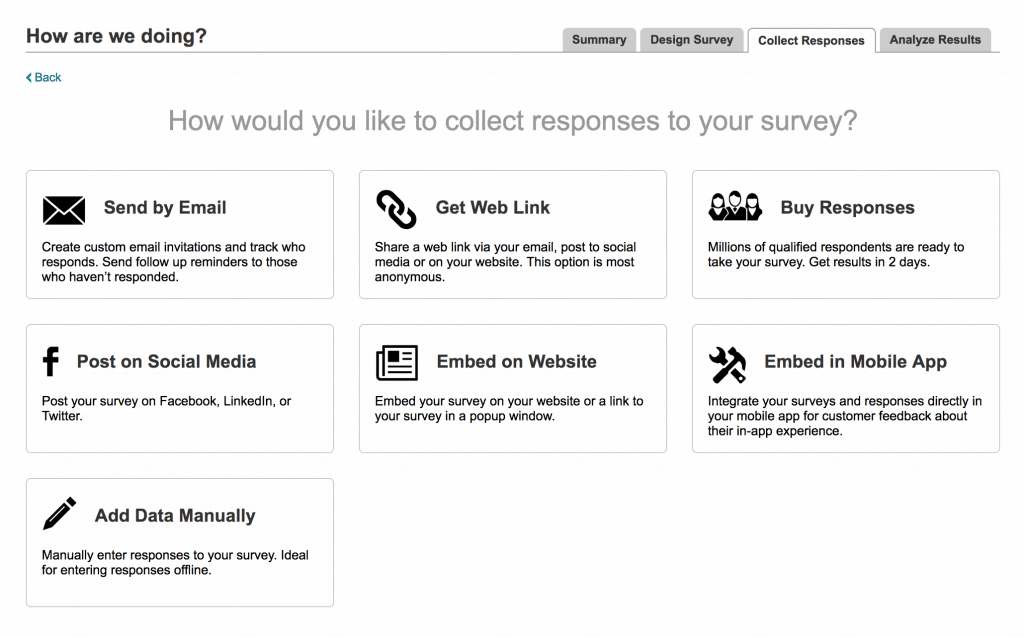
    7. Once you finished writing your survey questions, you’ll be able to choose how to get the survey to your customers. How to Survey Customers Using SurveyMonkey - Great for Silhouette Cameo or Cricut small business owners - by cuttingforbusiness.com

    When customers complete your survey, you’ll be to analyze the responses and make changes (or keep doing what you are doing!) in your business. To review your responses in SurveyMonkey, click “My Surveys” from the top navigation bar. This allows you to analyze the responses you’ve collected.

    Types of Questions to Ask Customers

    Before you write your survey, brainstorm what you want to find out from your customer. There is no point of having a survey if you don’t have an end goal. Here’s a quick list of ideas to get your started:

    • Ordering – How was the ordering process? Was the website easy to use?
    • Order Frequency – How often do you order?
    • Packaging – Did you like the packaging? Was your item well packed?
    • Shipping – Do you feel the shipping costs were reasonable? Was your package shipped on schedule?
    • Products – What future products would you like to see? What is your least favorite product?
    • Recommendations – Would you recommend us to a friend?
    • Logo/Branding – What do you think of when you hear our business name? What do you think of when you look at our logo?

    Some customers will dismiss surveys without filling them out. One great way to boost your survey responses is to tie it to a reward. Read on to the next post and learn about surveying customers through Rafflecopter.

    Save this post to Pinterest:
    How to Survey Customers Using SurveyMonkey - Great for Silhouette Cameo or Cricut small business owners - by cuttingforbusiness.com

  • How to Survey Customers Using Rafflecopter

    Yesterday, I showed you how to use SurveyMonkey to survey your customers. Near the end of the article, I mentioned that you can get a better response rate if you offer a reward to customers that complete your survey. Today, I’m going to show you how to easily run a giveaway while collecting responses from customers through Rafflecopter. (Hint: You might have recently seen me do this through my Christmas giveaways!). Like SurveyMonkey, Rafflecopter is easy to use and has a free plan.

    How to Survey Your Customers through Rafflecopter

    1. Create an account at rafflecopter.comHow to Survey Customers Using Rafflecopter. Perfect for Silhouette Cameo or Cricut small business owners. By cuttingforbusiness.com.
    2. After logging in, click the “New Giveaway” button. How to Survey Customers Using Rafflecopter. Perfect for Silhouette Cameo or Cricut small business owners. By cuttingforbusiness.com.
    3. Click the “Add a Prize” button. How to Survey Customers Using Rafflecopter. Perfect for Silhouette Cameo or Cricut small business owners. By cuttingforbusiness.com.
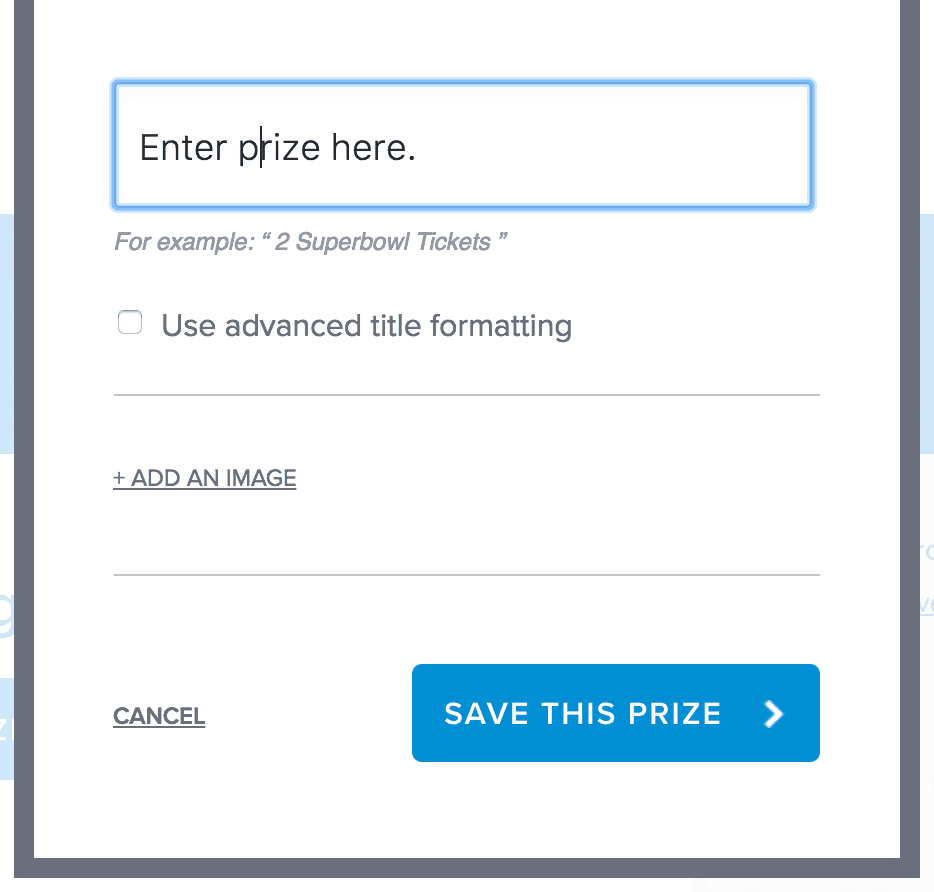
    4. Add your prize, along with a photo if you have one. How to Survey Customers Using Rafflecopter. Perfect for Silhouette Cameo or Cricut small business owners. By cuttingforbusiness.com.
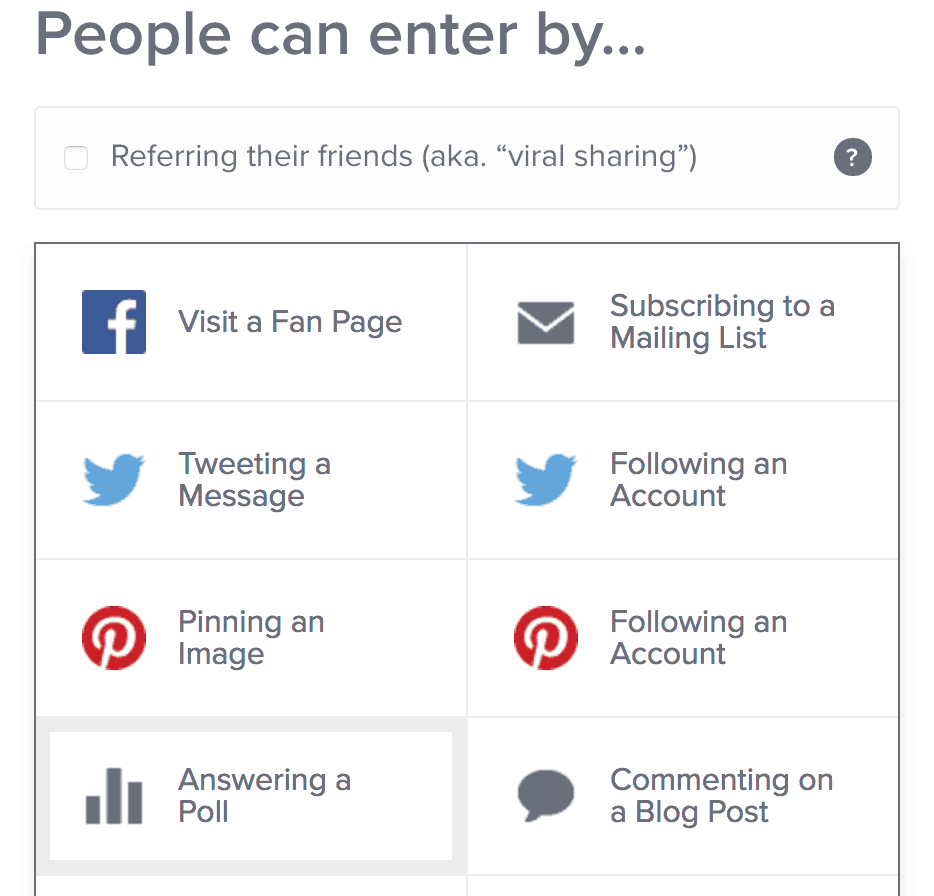
    5. Next, click “Add an Entry Option” under People can enter by. How to Survey Customers Using Rafflecopter. Perfect for Silhouette Cameo or Cricut small business owners. By cuttingforbusiness.com.
    6. Now, click “Answering a Poll”.How to Survey Customers Using Rafflecopter. Perfect for Silhouette Cameo or Cricut small business owners. By cuttingforbusiness.com.
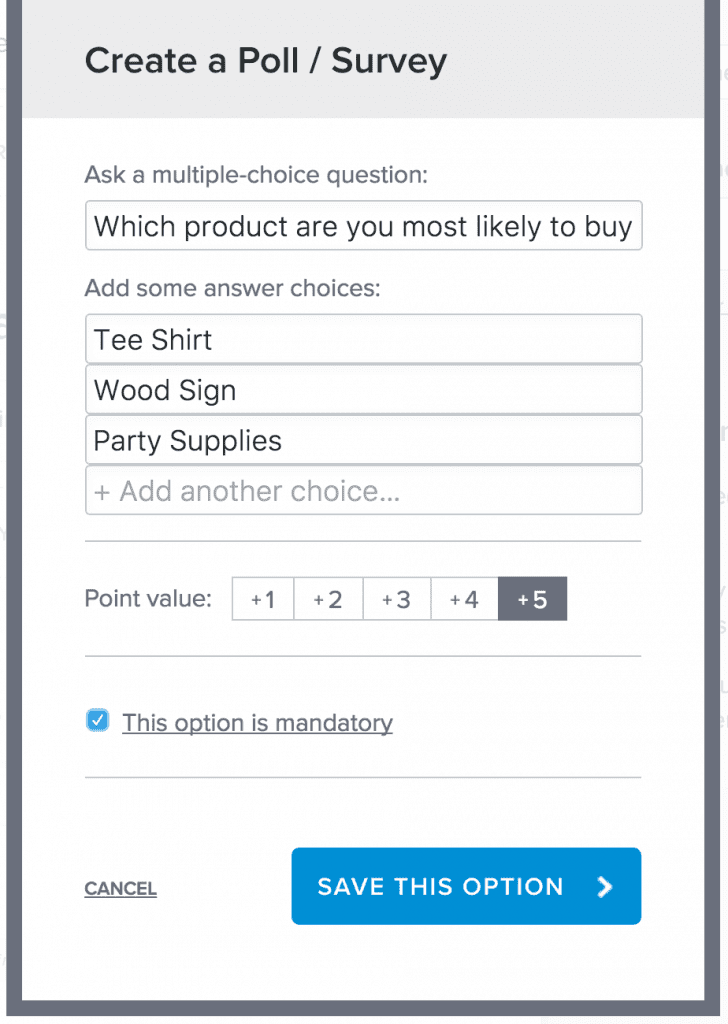
    7. Here you will enter your questions and answers. Unlike SurveyMonkey, you can only offer multiple choice questions. The point value you assign is the number of giveaway entries a person receives for completing the survey. Lastly, you can choose whether or not the questions are mandatory. Finally, click the “Save this Option” button.How to Survey Customers Using Rafflecopter. Perfect for Silhouette Cameo or Cricut small business owners. By cuttingforbusiness.com.
    8. When you are finished with all questions, you’ll choose the amount of time before you choose a winner and click the “Preview and Install” button. How to Survey Customers Using Rafflecopter. Perfect for Silhouette Cameo or Cricut small business owners. By cuttingforbusiness.com.
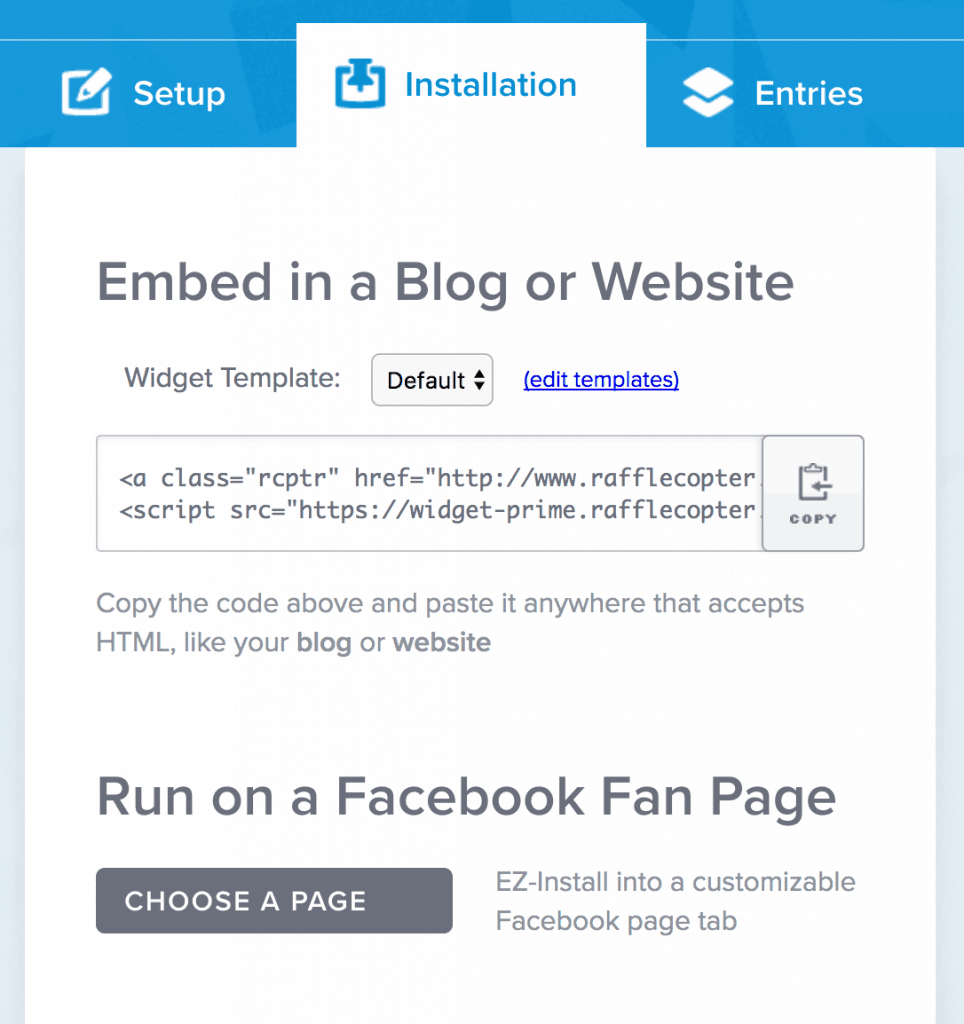
    9. To distribute your survey, you can post the code on your website or Facebook page. How to Survey Customers Using Rafflecopter. Perfect for Silhouette Cameo or Cricut small business owners. By cuttingforbusiness.com.

    When customers complete your survey, you’ll be able to see the entries from the “Entries” tab.

    Giveaway Ideas for Survey Respondents

    Need ideas for what to giveaway to encourage customers to complete your survey? Gift cards for your shop or website or gift baskets of your popular products usually work well.

    Save this post to Pinterest:
    How to Survey Customers Using Rafflecopter. Perfect for Silhouette Cameo or Cricut small business owners. By cuttingforbusiness.com.

  • How (and Why!) to Mind Dump in Your Craft Business

    I don’t know about you, but I have a lot of ideas! Since you are a small business owner, I bet that you have a lot of ideas, too! Human brains aren’t able to remember everything we think of, so the best way to keep track of all your ideas is to write them down. Today, I’m going to share the way that I use to keep up with all my brilliant (and not so brilliant!) ideas.

    What is Mind Dumping?

    Mind dumping is the process of writing down all the ideas that you come up with on a daily basis. For me, these may be blog posts, craft projects, design ideas, recipes to try, motivational quotes I come across, and anything else. Ideally, you spend 10 to 15 minutes a day writing down ideas that have crossed your mind since the last time you wrote them down.

    Some people like to write down ideas as soon as they get up in the morning, but I prefer to write down my ideas before I go to bed. The idea behind mind dumping is to free your brain to think of new ideas and concentrate on things you are working on; instead of trying to remember ideas.

    The best thing about mind dumping is a book full of ideas to reference. When I’m having a creative block, I head to my idea book to get through it. Usually, within a few minutes, I’m crafting a new project. If you need more help to get unstuck from a creative rut, head to this post.

    Three Easy Ways to Mind Dump Daily

    1. Write all of your ideas down in a notebook reserved for ideas. You don’t need anything fancy. A simple spiral notebook works well.
    2. Write all your ideas on small pieces of paper and put them in a jar. Again, no need for any fancy paper or jar – post it notes and a mason jar work great.
    3. Use a note taking app on your phone, tablet, or computer to record your ideas daily. There’s a number of them available, one of my favorites being Evernote.

    My Challenge to You

    For the rest of the week, mind dump daily and see if it helps you focus better on daily tasks and remember your ideas.

    Love this idea? Save the image below to Pinterest.

    How (and why!) to Mind Dump in Your Silhouette Cameo or Cricut Creative Business - by cuttingforbusiness.com

  • Hire Out Household Chores to Make More Time for Your Business

    I’ve written before about hiring help in your small business. (See these posts: When to Hire Help, Things to Consider When Hiring Help, and Hiring Virtual Help.) But, I know that many Silhouette Cameo and Cricut small business owners are hesitant to either share their crafting knowledge, uneasy about inviting someone into their home, or just don’t have enough steady work for an employee. Today, let’s look at hiring help from another perspective – household chores.

    Instead of hiring someone to help you in your business, consider hiring someone to take care of the mundane day-to-day household chores. Here’s some ideas of easy to hire chores to give you more time in your business:

    • Cleaning – Imagine the time you’ll gain if you aren’t sweeping, mopping, or vacuuming all the time!
    • Child Care – You could hire someone to watch your child or children for a few hours a week, or put them into a daycare or school setting.
    • Carpooling – If you spend hours driving older kids to and from school each day, consider setting up a carpool with neighborhood families. Each family takes a turn and takes and picks up the children from school. You’ll be able to gain a few extra hours in your week since you won’t have to deal with transportation daily.
    • Lawn Care – Hiring out lawn care or landscaping can free up time in your day to work on your business.
    • Snow Removal – This is backbreaking work anyway, hire it out and free up time in your day!
    • Laundry Services – Many dry cleaners and laundry mats offer drop off laundry services priced per pound.
    • Meal Swaps – While it isn’t easy to hire out cooking, you could join a meal swap with other families in your neighborhood. Each family cooks the same dish (one for each family) and swaps meals. You’ve instantly got ready to cook meals. When you spend less time in the kitchen, you’ll have more time in your day!
    • Home Improvement – If you are working on a large home project, hire it out and let the pros take it over! You’ll save time (and frustration!) of not having to do it yourself.

    When hiring help, consider neighbors, college students, or online classifieds such as Care.com. Did you know that Care.com has a whole section on their site for housekeeping? Save on a membership when you click through the banner below:


    Tell me, Cutting for Business readers, do you hire out help in your home or do you DIY everything? Let me know in the comments.

    Save this post to Pinterest:
    Hire Out Household Chores to Make More Time for Your Silhouette Cameo or Cricut Explore Business - by cuttingforbusiness.com

  • How to Be More Productive in Your Home Craft Business

    There’s so many time wasters – especially when working online or even on the computer. And, Cutting for Business readers regularly email me asking me for help with time management. Today, I’m sharing an awesome resource I stumbled across online called RescueTime.

    What Is Rescue Time?

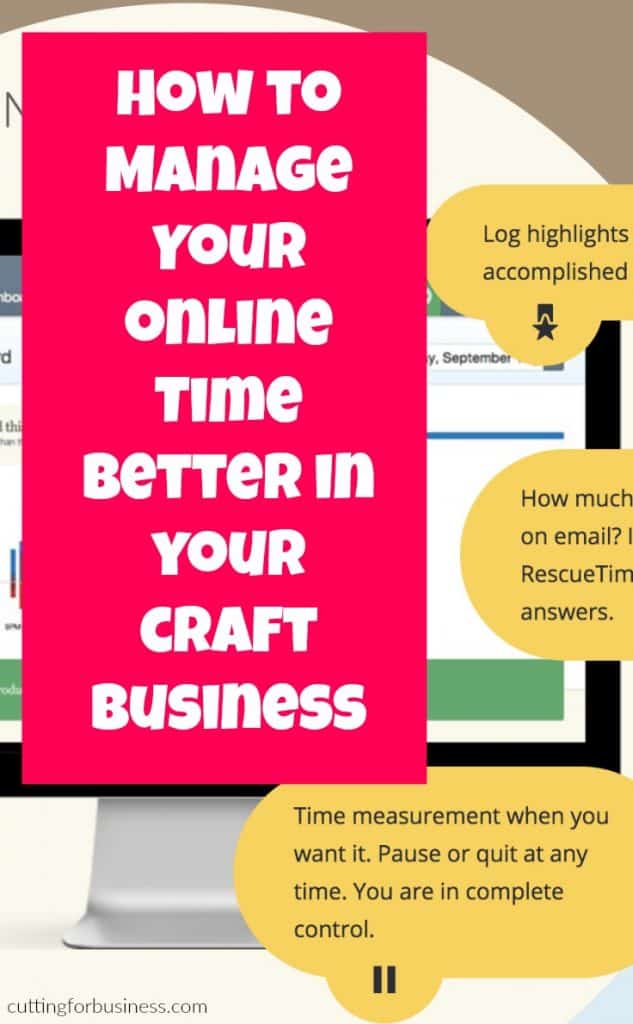
    Rescue Time is an online time tracker. It runs in the background on your computer and logs the websites you go to each day. You can then track what you’ve been doing online, set goals for better productivity, and even limit the amount of time spent on certain sites.

    What Have I Found Out Using Rescue Time?

    I’ve been using rescue time for about 3 weeks, and (not surprisingly) it has shown that I get distracted with social media and shopping sites throughout the day. Honestly, I didn’t need an app to tell me this – BUT I’ve made a conscience effort to stay off social media sites during my daytime working hours. So far, my productivity is increasing a few percentage points every few days. This has led to me finishing work earlier in the day – and less “scatter brain” moments throughout the day because I am not multitasking as much.

    How Much Does Rescue Time Cost?

    I’m happy to report that there is a free forever plan, as well as a paid plan. Get more information at this link.

    Want my recommendation for a great book to read on time management? Click here.

    Since Rescue Time is free, I can’t wait to hear about your experience! Tell me in the comments.

    Save this post to Pinterest:
    How to Be More Productive in Your Home Craft Business - Great for Silhouette Cameo and Cricut Explore Crafters - by cuttingforbusiness.com.

  • Paypal Working Capital – What it is and How it Works

    I’ve had a few readers asking me if I knew of any resources for micro or small businesses to get a business loan from. Unfortunately, banks generally won’t lend to tiny businesses. Don’t feel alone though, the majority of small business loan applications get denied. While I’m a huge fan of growing your business without debt (read more about that in this post), Paypal Working Capital might be a good fit for your Silhouette or Cricut small business.

    What is Paypal Working Capital?

    Paypal Working Capital is a division of Paypal that lends money to small businesses. If you have a Paypal account in good standing, it’s likely that you’ll get approved for a loan because Paypal bases their decision solely off of your relationship with them. Additionally, Paypal does not inquiry your credit to make a decision.

    What are the requirements to get a loan from Paypal Working Capital?

    You can borrow up to 15% of your total Paypal sales from the previous 12 months – capped at $97,000. You must have a Paypal Business Account, be a Paypal member for at least 3 months, and have a minimum of between $15,000 and $20,000 (varies per account) in sales on Paypal within the last 12 months. (This number may seem huge, but if your business has been on Paypal for 12 months – it’s an average of only $288 per week.)

    How do you pay back the Paypal Working Capital loan?

    This is my favorite part of the Working Capital program. Paypal deducts a portion of your daily sales to help pay back your loan over time. It’s okay to have a day without sales, you won’t fall behind on paying your loan. Furthermore, you’ll be able to determine the daily percentage of sales that Paypal takes when accepting your loan.

    How do you apply for Paypal Working Capital and what should you expect?

    You can apply to Paypal Working Capital at this link. You’ll complete a quick application (takes about 5 minutes), then Paypal will provide an instant decision about your loan. If you are approved for a loan, you choose some basic loan settings and review the loan cost. Rather than a percentage of the loan being charged for interest, you choose a flat rate. If you accept the loan, you will receive funds within minutes that you will be able to spend for your business needs.

    Note: I took out a loan for the purpose of this post and paid it back about a week later. I was not contracted to write this post.

    Save this post to Pinterest:
    Paypal Working Capital - What it is and How it Works for Your Silhouette Cameo or Cricut Explore Business - by cuttingforbusiness.com

  • What is a Ring Spun Cotton Shirt?

    A Cutting for Business reader recently stumped me on a question: “What is the difference between a ring spun cotton shirt and a regular cotton shirt?” Honestly, I have some ring spun tee shirts and I know that they are softer than regular cotton shirts – but why?

    Regular Cotton versus Ring Spun Cotton

    The cotton fibers used in both regular cotton and ring spun cotton are the same; however the process to make the two types of shirts are different:

    Regular cotton: When creating regular cotton shirts, the strands of cotton fiber are twisted together to make yarn. The cotton yarn is then woven together to make cotton fabric. From the fabric, shirts are created.

    Similarly, ring-spun cotton yarn is made by constantly twisting and thinning the cotton strands to make yarn. The higher number of times that the strands are twisted will determine how soft the cotton yarn becomes. (This similar to thread count in sheets: the higher the thread count – the better the quality.) Ring spun shirts generally look slightly fuzzier than regular cotton.

    Which one is better in your Silhouette Cameo or Cricut Business?

    It’s a personal choice. Both types of shirts will accept heat transfers, vinyl, and rhinestones. From the explanation above you can guess that ring spun cotton shirts are more expensive than regular cotton shirts. However, ring spun cotton shirts are more durable and softer than their regular cotton counterparts. If you offer ring spun cotton shirts, be sure to highlight this in your listing by noting that ring spun cotton is higher quality and softer.

    Wondering the best place to buy tee shirts? Head over to this post.

    Pin it now so you don’t forget, just hover over it:

    What is the difference between a ring spun cotton shirt and a regular shirt? Which one is better for your Silhouette Cameo or Cricut small business? By cuttingforbusiness.com.